Data warehouses
K-Lake can answer questions from your data warehouse without copying it. You connect a SQL Server, Azure SQL, Synapse or Fabric warehouse, publish a semantic model that names the business objects people ask about, and AI clients question the warehouse in place through two MCP tools. Each question becomes one bounded query that runs as, or on behalf of, the person asking. Every answer carries the statement that ran, so a figure can be checked against an existing report.
At a glance
| Supported warehouses | SQL Server (on-premises), Azure SQL, Azure Synapse, Microsoft Fabric warehouses |
| What K-Lake stores | The connection settings, the credential (encrypted, write-only), the models with their version history and changelog, and one audit record per question. No warehouse data is copied or indexed. |
| Models | One or more per connection, each with its own audience, versions and approval. Built with a guided builder from the database's catalog, edited in forms, or imported from Power BI, Fabric, SSAS Tabular or dbt. |
| What the AI sees | Your model: entities, attributes, relationships and worked questions. It never sees your tables. |
| How a question runs | One bounded, parameterised query with a row cap, a byte cap and a statement timeout, as the asking user's identity where the warehouse supports it |
| AI tools | warehouse_schema and warehouse_query, on the MCP server |
| Who sets it up | A tenant admin or a warehouse admin, in the console under Data › Databases, with the kdbl-control warehouse CLI, or through the REST API |
| Licence | The structured_sources feature. Optional AI help for model authors needs structured_sources_assist too. |
A very large warehouse costs K-Lake the same as a small one: the warehouse does the work, one bounded query per question.
flowchart LR
  U[User in an AI client] --> T["MCP tool<br/>warehouse_query"]
  T --> G{Allowed groups<br/>and visibility}
  G -- refused --> R[Explained refusal]
  G -- admitted --> M{Checked against<br/>the published model}
  M -- refused --> R
  M -- valid --> L{Concurrency and<br/>per-user limits}
  L -- over limit --> X["429 + Retry-After"]
  L -- admitted --> Q["One bounded query<br/>as the user's identity"]
  Q --> W[(Your warehouse)]
  W --> A["Answer + the statement that ran"]
  Q --> AU[Audit record]
  X --> AU
  R --> AU
  AU --> S[Your SIEM / CSV export]
What the AI sees
An AI client (Claude, Copilot or any MCP client) gets two tools:
| Tool | What it does |
|---|---|
warehouse_schema |
Lists the warehouses the caller may question, and returns one warehouse's model: entities, attributes, relationships and worked questions. Never the tables. |
warehouse_query |
Runs one bounded query: a worked question by name, a structured query against the model, or, only where you enable it, a single validated SELECT. |
On the structured path the AI never writes SQL. It names an entity, the attributes it wants, filters, a time range, aggregates and the declared relationships to follow. K-Lake binds every literal as a parameter, builds the statement for the warehouse, caps the rows and bytes, and runs it with a statement timeout. The response includes the statement that ran.
A warehouse refuses anyone its allowed groups don't admit. You can also hide one warehouse from the AI tools while keeping it available through the API.
A connection can carry several models,
each for its own audience. An assistant is offered only the published
models the user's groups allow. With one, nothing changes: no extra argument,
the same listing, the same model. With more than one, warehouse_schema lists
them under the warehouse by slug, name and one-line description, and both tools
take a model argument to choose one. A call that names no model when the user
is offered several is refused with the choices.
Who is shown the warehouse tools
The two tools are offered per user. A user's AI session lists them only when all of these hold:
- data warehouses are enabled for the tenant (the licence includes them and, on a deployment hosting many customers, the provider has enabled them for the tenant);
- at least one warehouse is enabled and exposed to the AI tools;
- that warehouse admits the user: its allowed groups are empty, or the user is in one of them, or the user is a tenant administrator or warehouse admin; and
- it offers the user at least one model: a published model whose own groups admit them (or, while nothing on the connection is published, its default model).
Everyone else never sees warehouse_schema or warehouse_query. Their
assistant doesn't spend context on two long tool descriptions or try a tool
that would only refuse them. To see the decision for one person, use
Check a user's access on the warehouse's Connection tab (see
Set up a warehouse). If such a user's client calls one by name anyway,
it gets the same "unknown tool" error as a made-up tool name, and the audit
log records the call as denied. The same rule decides which warehouses
warehouse_schema lists, so the tool list and the tool always agree.
When access changes. Creating or deleting a warehouse, or changing whether it is enabled or exposed or who its allowed groups are, takes effect on the next tool list. Clients that keep a notification stream open (current Claude clients do) are told and re-read the list within seconds. Other clients pick it up when they next connect, or within five minutes. A change to a user's own group membership doesn't notify connected clients: the user sees the new tool list in their next session.
Copilot Studio: build the agent with an account that has warehouse access
Copilot Studio reads the tool list once, when the agent is built, as the maker (or the connection the agent is built with). If that account can't question any warehouse, Studio never sees the warehouse tools and can't add them to the agent. Build the agent as a member of one of the warehouse's allowed groups, or as a warehouse admin. When the agent runs, each user's calls are still checked against that user's own access, so a user outside the groups is refused.
Clients that sign each user in themselves (Claude, the Microsoft 365 Copilot connector, ChatGPT) read the list per user, so each user sees exactly the tools they can use.
Try it before an AI does
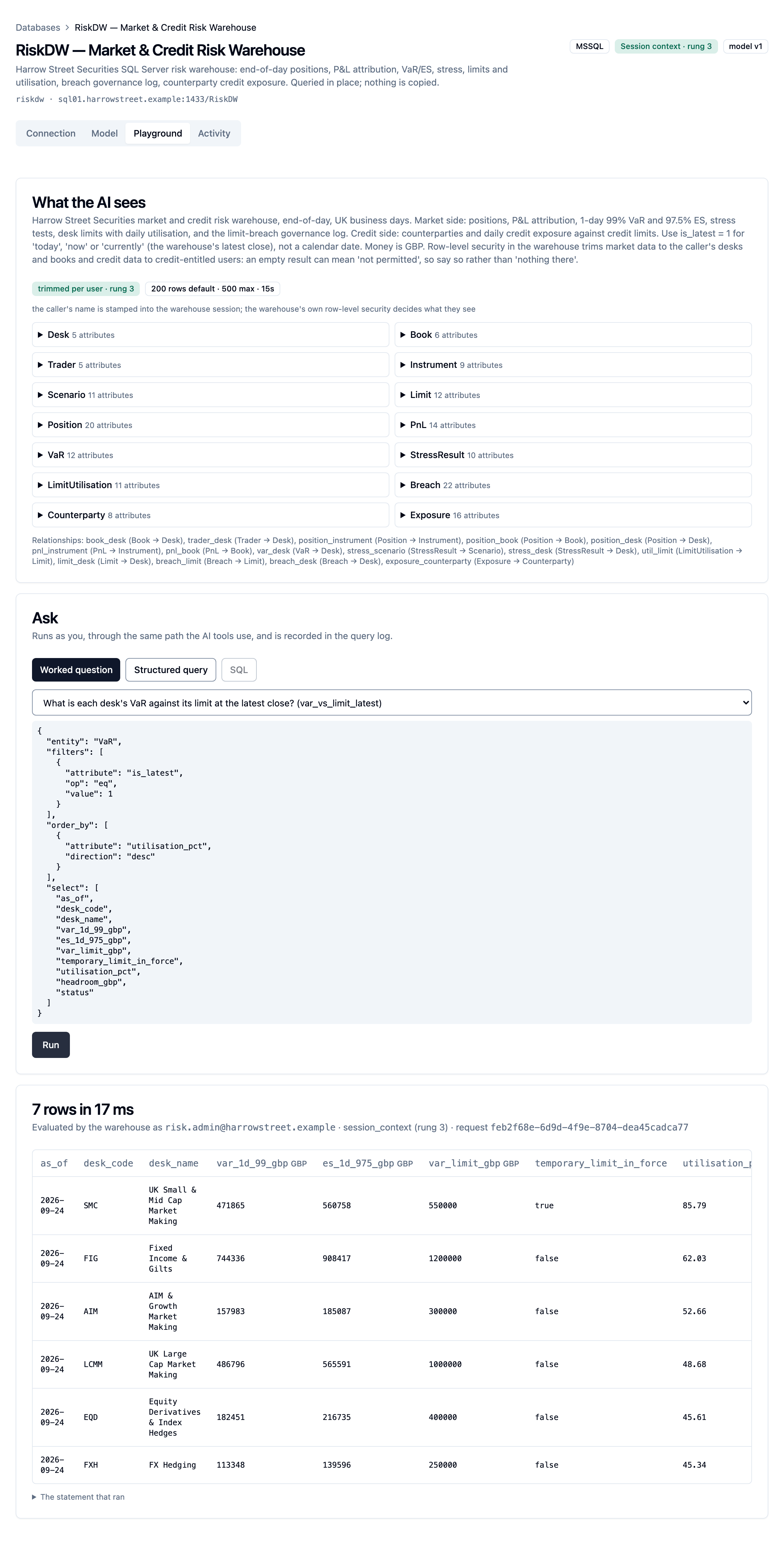
The warehouse's Playground tab shows exactly what the AI sees, lets you run a worked question or a structured query as yourself, and shows the statement that ran. On a warehouse's page, press ⌘K / Ctrl+K and choose Open playground to go straight to it.
Licence and enablement
Data warehouses are a licensed feature, structured_sources. The licence can
cap it with max_warehouses: the number of enabled warehouses across the
whole deployment. Creating or re-enabling a warehouse beyond the cap is refused;
disabling or deleting one frees a slot. See Licensing.
On a deployment that hosts several customers, a cluster admin chooses which tenants get the feature, and can also cap one tenant's number of warehouses. A single-customer deployment has every licensed feature by default.
The licence counts connections, not models. One connection holds up to 20 models unless your licence sets another limit, and a cloned connection counts as a connection like any other.
AI help for model authors (the Suggest buttons and Ask in the
Playground) is a separate feature, structured_sources_assist, which needs
structured_sources. Even where the licence grants it, it stays off until a
tenant administrator switches it on. See AI help and Ask.
If the feature lapses (a licence without it is applied, or it is switched off for the tenant):
- Nothing is deleted.
- Admins can still list, view and delete warehouses, so they can see and clean up what is configured.
- Everything else is refused: creating, changing, probing, browsing the catalog, editing or publishing a model, asking questions, and reading the query log.
- The MCP tools disappear from the tool list, and connected clients are told to refresh it.
- The console hides Databases from the sidebar. If someone opens the page directly, it says structured sources are not included in the licence and lists the existing warehouses, which can be deleted but not changed, queried or added to.
Who can do what
| Role | Can |
|---|---|
| Any user | Ask questions of warehouses whose allowed groups admit them, and see the model parts they are entitled to see |
| Warehouse admin | Administer the tenant's warehouses: connections, credentials, probes, the catalog, models, publishing, approvals and review comments, syncs, accuracy runs, suggested values lists, AI help and Ask (once a tenant admin has switched them on), and the query log of each warehouse and of all of them (Databases › Query audit) |
| Tenant admin | Everything a warehouse admin can, plus switching model approval off, switching raw SQL on, the AI help settings, and the tenant's warehouse audit settings |
| Cluster admin | Enable the feature per tenant (on a multi-customer deployment), set audit retention for any tenant |
The warehouse admin role
Warehouse admin is a flag on a user, alongside their role. It lets a data team run the tenant's warehouses without broader admin rights. A warehouse admin:
- administers every warehouse in the tenant;
- can read, but not change, the admin views a warehouse team needs: Estate insights' aggregate views (not its file-level listing), the MCP activity, connections, sessions and configuration, the group picker used to set a warehouse's allowed groups, tenant usage, and the admin audit log narrowed to warehouse changes;
- cannot touch sources, crawls, extraction, classification, actions, users, sign-in and identity-provider settings, MCP settings or tokens, CA certificates or branding.
A reader who is a warehouse admin is the right account for a warehouse team
or a pipeline. A tenant admin grants the flag from the tenant's user list, with
kdbl-control users warehouse-admin --user <email>, or with
PATCH /api/users/:id {"is_warehouse_admin": true}. With single sign-on, list
directory groups in the tenant's warehouse-admin groups to grant it
automatically on each sign-in.
Set up a warehouse
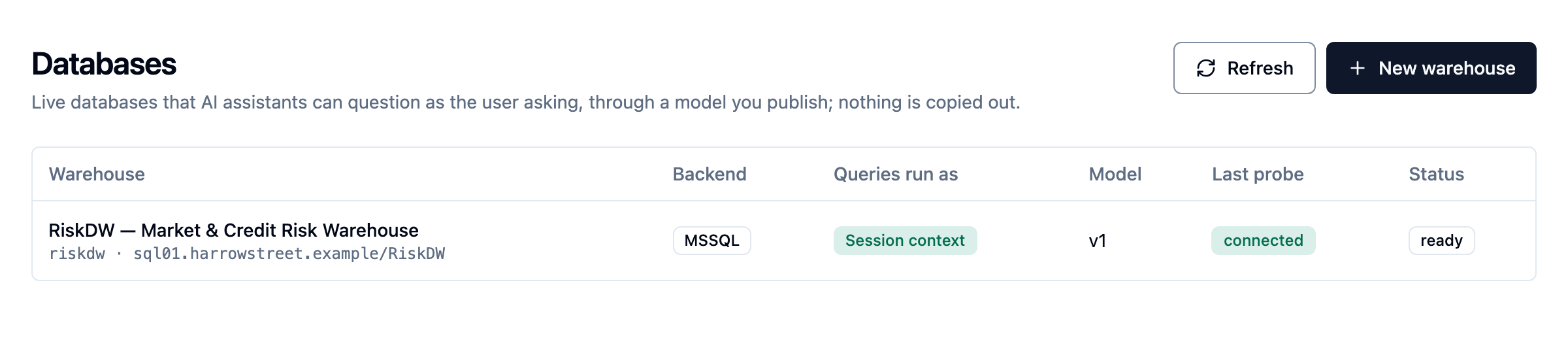
In the console, warehouses are called databases: they are under Data ›
Databases in the sidebar, which appears once the licence includes structured
sources. Press ⌘K / Ctrl+K and type databases to go there, or # and part of
a warehouse's slug to open that warehouse.
- Create it. Go to Data › Databases and click New warehouse. Give it a slug (the name the AI uses), then the host, port, database, how the service connection authenticates, and the credential. The credential is encrypted as it arrives and can be replaced but never read back.
- Test the connection. The probe reports the server version, the login the service connection authenticated as, that the session is encrypted, and the identity mode in effect. The warehouse's Connection tab has Probe now for later checks.
-
Browse the catalog. The Catalog, folded above the editor on a model's Edit tab, lists the views and tables the service connection can see. Only objects the login can
SELECTfrom are listed, so a model can only be built on what the connection may read. Each table shows its primary key, unique constraints, foreign keys and an estimated row count, read from the warehouse's statistics rather than by counting. A view declares no key of its own, so for a view the catalog shows its likely key and the foreign keys it inherits from the tables underneath, marked inherited. A join or filter inside the view can still change its grain, so a likely key is a hint to confirm.On SQL Server, a table's own keys need no extra permission. To see the keys behind views and the row counts, give the service login two read-only grants:
GRANT VIEW DEFINITION TO kdbl_reader;      -- keys of the tables behind the views
GRANT VIEW DATABASE STATE TO kdbl_reader;  -- estimated row counts
VIEW DEFINITIONshows the login the base tables' definitions (not their rows), so they appear in the catalog too. Without it, the model builder tells you that keys were guessed from column names. -
Build the model. A new model opens on Build from the catalog, a guided flow from picking tables to a published model. You can instead import a model you already have, or write one in the editor. See Build a model.
- Validate and publish. Validate against warehouse checks every backing object and column, including the columns used inside expressions. Publishing bumps the model version and records it in the version history and the changelog, so "what did the AI see on that date?" always has an answer.
- Choose who may ask on the Connection tab:
- Limit to members of these groups: search your directory's groups by name and pick them; no groups means every user of the tenant may ask. The list holds the groups as your sign-in provider sends them (with Entra ID, the group's Object ID), so you can also type or paste a value, and a comma-separated list splits into one entry each. A saved group that no sign-in has carried and the directory does not know is marked not seen yet: check the value. Administrators may always ask.
- Visible to the AI tools (MCP): clear it to hide the warehouse from AI clients while keeping the API.
- Allow raw SQL: off by default, and only a tenant administrator can switch it on. A warehouse admin sees the switch disabled, with the reason, and can switch it off (see The raw SQL path).
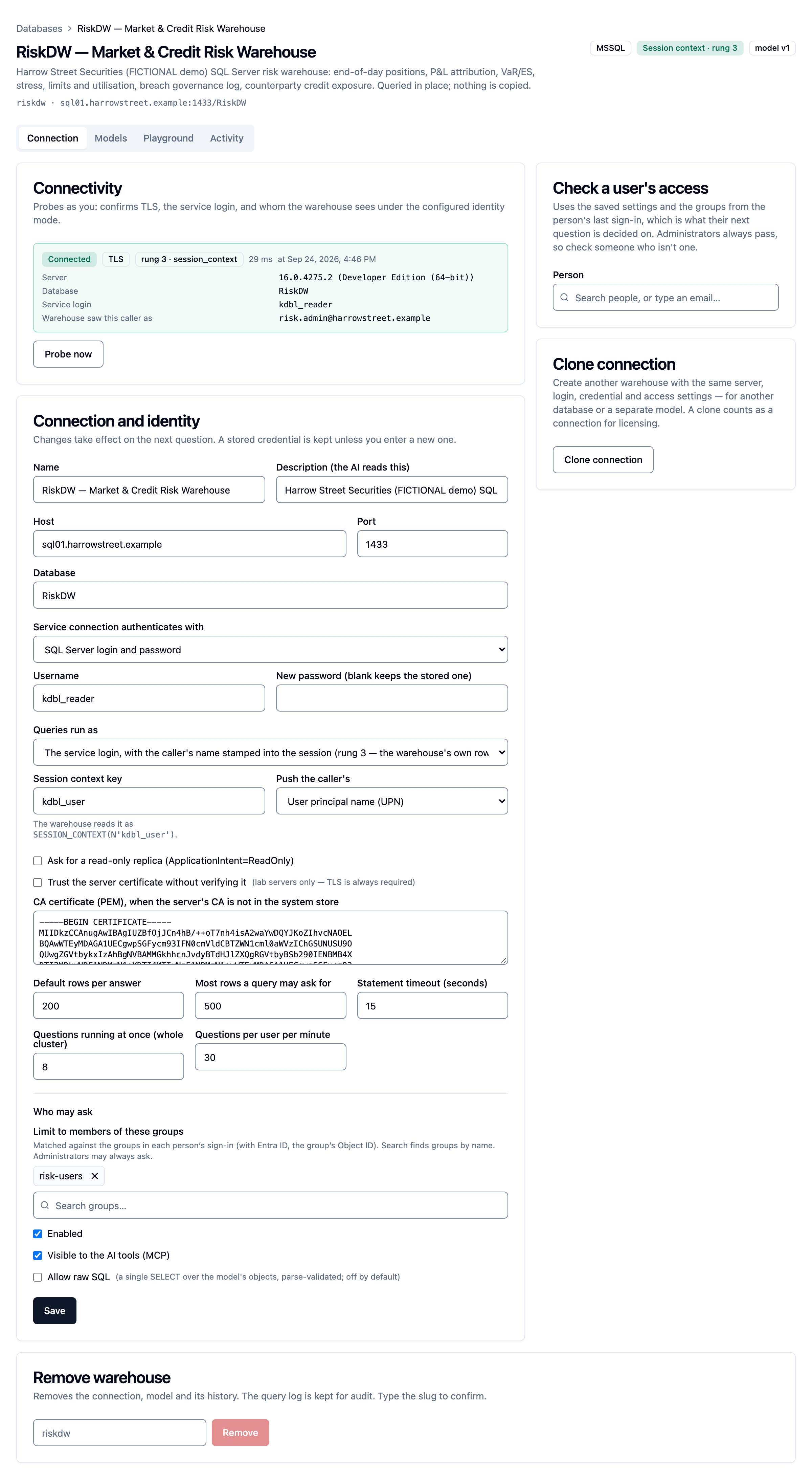
- Check a user's access. The card in the column beside the connection settings (behind the ⋮ menu on a narrow screen) replays the warehouse's real decision for one person, as of their last sign-in: pick them from the people search, or type an email. It says whether they can ask and whether their AI assistant is offered the warehouse, gives the reason with a fix for each failure (their sign-in carried no groups, none of their groups is allowed, nobody with that email has signed in yet, the warehouse is switched off), lists their groups with the allowed ones marked, and shows what the warehouse sees them as under its identity mode. Administrators always pass, so check someone who is not one. Where the connection has several models, it also says which models the person reaches. The check changes nothing; tenant administrators and warehouse admins can run it.
To add a second connection to the same server (another database, or a separate audience), use Clone connection on the Connection tab rather than registering it again. See Clone a connection.
The Connection tab keeps the connection in one column — Connectivity with Probe now, then Connection and identity with Who may ask — and puts Check a user's access and Clone connection in a column beside it. Remove warehouse stays at the bottom.
Encryption and certificates
Connections to the warehouse are always encrypted; TLS is required, not
optional. If the server's certificate is signed by a CA that isn't publicly
trusted (an internal enterprise CA, for example), paste that CA's PEM bundle
into CA certificate (PEM) on the connection form (tls.ca_pem in the API).
It belongs to this warehouse's connection only, so the warehouse admin needs no
access to the tenant's CA store.
Paste one certificate: the CA that issued the SQL Server's certificate. With an offline root and an issuing CA (a typical Active Directory Certificate Services setup), that is the issuing CA, not the root. SQL Server usually presents only its own certificate, not the chain, so the root alone cannot be matched to it. A bundle of several certificates is refused when you save. The host name on the form must be one the server's certificate names.
A trust server certificate option accepts any certificate the server presents. It is off by default and meant for lab servers only.
Network
The K-Lake API opens the warehouse connection. Where egress from the API is restricted, allow TCP to the warehouse's port, 1433 by default, and for a Windows login TCP and UDP 88 to the domain controllers. Nothing else in the deployment talks to the warehouse.
The semantic model
A model is entity-first. You name the business objects and how they relate, and back each one with a single warehouse object, normally a view built for the purpose. Your table structure isn't copied into K-Lake or shown to the AI.
{
  "name": "risk",
  "description": "Daily market, credit and operational risk positions against approved limits.",
  "entities": [
    {
      "name": "RiskMetric",
      "description": "One monitored risk measure with its current value, appetite and tolerance.",
      "source": { "schema": "risk", "object": "v_metric_current" },
      "key": ["metric_id"],
      "default_time": "as_of",
      "attributes": [
        { "name": "metric_id", "column": "MetricId", "type": "string", "role": "key" },
        { "name": "domain", "column": "RiskDomain", "type": "string", "values": ["market", "credit", "operational"] },
        { "name": "value", "column": "CurrentValue", "type": "number", "role": "measure" },
        { "name": "appetite", "column": "AppetiteLimit", "type": "number", "role": "measure" },
        { "name": "utilisation_pct", "expression": "({CurrentValue} / NULLIF({AppetiteLimit}, 0)) * 100",
          "type": "number", "role": "measure", "unit": "%" },
        { "name": "status", "column": "Status", "type": "string", "values": ["ok", "warning", "breach"] },
        { "name": "as_of", "column": "AsOfDate", "type": "date", "role": "time" }
      ]
    }
  ],
  "relationships": [
    { "name": "breach_metric", "from": "Breach", "to": "RiskMetric",
      "on": [{ "from": "metric_id", "to": "metric_id" }], "cardinality": "many_to_one" }
  ],
  "questions": [
    { "name": "outside_appetite", "text": "Which risk metrics are currently outside appetite?",
      "query": { "entity": "RiskMetric", "filters": [{ "attribute": "status", "op": "eq", "value": "breach" }] } }
  ]
}
| Part | What it is |
|---|---|
| Entity | A business object, backed by one view or table (source). key describes its grain. default_time is the attribute that "today" or "last week" applies to when none is named. default_order keeps the first page of a large view meaningful. row_cap can lower the row limit for this entity. |
| Attribute | A typed column (string, integer, number, boolean, date, timestamp) with a role (key, dimension, measure, time), an optional unit, an optional closed values list (a filter outside it is refused before it reaches the warehouse) and a description the AI reads. An attribute can be an expression over the view's columns instead, written with columns as {Column}. Put calculations such as "utilisation of appetite" here, so the AI filters on them rather than inventing them. |
| Relationship | A declared join between two entities, with a cardinality: many_to_one (default), one_to_many, one_to_one or many_to_many. The AI can only join along declared relationships. |
| Worked question | A question in your users' own words, paired with the exact query that answers it. The AI sees these as examples and can call them by name. |
Descriptions matter: they are what the AI reads when it decides which entity and attribute a question is about.
Editor support
kdbl-control warehouse model schema prints the model's JSON Schema. Point
your editor at it (or add a "$schema" key to the model file; the API
ignores that key) for completion and inline errors. The schema also catches
misspelt keys.
Several entities from one view
A view often mixes grains: desk rows and a firm-wide total row, or current and
historical rows. Give an entity a fixed filter to back it with just part of a
view. The filter applies to every query against that entity, whether it is the
entity asked about or one reached through a relationship. A caller's own
filters are added to it and can never widen it. filter_description is the one
line the AI is told about it.
{ "name": "DeskLimit", "source": { "schema": "risk", "object": "v_limit" },
  "filter": [{ "attribute": "desk_code", "op": "ne", "value": "FIRM" }],
  "filter_description": "Desk-level limits only; the firm-wide total is FirmLimit." }
Note
An entity filter is a modelling device, not a security control. The raw SQL path reads the view unfiltered, and the warehouse's own permissions remain the boundary.
How measures add up
Many finance and risk measures can't simply be summed: asked for "total VaR last
month", an AI will otherwise produce a confident, meaningless sum. Give a
numeric measure an aggregation rule and K-Lake enforces it:
aggregation |
For | What a total does |
|---|---|---|
additive (default) |
Measures that add up across everything, such as P&L or notional traded | Sums |
semi_additive |
Balances, positions, exposure: they add up across desks or counterparties, but not across dates | Sums when the question groups by date or pins one date. Otherwise, with over_time: "last" (or "first"), it sums only the rows at the latest (or earliest) date in range; without over_time, the total is refused with an explanation. |
non_additive |
VaR, expected shortfall, percentages, ratios | Refused; min, max, avg and count still work |
A non-additive measure can declare a ratio of two summable measures. A total
of it is then computed from the summed parts (for example, total exposure over
total limit), not as an average of percentages:
{ "name": "utilisation_pct", "column": "UtilisationPct", "type": "number", "role": "measure", "unit": "%",
  "aggregation": "non_additive",
  "ratio": { "numerator": "exposure", "denominator": "limit_applied", "scale": 100 } },
{ "name": "exposure", "column": "Exposure", "type": "number", "role": "measure",
  "aggregation": "semi_additive", "over_time": "last" }
The AI sees these rules in the schema, so it asks for the right total first
time. A count is never affected.
Questions that span several entities
A question can follow a chain of declared relationships, for example from a breach to its limit, to that limit's desk, to the desk's division.
- One path can walk at most the model's
max_join_depthrelationships: 3 by default, and you can set it from 1 to 4. One query joins at most four entities in total. - A relationship can be followed in either direction.
- If an entity is reached twice by different routes, the query must name the second one with an alias; an ambiguous query is refused.
- A query that names an unknown relationship, a path that doesn't connect, a loop or a path that is too long is refused with the reason.
Totals across one-to-many relationships
Following a relationship to its "many" side repeats rows: each desk appears once per limit. Adding up a desk measure over those repeated rows is the classic reporting mistake that double-counts.
K-Lake keeps these totals exact. Each measure is counted once at its own
grain, even when the question also totals measures from the many side. A plain
count counts rows of the entity you asked about, never joined rows; to count
the many side, count one of its attributes. The result's notes say how the total
was counted.
Where an exact answer isn't possible in one query, the question is refused with an explanation instead of returning a wrong figure. For example:
- totals at two nested one-to-many levels at once (division, then desks, then limits): ask for each total separately;
- a distinct count, or a latest-date balance, on a one-to-many side that is being totalled.
Many-to-many relationships
A many_to_many relationship can be followed to list rows (the result notes
that rows repeat), but totals across it are refused. Model the link
table as a bridge entity with a many_to_one relationship to each side, and
join through it. Totals through a bridge are exact.
Who can see which parts of the model
Add visible_to: ["group", …] to an entity, an attribute or a worked question.
Only members of a listed group, and the warehouse's administrators, see it. To
everyone else it doesn't exist: it is left out of the schema they get, a
question naming it is refused with the same message as an unknown name (so the
refusal doesn't reveal it exists), and worked questions that use it aren't
offered.
{ "name": "trader_pnl", "column": "TraderPnl", "type": "number", "role": "measure",
  "visible_to": ["market-risk", "desk-heads"] }
Visibility decides what a caller can name. The warehouse's own permissions still decide which rows come back. Raw SQL is refused to anyone who can't see the whole model.
Build a model
There are three ways to start a model, and all of them end in the same draft, checked against the warehouse and published (or submitted for approval) the same way:
- Build from the catalog, a guided flow for a new model;
- Import model, from a semantic model you already have in Power BI, Fabric, SSAS Tabular or dbt;
- the editor, in forms or as JSON, for everything else.
Nothing reaches an AI assistant until a model is published.
Build from the catalog
A model with no draft and nothing published opens on Build from the catalog, and so does a model created with New model. The flow has five steps. Each one saves to the draft, so you can leave and pick up where you stopped.
- Pick tables and views. Search by name, filter by schema, by kind and by Has keys, and tick objects, or Select all in a schema. Badges show each object's key, likely key and foreign keys, with its estimated row count. A model can be built from up to 200 objects.
- Review the suggested entities. One card per object: the entity's name, a description filled in from the catalog, its key with the evidence for it (primary key, unique constraint, inherited from a view's base table, identity column, or from a column name: confirm it), the default time attribute, and each attribute with its type, role and aggregation rule and why it was chosen. Regenerate suggests again after you change the selection, and keeps the entities you have edited.
- Review the relationships, grouped by their evidence: from foreign keys, inherited by a view from its base table, or matched by column name (for you to confirm). Accept or dismiss each, or Accept all. The join columns and cardinality can be changed, with a graph of the model beside them.
- Describe the model: its name, the description the AI reads first, and synonyms for each entity.
- Validate and publish: the console's own checks, then Check against the warehouse, then Save draft, Publish or Submit for approval. Publishing opens the editor on the new model.
The suggestion comes from the database's own keys and foreign keys, by fixed
rules, not by AI, and nothing is saved until you save the draft. Entity
names come from object names (common prefixes such as v_, dim_ and fact_
dropped, made singular where that is obvious). Measures get an aggregation rule
from their names: a percentage, rate or ratio is non-additive, and a balance,
position or exposure is semi-additive, taken at the latest date. A few
candidate worked questions are drafted too.
Treat the result as a first draft. The entity names, descriptions and worked
questions are yours to write, and every key or relationship that was inferred
from a column name is for you to confirm. If the service login could see no
key metadata at all, the builder says so first: every key and relationship was
then guessed from names. Grant VIEW DEFINITION (see
Set up a warehouse) and regenerate.
To add to a draft you already have, Add entities from catalog on the
editor's Entities tab runs the first three steps and keeps every entity you
have already edited. On the Catalog card, Build from N selected opens the
flow at step 2 with the objects you ticked. kdbl-control warehouse model
suggest gives the same suggestion from the command line.
The model editor
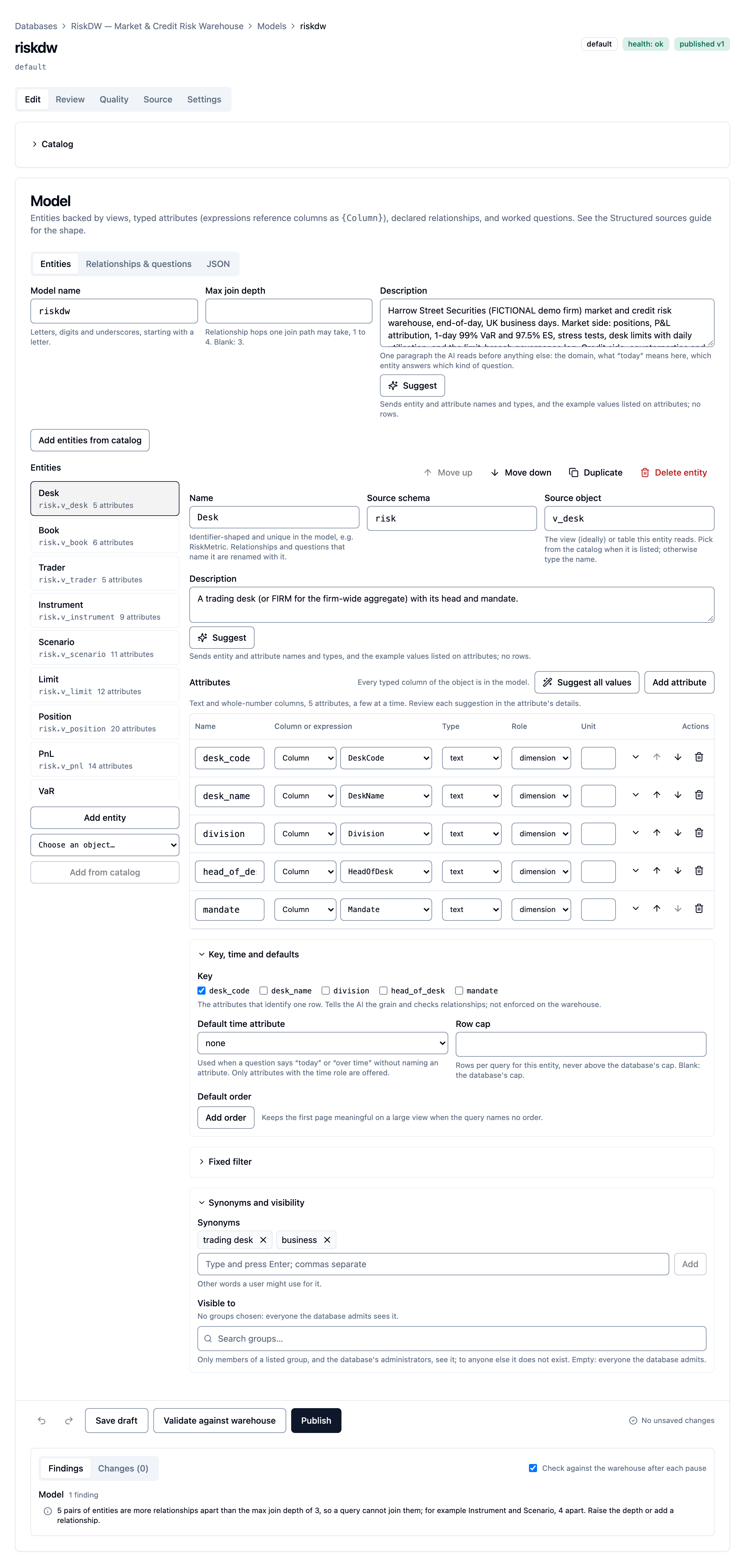
Open a model from the Models tab (Open): it opens on its own page, on the Edit tab (see The model page). The editor uses forms rather than a JSON box, across three tabs:
- Entities: the model's name, description and join depth, then a list of
entities beside the selected entity's sheet. The sheet holds the name,
description and backing view or table (picked from the catalog), the
attributes grid (column or
{Column}expression, type, role and unit; under each row its aggregation rule, values list, synonyms, who may see it and its description), and folded sections for the key, default time and order, row cap, the fixed filter and who may see the entity. Add N unused columns adds an attribute for every catalog column the entity does not use yet. - Relationships & questions: the relationships table and the worked questions editor.
- JSON: the same model as text, for pasting a file in or out. It stays in step with the forms. Text that is not valid JSON is never applied, and you cannot leave the tab until it is fixed, so no edit is lost.
Checks as you type. The editor checks the model on every change. A Findings panel lists each finding, grouped by entity, relationships, worked questions and the model; select one to go straight to the field. Findings include columns used inside expressions. Two seconds after you stop typing, the editor also re-checks the model against the warehouse (you can turn that off). Publish shows the number of errors and is disabled while there are any; Publish despite warnings remains for warnings.
Autosave and undo. Once the editor finds no error, the draft saves itself two seconds after you stop typing ("Saved · 12:04" beside the buttons). Save draft saves at once, and leaving the page with unsaved edits asks first. Undo and Redo (Ctrl/⌘+Z and Shift+Ctrl/⌘+Z outside a text box) go back up to 100 edits; typing in one field counts as one. If someone else saved the same draft in the meantime (in another tab, another administrator, or a sync), you choose whose version to keep: Reload theirs, with yours one Undo away, or Keep mine (overwrite).
Changes. The Changes tab shows exactly what publishing would change: the draft against the published model, as a reviewer sees it, with counts of what is added, changed and removed.
Relationships
Relationships have their own table: name, the two entities, the join pairs (each side picked from that entity's attributes), the cardinality (N:1, 1:N, 1:1 or N:N) and a description. Suggested relationships lists joins that the database's foreign keys imply between entities in the model, including those a view inherits from its base tables, and attributes named like another entity's key (marked "by name"). Accept, Dismiss or Accept all.
The editor flags an unknown entity or attribute, a duplicate name or join, a relationship that joins a row to itself, a "many" side that joins on its whole key, and entities further apart than the model's join depth. Below the table, a graph draws the model: entities as boxes and relationships as arrows labelled with their cardinality. Select a box to open that entity, or a line to go to its row.
Worked questions
Worked questions have a form: the name, the question in your users' own words (up to 500 bytes), who may see it, and a query builder over the draft's entities: joins (one relationship or a path of several, with an optional alias), the attributes returned, filters, a time range, aggregates and group by, order by, a row limit and distinct. A JSON toggle shows the query as text, kept in step both ways. The editor flags an unknown name, a filter value outside an attribute's values list, and a join that is not declared or does not connect.
Run against the draft saves the draft if it has unsaved changes, then runs the question against it and shows the rows, the statement and the timing, as the Playground does. AI assistants keep using the published model. The Playground can try any question against the draft too (Published | Draft), and a successful structured query there has Save as worked question, which opens this editor (the model page's Edit tab) with the query as a new question for you to word.
Suggested values lists
A closed values list on an attribute makes an AI's filters more accurate, and a value outside it is refused before it reaches the warehouse. Instead of typing one for every code column, ask the database:
- Suggest values, in an attribute's details, reads the column's distinct values (text, whole-number and yes/no attributes), up to 200;
- Suggest range reads a date column's earliest and latest dates and its row count, and accepting it adds the coverage to the attribute's description;
- Suggest all values, above the attributes grid, does this for every text and whole-number attribute of the entity, with progress.
A column with too many distinct values is reported as such, and you keep typing the list yourself.
The sensitivity check. A values list is part of the model, so every reader of the model sees it, whatever row-level security the warehouse applies to the rows themselves. Each suggested list is checked before it is shown. A list that looks like personal data (email addresses, payment card, US social security or UK National Insurance numbers, IBANs, phone numbers, or people's names) is flagged with a few of the values that triggered it, and the editor will not accept it until you tick I have checked the list and want to include it anyway. The names check is a heuristic: a list it misses is still yours to judge.
How it runs. Each request is available to tenant and warehouse admins
only, with a full-authority token (not a read-scoped one, because the
values are read as the service login, past the warehouse's per-user
permissions). It runs one bounded, parameterised statement per column, each
with the warehouse's statement timeout, row cap and byte cap, under an overall
time budget for the request (120 seconds by default; operators can change it
with the chart value warehouses.runtime.profileBudgetMs), and it takes a slot
under the warehouse's concurrency limit like a
question does. Every statement is recorded in the query log. It is not
available under Entra on-behalf-of, whose identity is used to ask questions
as each user, not to read data on its own. On a very large table a distinct
or range read is a scan: narrow the request, or let the timeout stop it.
Nothing is saved until you accept a suggestion into the draft and save it.
Import an existing semantic model
Most data teams already have measures and relationships defined and signed off
in a semantic layer. Rather than write them a second time, and keep two
drifting definitions of "exposure", import them. On a model's Source tab, under
Import a model, choose the format, drop the files and read the report;
Use as draft puts the model in the editor. From the command line:
kdbl-control warehouse model import <slug> --kind tmdl|bim|metricflow <path>….
| Format | What to upload |
|---|---|
| Power BI, Fabric or SSAS Tabular: TMDL | The definition folder of a Power BI project or a Fabric item |
| Power BI or SSAS Tabular: BIM | model.bim |
| dbt semantic layer: MetricFlow | The project's YAML files that declare semantic_models: and metrics:, and dbt_project.yml for the model's name |
What carries over:
- Tables or semantic models become entities, each backed by the view or table its source reads. Where that cannot be determined (a complex query, a schema dbt resolves at build time), the backing object is a placeholder named in the report, and validation flags it until you set it.
- Columns and dimensions become typed attributes with their descriptions, keys and default time.
- Relationships become relationships with their cardinality.
- Simple measures (a sum, average, minimum, maximum, count or distinct
count of one column) become worked questions, and a sum also marks the
column as an additive measure. A ratio of two sums (a DAX
DIVIDE, or a MetricFlow ratio metric) becomes a ratio attribute that totals correctly. - Everything else is listed, not imported, with its source text and the
reason: complex DAX (
CALCULATE, time intelligence, iterators), calculated columns and tables, inactive relationships, and derived, cumulative or filtered metrics.
The import is one-way and never publishes. Nothing is saved until you save the draft, and the draft is validated against the warehouse, published and, where required, approved exactly like one written by hand. The import itself reads nothing from the warehouse, and the files may total 5 MB. SSAS Multidimensional cubes are not supported: model the cube's underlying views directly, or migrate the cube to Tabular and import that.
Several models on one connection
One server often serves several audiences: a market-risk model for the risk desk and a credit model for credit officers, say. Keep one connection, with one credential to rotate and one licence slot, and give it a model for each. Each model has its own:
- slug, name and one-line description: the slug is what an AI names, and the description is the line it reads when choosing;
- audience: its own allowed groups, applied after the connection's. A user must be admitted by the connection and then by the model (no groups means everyone the connection admits). Tenant administrators and warehouse admins pass both;
- draft, versions and changelog, published and compared on their own;
- approval: whether approval is required is the connection's setting, and what is waiting, and who reviewed it, belongs to each model;
- health checks and model source;
- accuracy runs and golden cases, and its query log rows (the Activity tab and the query log have a model filter).
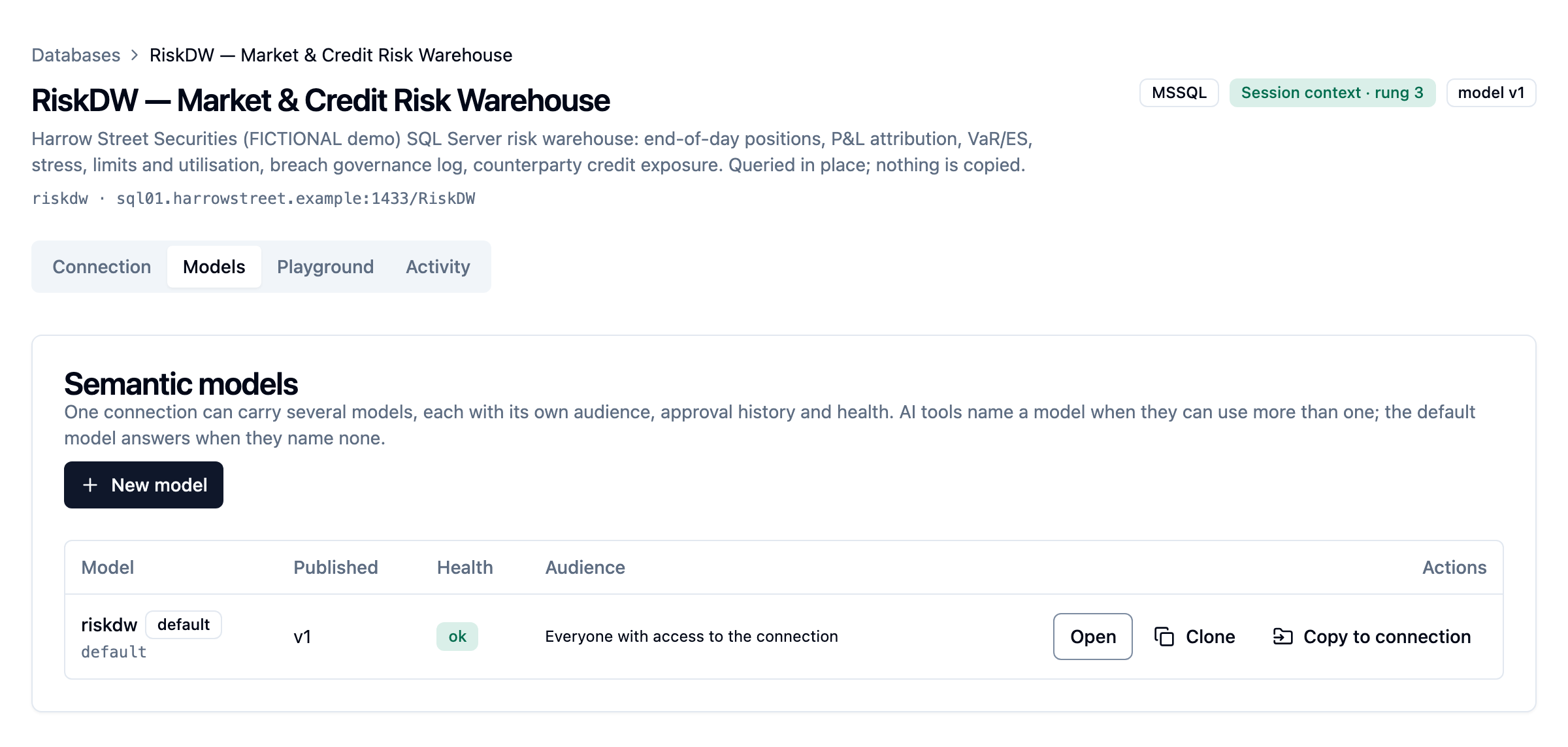
The Models tab lists the connection's models with their published version, health, pending approval, audience and which is the default, and has New model, Clone (a new model on this connection, starting from this one's published model or draft), Copy to connection (the same, onto another connection), Make default and Delete. The Playground has a model picker, and Check a user's access says which models a person reaches.
How it behaves:
- A new model changes nothing for anyone's assistant until it is published. Assistants are offered published models only. A copied or cloned model always lands in the new model's draft, to be validated against its connection and published there.
- A connection with one model looks exactly as before, to users, to their assistants and to the API.
- One model is the default. It answers everything that names no model:
kdbl-controlwithout--model, the routes without a model in the path, and an assistant whose user can use only that model. The default cannot be deleted; make another model the default first. A connection's only model cannot be deleted either; delete the connection instead. - A model a user may not use does not exist for them. It is left out of every listing and refused exactly as an unknown name is, so its name is never confirmed.
- Deleting a model keeps its version history, accuracy runs and query-log rows.
- A connection holds up to 20 models unless your licence sets another limit.
Several models cost nothing noticeable at question time. On our demo estate, a
question's median response time was 35.1 ms before and 36.8 ms after, within
measurement noise, and the server's own time was unchanged. The tool list an
assistant reads grew by about 110 tokens, for the optional model argument.
The model page
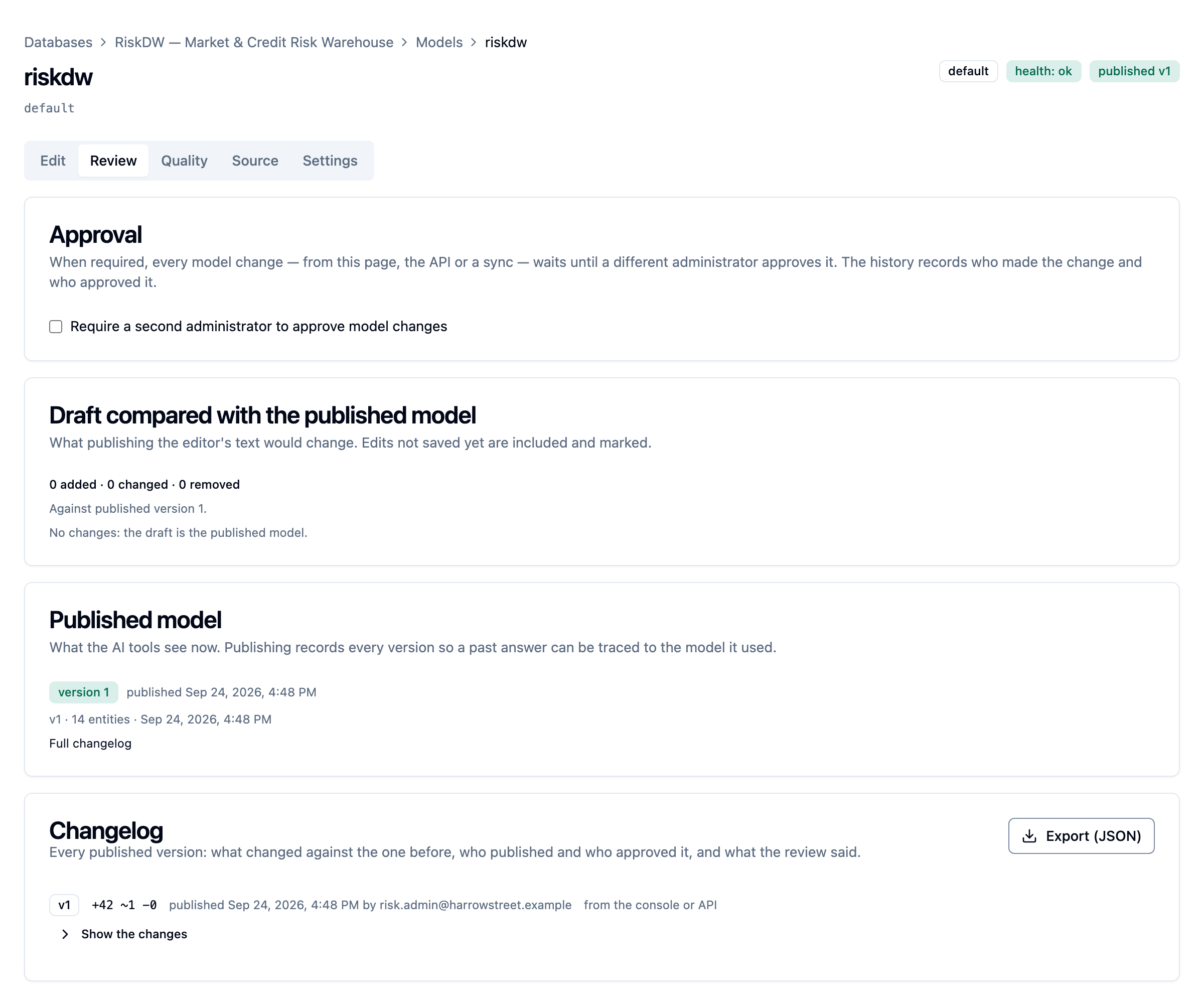
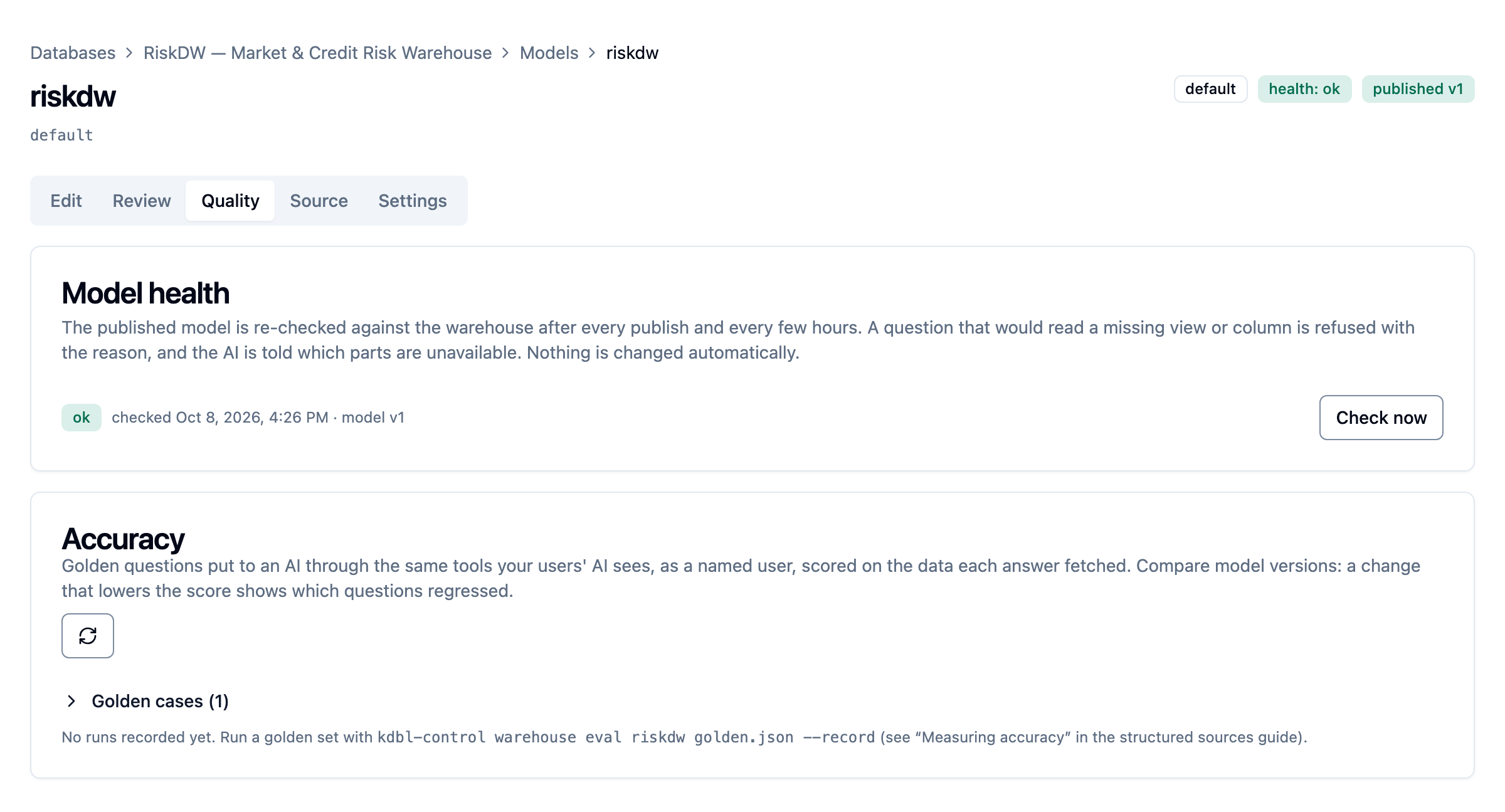
Open takes a model to its own page. Its header shows the model's name, its default and draft badges, its health and the published version, and its tabs are:
| Tab | What is on it |
|---|---|
| Edit (the default) | The model editor with its findings and changes, the save state, Validate against warehouse, Save draft and Publish; the Catalog folds above it |
| Review | The Approval card and its review comments, the draft compared with the published model, the published versions and the Changelog |
| Quality | Model health with Check now, and accuracy against the golden questions |
| Source | Model source (where the model comes from; see Keep the model in the warehouse) and Import a model (Power BI or dbt; the result opens on Edit) |
| Settings | The name, one-line description, the groups that may use the model, Make default and Delete |
The editor stays loaded while another tab is shown, so unsaved text, undo and the guided build survive a switch. Each tab has its own address, so you can link straight to one.
Clone a connection
When you need a second connection to the same server, such as another
database on it, use Clone connection on the Connection tab (or
kdbl-control warehouse clone risk --as risk-eu). The clone copies the source's connection settings, bounds and
identity mode, its credential (so nothing is typed again), its allowed
groups, AI visibility and approval setting. The dialog asks for a slug, a
name and the database (filled in from the source), and offers to copy the
published model or the draft, or neither.
- A copied model always lands in the clone's draft, never published: validate it against the new connection and publish it there.
- The source's probe result, model health, model source and anything waiting for approval are not copied. The clone is probed as soon as it exists.
- Raw SQL is copied only when a tenant administrator clones; a warehouse admin's clone starts with it off.
- A clone counts as a connection under your licence. If the licence or the tenant's quota has no room, the clone is created disabled, with a notice saying so: disable or delete another connection, then enable it.
For several vocabularies over the same database, prefer several models on one connection (above): one credential and one licence slot.
AI help and Ask
Two optional features use an AI provider to help model authors. Both are off
by default, need the structured_sources_assist licence feature, and send
nothing to an AI provider until a tenant administrator switches them on.
Suggest: AI help for model authors
Good descriptions, synonyms and worked questions are what make an AI answer well, and they are the tedious part. With AI help switched on, the editor has Suggest buttons under the model's description, under each entity's and under each attribute's, and Suggest questions above the worked questions. Suggestions appear beside the field, and you accept each one yourself: a description, each synonym, each question. Nothing is applied by itself, and nothing is saved until the draft is. Candidate questions are checked against the model, and those that fail its checks are dropped, with the reason.
What is sent: the model's structure only. The model's, entities' and attributes' names, types, roles, units, aggregation rules, descriptions and synonyms, the relationships, and the existing worked questions with every filter value replaced by a placeholder. Never sent: rows of data, the database's table or column names, expressions, fixed filters, who may see what, or the connection's settings or credential. Example values (the attributes' values lists) are included only if a tenant administrator allows them. The editor says what is sent in one line under each button.
From the command line: kdbl-control warehouse model assist <slug> --scope
questions|entity|attribute|model.
Ask in the Playground
If a tenant administrator also allows it, the Playground gets an Ask in
words mode beside the worked question, query and SQL modes. Type a question
the way a user would ask it, and the AI builds the query using the same two
tools an assistant gets (warehouse_schema and warehouse_query). The
Playground shows the query it built (open it in the query builder to adjust
it), the rows, the statement and timing, every step the AI took, and the
tokens used. Then:
- Save as worked question hands the query and the question's wording to the editor, as the query mode does;
- Record as golden case keeps the question for the model's accuracy checks, with the result just seen as its expectation.
Ask runs against the model and state chosen in the Playground (published or draft). Every query the AI runs executes as the administrator who asked, with their access, row and byte caps and rate limit, and is recorded in the query log. One Ask makes at most six tool calls, within one minute.
Unlike the Suggest buttons, Ask sends data. The provider receives the question, the model as an assistant sees it, and the results of the queries the AI runs: rows of warehouse data, as the asking administrator may see them, with the statement that ran. It never receives the connection's settings or credential, or the database's table and column names. Connection details (host, port, database, login, addresses) are removed from any error message before it is sent. Query results and model descriptions are labelled as data, with control, invisible and text-direction override characters removed, and the AI is told that they are data and not instructions. The provider's own written answer is not shown; the Playground shows only what the AI ran and what came back.
From the command line: kdbl-control warehouse model ask <slug> "<question>"
(--model, --state draft).
Switching it on
A tenant administrator switches AI help on under Settings › Search & content › AI help for database models:
| Setting | Meaning |
|---|---|
| Offer AI suggestions in the model editor | The main switch. Off by default. |
| Provider, Model | The AI provider (Anthropic today) and the model to ask; empty uses the default shown on the card. |
| API key | Your own provider key. It is stored encrypted, can be replaced or removed, and is never shown again. |
| Gateway address | Optional. Empty means the provider's own API. A gateway must use https and be on a host your deployment allows (operators set the list with the chart value warehouses.runtime.assistAllowHosts). |
| Also send the example values | Off by default. When on, Suggest requests include the attributes' values lists. |
| Allow Ask in the Playground | Off by default, and separate. It is the only way query results ever reach the provider. |
| Daily token budget | Optional. Input and output tokens per UTC day across the tenant. Once spent, calls are refused without contacting the provider until the next day. |
The card shows the tokens and calls used today. On a deployment hosting
several customers, the provider enables structured_sources_assist per
tenant like any other feature (see Licensing).
Who may use it. Tenant administrators and warehouse admins only. Readers
cannot, and neither can a read-scoped token.
Audit. Every Suggest and every Ask is recorded in the database's query log, with what was sent (structure only, example values, or query results), the provider and model, the tokens used and the correlation ID. Refused calls, such as one over the budget, are recorded too. The queries an Ask runs are ordinary query-log entries as the asking administrator, carrying the Ask's correlation ID.
Keep the model in the warehouse
A model doesn't have to be written in the console. If your data team wants it next to the views it describes, owned by the DBAs and released with the DDL under the same change control, keep it in a table in the warehouse:
CREATE SCHEMA kdbl;
CREATE TABLE kdbl.semantic_model (
name nvarchar(128) NOT NULL, -- which model; a table may hold several
version nvarchar(64) NOT NULL, -- your label, recorded with every publish
model_json nvarchar(max) NOT NULL, -- the model document (at most 2 MiB)
updated_at datetime2(3) NOT NULL DEFAULT SYSUTCDATETIME()
);
GRANT SELECT ON kdbl.semantic_model TO kdbl_reader; -- the service login
Then, on the model page's Source tab, set Model
source to Read from a table in the warehouse (or
PATCH /api/warehouses/:id/models/:model with a model_source):
{ "model_source": { "kind": "warehouse", "name": "risk",
"object": { "schema": "kdbl", "object": "semantic_model" },
"descriptions": true, "auto_publish": false, "every_minutes": 60 } }
| Option | Default | Meaning |
|---|---|---|
name |
— | The model row to read. If several rows share the name, the newest updated_at wins. |
object |
kdbl.semantic_model |
The model table |
descriptions |
true |
Fill any entity or attribute description the model leaves empty from the view's or column's MS_Description extended property. A description in the model always wins. |
auto_publish |
false |
Publish a synced model automatically, but only when the warehouse check is clean |
every_minutes |
none | Sync on a schedule (5–1440 minutes). Without it, sync on request with Sync now, kdbl-control warehouse model sync, or the API. |
How a sync behaves:
- It always produces a draft first. It publishes only when
auto_publishis on and the warehouse check raises no warnings. Otherwise the draft waits for an admin, and the model's page says why. - Nothing is exposed by accident. Only what the model names reaches the AI; a column added to a view is not picked up on its own.
- Every published version records where it came from: the table, the row's name and version label, a content hash, and whether a person or the schedule triggered it.
- A row that isn't valid, or that names a missing object, is recorded as a failed sync with the reason, and the live model stays as it was.
Switching back to Authored in the console leaves the current model in place.
Treat the model table like the views
Whoever can write to the model table decides what the AI can see. Grant
write access only to the model's owners, and leave auto_publish off where
each change should be approved.
Approving model changes (maker-checker)
A model decides what data an AI can reach and how its figures are calculated, so
you can require a second person to approve each change. Turn on Require a
second administrator to approve model changes on the Approval card, on
a model's Review tab (publish_approval: "required" in the API).
With approval required, every publish, whether from the console, the API, the CLI or an automatic sync, is validated as usual and then held as a pending change instead of going live:
- A different administrator approves it. Reviewers see what the change does to the live model, entity by entity and attribute by attribute, and can open the full submitted model. On Approve and publish the model is checked against the warehouse again, then published.
- The author can never approve their own change. Another administrator can Reject it with a comment, and the author can Withdraw it. The decision and comment stay on the warehouse for the author to see.
- A newer submission replaces the one waiting.
- The version history records the author, the approver, when it was approved and the comment. Approvals, rejections and setting changes are also in the admin audit log.
- A warehouse admin can turn approval on; only a tenant admin can turn it off, because turning it off is itself the bypass.
When approval is on, the console's publish button reads Submit for approval.
Review comments
While a change waits for approval, its reviewers and its author can discuss it on the change itself. The Approval card, on the model's Review tab, shows the pending change part by part (the model's own fields, and each entity, attribute, relationship and worked question that changed), each with a Comment button and its thread; general comments go below. Tenant administrators and warehouse admins who can see the model may comment; readers cannot.
- Resolve marks a comment's point as dealt with; anyone reviewing can resolve or reopen it. Only its author can delete a comment, and only while it is unresolved. Approving with unresolved comments asks you to confirm first.
- Comments follow the change. When the author revises it (a new submission, or one after a rejection or withdrawal), the comments carry over. A comment on a part the revised change no longer touches is listed under "On parts no longer in this change".
- On approval, the comments are kept with the published version, in its history and the changelog.
- People are named by their directory sign-in name, else their email.
- A comment holds up to 4,000 bytes, and a model up to 500 comments under review at once.
Changelog
The Changelog card on a model's Review tab lists every published version, newest
first: what changed against the version before (+added ~changed −removed),
who published it and when, where it came from (the console or API, an import,
a clone, or a sync from the warehouse's model table), who approved it with
their comment, and how many review comments it had. Each version expands to
its full difference and the review comments.
Export (JSON) downloads the whole changelog for an auditor: every version,
oldest first, with its full difference and its review, comments included.
From the command line, kdbl-control warehouse model changelog <slug> prints
one line per version, and --full prints the export.
Versions published before 0.1.50 have no review comments, and show who published or approved them only to a tenant administrator.
Model health (drift detection)
A DBA may later change or drop a view that a published model depends on. K-Lake re-checks every enabled warehouse's published model against the warehouse catalog: within a minute of each publish, every 6 hours by default, and on demand with Check now on the model page's Quality tab.
| Status | Meaning |
|---|---|
ok |
Every backing object and column is present with a compatible type |
degraded |
A column is missing (including one an expression uses), or a column's type no longer suits its attribute. Everything else works. |
broken |
At least one entity's backing view or table is gone |
unreachable |
The catalog couldn't be read; the previous findings are kept |
Each finding names the entity, the attribute and what changed. Nothing in the model is changed automatically. A question that would read a missing object or column is refused before it reaches the warehouse, with the finding as the explanation, and the AI's schema marks those parts unavailable so it can steer around them. A type change is reported but not refused.
Each model on a connection is checked on its own. Operators can change the
check interval with the chart value warehouses.runtime.driftCheckMinutes
(KDBL_WAREHOUSE_DRIFT_CHECK_MINUTES on the API; default 360).
Identity: whose permissions apply
There are two separate decisions: how K-Lake's service connection authenticates, and whose identity the warehouse evaluates each question as.
Service connection
| Method | When to use it |
|---|---|
SQL Server login (sql_server) |
A SQL login and password. On-premises and Azure. |
Entra service principal (entra_client_credentials) |
Tenant ID, client ID and client secret. Azure SQL, Synapse, Fabric. |
Windows login (kerberos) |
A domain service account, signed in with Kerberos. On-premises SQL Server that accepts only Windows logins. Version 0.1.48 and later. |
The service connection is used for probing, listing the catalog and reading a model table.
Windows login (Kerberos)
For a SQL Server that does not allow SQL logins. K-Lake signs in as one domain service account using Kerberos. NTLM is not used. The identity modes below work the same on top of it, so per-user trimming is unchanged.
There are two ways to hold the account's credential:
| Account and password (default) | Cluster keytab | |
|---|---|---|
| Set up by | The warehouse admin, on the connection form | A cluster administrator, in the Helm values |
| Stored | Encrypted with the deployment's master key, like a SQL login's password | A Kubernetes Secret on the deployment |
| When the password changes | Update it on the connection form | Export a new keytab and replace the Secret |
| Finding the domain controllers | Automatic through DNS, or listed on the form | In the krb5.conf you supply |
In your domain (either way):
- A domain user for K-Lake, for example
svc_klake. A group managed service account (gMSA) cannot be used. - The SQL Server's service principal name, for the exact host name you will
enter in K-Lake. Check what is registered with
setspn -L <SQL Server service account>, and add it if needed:setspn -S MSSQLSvc/dbserver.corp.example.com:1433 <SQL Server service account>. - A login on the server for the account, with read access to the views you
will model:
CREATE LOGIN [CORP\svc_klake] FROM WINDOWS;and a database user with the same grants a SQL login would have had. For theexecute_asidentity mode, alsoIMPERSONATEon each user.
With account and password: on the connection form choose Windows login
(Kerberos) and Account and password. Enter the account as
svc_klake@CORP.EXAMPLE.COM: the account name and your Active Directory DNS
domain, not CORP\svc_klake and not an email address. Leave Domain
controllers empty when your cluster's DNS resolves the domain; otherwise list
them, comma-separated.
With a keytab: export it for the account
(ktpass /princ svc_klake@CORP.EXAMPLE.COM /mapuser CORP\svc_klake /pass * /crypto AES256-SHA1 /ptype KRB5_NT_PRINCIPAL /out svc_klake.keytab),
then:
kubectl -n <namespace> create secret generic kdbl-warehouse-keytab --from-file=keytab=svc_klake.keytab
warehouses:
kerberos:
enabled: true
keytabSecret: kdbl-warehouse-keytab
krb5Conf: |
[libdefaults]
default_realm = CORP.EXAMPLE.COM
dns_lookup_kdc = false
rdns = false
[realms]
CORP.EXAMPLE.COM = {
kdc = dc1.corp.example.com
kdc = dc2.corp.example.com
}
Apply with helm upgrade, then choose Windows login (Kerberos) and The
cluster's keytab on the form. A keytab login uses the deployment's own
identity, so the tenant's source policy must allow ambient credentials
(single-customer deployments do by default).
Either way, enter the server's full DNS name as the host (not an IP
address), exactly as in the service principal name. A named instance is given
by its TCP port. Test connection shows the domain login, for example
CORP\svc_klake. If the login holds VIEW SERVER PERFORMANCE STATE, it also
shows Signed in with: KERBEROS.
When the test fails, the message names the step to fix:
| The message says | Fix |
|---|---|
the domain has no SPN MSSQLSvc/… |
Register it (step 2) for exactly the host name entered |
| the domain rejected the password | Update the password on the form |
| the domain has no such account | Enter the account as name@DNS.DOMAIN |
| the keytab does not match the account's current password | Export a new keytab and replace the Secret |
| no domain controller found / reachable | DNS for the domain, the Domain controllers field or krb5.conf, and port 88 |
| the clocks differ by more than five minutes | Time synchronisation on the cluster nodes |
Login failed for user 'CORP\svc_klake' |
Step 3: the login or its database user |
warehouses.kerberos.trace: true logs each Kerberos exchange to the API's log
while you diagnose a keytab setup.
Identity modes
| Mode | What the warehouse sees | Per-user row security |
|---|---|---|
entra_on_behalf_of |
The asking user, signed in with their own Entra token | Yes, natively: permissions, row-level security, masking and auditing all apply to the real user |
execute_as |
The asking user's database user (the service login impersonates it, which needs IMPERSONATE on each user) |
Yes: grants, denies, row-level security and masking apply as that user |
session_context |
The service login, with the user's UPN set read-only in SESSION_CONTEXT for your row-level security predicates to read |
Yes, if your predicates use it |
service |
One service login for everyone | No |
K-Lake records the mode on the warehouse, reports it in the probe and tells the AI whether answers are per-user, so the product never claims per-user trimming a warehouse can't provide. Under a per-user mode an empty result may mean "not permitted", and the AI is told to say so rather than "there is nothing there".
Every question opens its own connection and closes it afterwards. A connection that has switched to a user's identity is never reused.
Which to choose:
session_contextsuits an on-premises warehouse whose views already carry row-level security. Write the predicate againstSESSION_CONTEXT(N'kdbl_user')(the key is configurable) and K-Lake supplies the caller's UPN.execute_assuits a warehouse where per-user database users already exist.entra_on_behalf_ofis the target for Azure estates: every question runs as the person asking, with no shared identity in the query path. Set it up as below.
Set up Entra on-behalf-of (Azure SQL, Synapse, Fabric)
When a user signs in, K-Lake obtains an Entra token issued to K-Lake's app registration for that user. For each question it exchanges that token with Microsoft for one scoped to the database, and connects with it. The warehouse's own audit then shows each user, not a service principal.
In your Entra tenant, on the app registration users sign in to K-Lake with (Entra only lets the app a token was issued to exchange it, so the warehouse must use the same app; see OAuth and identity providers):
- Expose an API. Keep the default Application ID URI
api://<client-id>and add a delegated scope such asaccess_as_user. - API permissions. Add Azure SQL Database › user_impersonation (delegated; the same permission covers Fabric warehouses) and Grant admin consent for the tenant.
- Certificates & secrets. Create a client secret; it goes in the warehouse's credential.
- Request K-Lake's API at sign-in. Set the sign-in scopes to
openid profile email offline_access api://<client-id>/access_as_user.offline_accesslets a sign-in outlive the one-hour access token; without it, users sign in again every hour.
In the warehouse, create a contained user for each person (or an Entra group)
who will ask questions (CREATE USER [alice@contoso.com] FROM EXTERNAL
PROVIDER), grant what they may read, and write row-level security on
USER_NAME(). The app's own service principal also needs a user with
VIEW DEFINITION, for the catalog and model-table syncs only; a user's question
never runs as the service principal.
In K-Lake, configure the warehouse like this, with the client secret as its credential:
{
"host": "contoso-dw.database.windows.net",
"database": "RiskDW",
"auth": { "method": "entra_client_credentials",
"app": { "tenant_id": "<directory id>", "client_id": "<client id>" } },
"identity": { "mode": "entra_on_behalf_of" }
}
Then probe the warehouse while signed in with Entra. The probe performs a real exchange for you and reports on-behalf-of as working only when it succeeds; signed in with a personal access token, or with consent missing, it reports the reason instead.
Who can use it:
| Caller | On-behalf-of |
|---|---|
| An MCP client (Copilot, Claude, …) signed in through K-Lake | Yes |
| The console, signed in through K-Lake or directly with Entra SSO | Yes |
| A personal access token, the cluster-admin token, or a delegated partner administrator | No: refused with an explanation. Under this mode a caller who can't be exchanged is refused, never run as the service principal. |
A user who signed in before the tenant's first on-behalf-of warehouse existed is asked to reconnect once.
Entra tokens are held only while needed, encrypted at rest, never logged and never returned by any API. Revoking a user's session (AI access (MCP) › Tokens › OAuth login sessions) stops their warehouse access immediately.
When Entra refuses, the user is told why, and the refusal is logged:
| Situation | What the user is told |
|---|---|
| No Entra sign-in (for example a personal access token) | This warehouse runs as you; connect through Entra sign-in and ask again |
Admin consent missing (AADSTS65001) |
An Entra administrator must grant consent for Azure SQL Database › user_impersonation on the named app |
| Conditional Access requires MFA, registration or a compliant device | Sign in again completing the step. If it persists, the Conditional Access policy on Azure SQL must be satisfiable at sign-in to K-Lake. |
| Sign-in expired or the session was revoked | Sign in again |
| The app's own client secret refused | The warehouse is misconfigured; an administrator updates the secret |
Bounds and throttling
Every warehouse has conservative limits, which you can raise up to a ceiling:
| Limit | Default | Ceiling |
|---|---|---|
row_cap: rows returned when a query names no limit |
200 | max_row_cap |
max_row_cap: rows a query may ask for |
2,000 | 5,000 |
statement_timeout_ms |
30,000 (30 s) | 300,000 (5 min) |
connect_timeout_ms |
10,000 (10 s) | 60,000 (1 min) |
max_result_bytes |
2 MiB | 16 MiB |
max_concurrent: statements this warehouse runs at once, across the whole cluster |
8 | 64 |
per_user_per_minute: questions one user may ask this warehouse per minute |
30 | 600 |
queue_wait_ms: how long a question waits for a free slot before it is refused |
5,000 (5 s) | 30,000 (30 s) |
A truncated result says so. The row cap is an exfiltration bound as much as a performance one: a fully authorised read is still not a bulk export.
When a warehouse is at max_concurrent, a new question waits up to
queue_wait_ms and is then refused; a user past per_user_per_minute is refused
straight away. Both are answered 429 Too Many Requests with a Retry-After
header (on MCP, the same answer as the tenant's other rate limits), and
logged with outcome throttled. An API replica that stops mid-query never
strands a slot.
The read_only_intent setting asks for a readable secondary where the
warehouse offers one (an Always On availability group, or Azure SQL read
scale-out).
The raw SQL path
Allow raw SQL is off by default, and only a tenant administrator can
switch it on, when the warehouse is created or later; a warehouse admin can
switch it off. When it is on, the AI may send a single
SELECT. K-Lake parses it and refuses it unless it reads only the model's
objects: no base tables, no system views, no procedures, table hints, linked
servers, SELECT INTO or OPENROWSET. A row limit is added to the statement.
The warehouse's permissions remain the control; this is defence in depth.
Prefer the structured path.
Model as code
If your data team runs the warehouse through change control, keep the model the
same way: in a git repository, reviewed by pull request, and promoted between
environments by your pipeline. kdbl-control warehouse model wraps the API in
commands with pipeline-friendly exit codes.
flowchart LR
A[Edit model JSON<br/>in a branch] --> B[Pull request]
B --> C["check · diff · validate<br/>(read-scoped token)"]
C --> D{Review}
D -- merge --> E["publish<br/>(admin-scoped token)"]
E --> F{Approval<br/>required?}
F -- no --> H[Live: new model version]
F -- yes --> G[Second admin approves<br/>in the console]
G --> H- Keep the model in the repository, one JSON file per warehouse. Start
from what is live:
kdbl-control warehouse model pull risk -o warehouse/risk.json. - Validate every pull request.
model checkparses the file and runs the structural checks offline (a pre-commit hook can run it too).model validatechecks every backing object and column against the warehouse, the columns inside expressions too, and prints each finding with the path to the field it is about.model diffshows what the change does to the live model, so the reviewer reads "attributeexposure: typeinteger→number" instead of a JSON text diff. - Publish on merge.
model publishvalidates again and publishes. A publish whose warehouse check raises warnings is refused, and the pipeline fails, unless you pass--force. - Promote with one job per environment, each with its own API URL and token, behind your pipeline's own environment approvals.
Every model command takes --model <slug> to act on one of a connection's
several models; without it, the command
acts on the default model. kdbl-control warehouse models <slug> lists them.
| Command | Exit code |
|---|---|
kdbl-control warehouse model check <file> |
0 valid; 1 doesn't parse or fails the structural checks. No API call. |
kdbl-control warehouse model validate <slug> <file> |
0 clean; 2 the warehouse check raised warnings (0 with --allow-warnings); 1 structural error or refused call |
kdbl-control warehouse model diff <slug> <file> [--json] |
0. With --json, .empty is true when there is nothing to publish |
kdbl-control warehouse model push <slug> <file> |
0 saved as the draft; 1 otherwise |
kdbl-control warehouse model publish <slug> [<file>] [--force] |
0 published; 2 held back for warnings; 1 otherwise |
kdbl-control warehouse model sync <slug> |
0 synced; 1 the sync failed (model kept in the warehouse) |
kdbl-control warehouse model suggest <slug> --objects schema.obj,… |
0 a suggested model was written (Build from the catalog's suggestion), with its report; 1 otherwise. Nothing is saved: model push the file when it is right |
kdbl-control warehouse model import <slug> --kind tmdl|bim|metricflow <path>… |
0 the imported model was written, with the report of what was not imported; --push also saves it as the draft (never published); 1 otherwise |
kdbl-control warehouse model suggest-values <slug> --object schema.obj --columns a,b |
0 the suggested values were printed, with a warning under any list the sensitivity check flagged; 1 otherwise. Nothing is saved. Needs a full-authority token |
kdbl-control warehouse model assist <slug> --scope questions|entity|attribute|model |
0 the AI suggestions were printed; 1 refused, AI help not on, or budget spent. Nothing is saved |
kdbl-control warehouse model ask <slug> "<question>" |
0 a query answered the question (Ask); 1 otherwise. Sends query results to your AI provider |
kdbl-control warehouse model changelog <slug> [--full] |
0. One line per published version, or with --full every version with its changes and review comments |
kdbl-control warehouse model schema |
Prints the model's JSON Schema |
Every non-zero exit prints the reason. kdbl-control reads KDBL_API_URL and
KDBL_API_TOKEN from the environment, so secrets never appear on a command
line. See the CLI reference for the other warehouse commands
(list, show, probe, catalog, queries).
Approval and pipelines
With approval required, a pipeline's publish is submitted, not live, until a second administrator approves it. Treat a successful publish job as "submitted for approval".
Tokens for a pipeline
Create personal access tokens for a dedicated account that holds the warehouse admin flag, not for a person. Use two tokens, so that validating and publishing stay apart:
- a
read-scoped token for pull requests. It can validate a model against the warehouse, diff, pull and read the query log, but it cannot push, publish or approve.model checkneeds no token at all. - an
admin-scoped token only for the publish job on your protected branch, never exposed to pull requests from forks.
Use one token per environment, so a UAT token can't publish to production.
Run the CLI in CI
A CI runner usually can't reach inside the cluster. Use the K-Lake worker image
(ghcr.io/kdbl-consulting/kdbl-worker), which carries kdbl-control, either as
the job's container or with docker run --entrypoint kdbl-control. Pin it to
the release your deployment runs, so the CLI matches the API.
# .github/workflows/warehouse-model.yml
name: warehouse model
on:
  pull_request:
    paths: ["warehouse/**"]
  push:
    branches: [main]
    paths: ["warehouse/**"]

jobs:
  validate:
    if: github.event_name == 'pull_request'
    runs-on: ubuntu-latest
    container:
      image: ghcr.io/kdbl-consulting/kdbl-worker:<your release>
      options: --user root   # checkout writes the workspace
    env:
      KDBL_API_URL: ${{ vars.KDBL_API_URL }}
      KDBL_API_TOKEN: ${{ secrets.KDBL_WAREHOUSE_READ_TOKEN }}
    steps:
      - uses: actions/checkout@v4
      - run: kdbl-control warehouse model check warehouse/risk.json
      - run: kdbl-control warehouse model diff risk warehouse/risk.json
      - run: kdbl-control warehouse model validate risk warehouse/risk.json

  publish:
    if: github.event_name == 'push'
    runs-on: ubuntu-latest
    environment: prod            # the environment's protection rules gate the job
    container:
      image: ghcr.io/kdbl-consulting/kdbl-worker:<your release>
      options: --user root
    env:
      KDBL_API_URL: ${{ vars.KDBL_API_URL }}
      KDBL_API_TOKEN: ${{ secrets.KDBL_WAREHOUSE_ADMIN_TOKEN }}
    steps:
      - uses: actions/checkout@v4
      - run: kdbl-control warehouse model publish risk warehouse/risk.json
The same pattern works in Azure DevOps and GitLab CI. A runner with only curl
and jq can call POST /api/warehouses/:id/models/:model/validate and
POST /api/warehouses/:id/models/:model/publish directly
(POST …/models/:model/diff gives the reviewer's diff). Validation returns
findings, each with the JSON path of the field it concerns, beside the flat
warnings list, which is kept for this release; move pipelines to
findings.
One source of truth per warehouse
Manage a model either from git through the API or from a
table in the warehouse, not both. With a
warehouse model table, a sync replaces anything published from git as soon
as it finds a changed row. You can still run model check and
model validate on the JSON before it goes into the table.
Measuring accuracy
"How accurate is it on our data?" is answered with a golden question set:
the questions your users actually ask, each with the answer it should get.
kdbl-control warehouse eval puts every question to an AI model through the same
two tools your users' AI clients see, and scores the data its final query
fetched against the expected answer. Every tool call runs as the token's user,
so row-level security, the aggregation rules, the row caps and the audit log
apply exactly as they would in Copilot or Claude.
The golden set is a JSON file:
{
  "name": "risk-poc",
  "warehouse": "risk",
  "cases": [
    { "id": "open_breach_count",
      "question": "How many limit breaches are still open?",
      "expected": { "query": { "entity": "Breach",
                               "filters": [{ "attribute": "is_open", "op": "eq", "value": 1 }],
                               "aggregates": [{ "function": "count", "as": "open_breaches" }] },
                    "values": { "open_breaches": 3 } },
      "tags": ["breach", "count"] }
  ]
}
| Field | Meaning |
|---|---|
id |
Stable identifier; trends across runs are keyed on it |
question |
The question exactly as a user would ask it |
expected.query / expected.question |
The query (or worked question) that produces the answer. On its own, the expected answer is whatever it returns at run time, which suits data that changes daily. |
expected.rows / expected.values / expected.row_count |
A literal answer: rows, named aggregate values, or a row count |
tolerance |
{"abs": …} and/or {"rel": …}, per case or for the set |
compare, ordered, match |
Which columns decide the answer; whether order matters; exact or contains |
as_user |
Who the case was written for, when row-level security changes the answer. Skipped for other users. |
tags, notes |
For filtering (--tag) and for the author |
Answers are compared on their data, not their wording: columns are matched by
name or by their values, numbers within the tolerance, rows order-insensitive
unless ordered.
# Before relying on the set: every expected query runs and still gives the literal answers
kdbl-control warehouse eval risk golden.json --expected-only

# Ask the AI model three times per question, as the token's user
ANTHROPIC_API_KEY=… kdbl-control warehouse eval risk golden.json --runs 3 --out report.json

# Gate a pipeline on accuracy, and keep the run for the console
kdbl-control warehouse eval risk golden.json --runs 3 --min-accuracy 90 --record
| Flag | Meaning |
|---|---|
--expected-only |
Run each case's expected query instead of asking an AI model. No API key needed. |
--runs N |
Ask each question N times; a case passes only if every run passes. Use 3 or more for a figure you'll quote. |
--min-accuracy P |
Exit 3 when accuracy is below P percent |
--record |
Store the run for the model's Accuracy card (warehouse admin token) |
--cases db |
Also run the golden cases kept for the model; the file is then optional, and a file case wins a shared name |
--warehouse-model <slug> |
Which of the connection's models to question; without it, the default model |
--tag, --model, --json, --out |
Filter cases, choose the AI model, print or save the full report |
Exit codes: 0 the run completed and met --min-accuracy, 3 below it,
1 an error (including a run where no case could be evaluated). Questions and
results go to the AI model you choose; the warehouse is reached only through the
normal bounded query path.
Recorded runs appear on the Accuracy card on the model's Quality tab: the model version, the accuracy and its change since the previous run of the same golden set, the AI model, and each case's verdict and differences. A stored run keeps only a few sample rows per case, never a full result. The card is shown in the screenshot under Model health.
Golden cases kept per model
Besides a file, each model can keep its own golden set in K-Lake. Add cases
from the Playground with Record as golden case after an
Ask, or post them to
POST /api/warehouses/:id/models/:model/evals/cases. A case keeps the
question, the query, and the row count and column names it returned. When the
case is run, the query's result at that moment is the expected answer, so a
case survives the data changing. A model keeps up to 500 cases.
The Accuracy card, on the model's Quality tab, shows Golden cases (N) with the list, and
administrators can delete a case there. Run them with
kdbl-control warehouse eval <slug> --cases db, alone or together with a
file; stored cases carry the tag recorded. Anyone the model admits can list
its cases, so a run as a reader can use them.
Writing a useful golden set
Start from your users' real questions and aim for 30–50. Cover lookups,
counts, totals, breakdowns, time windows, joins and at least one question
whose honest answer is "none". Phrase them the way users do, not the way the
model names things. Include row-level security cases with as_user. Keep
golden questions out of the model's worked questions, or the score
measures recall.
The score tells you how often the AI fetched the right data for these questions, asked as this user, of this model version. It doesn't grade the AI's written prose, and it is only as good as the golden set.
Audit
Every question produces one audit record: who asked, the identity the warehouse evaluated it as, the channel (MCP or API), the exact statement and parameters, the rows returned, whether the result was truncated, the duration, the outcome, and a correlation ID that is also set inside the warehouse session. MCP calls are additionally in the MCP audit like every other tool.
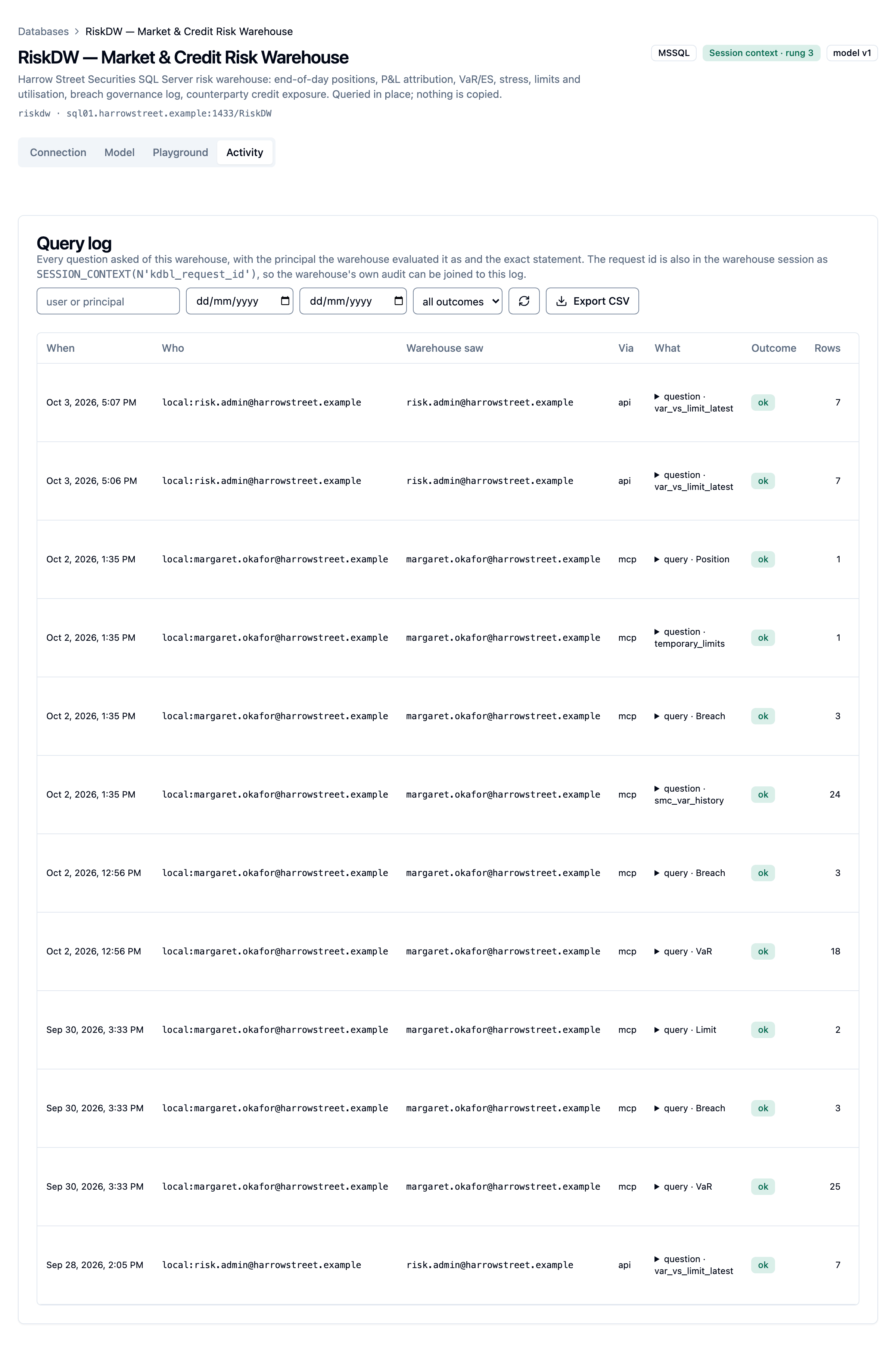
Outcomes are ok, refused (the warehouse refused, for example permissions or
a missing object), throttled, timeout, error and denied (the caller is
not in the warehouse's allowed groups).
Each record names the model the question used, and the log can be filtered by model. Model authoring is in the same log: every statement a suggested values request runs, and every AI help and Ask call, with what was sent to the provider, the tokens used and the outcome, refused calls included.
Query audit for every database
Each warehouse's Activity tab shows the questions asked of that warehouse. To see every warehouse's questions in one log, open Databases and click Query audit (or press ⌘K / Ctrl+K and type query audit). The page lists every question asked of the tenant's databases, newest first, with a Database column that links to each warehouse's own Activity tab (a warehouse removed since shows as removed).
- Who sees it: tenant admins and warehouse admins. A cluster administrator has no tenant of their own, so the page points them to the tenant's page under Tenants for its audit settings; to read a tenant's log, sign in with an account in that tenant.
- Filters: by user or principal, from and to dates, and outcome.
- Paging: the log loads 100 questions at a time; Load older questions at the foot fetches the next 100, so a large log never loads at once.
- Export CSV downloads the filtered log, up to 10,000 rows (see Export for more through the API).
- Settings: for a tenant admin, the Warehouse query audit card below the log sets how long questions are kept and whether query parameters are recorded (see Parameter redaction and Retention). A warehouse admin reads the log but doesn't change these settings.
Stream to your SIEM
Each question emits one structured event, target: "warehouse.audit", on the
same JSON log stream and in the same shape as the MCP audit's mcp.audit (see
Streaming to your SIEM). Add the target to the
filter that already forwards mcp.audit. Key fields:
| Field | Meaning |
|---|---|
event |
Always warehouse.query |
at, tenant_id, warehouse |
When, which tenant, which warehouse |
principal, effective_principal |
Who asked, and the identity the warehouse evaluated the question as (empty under the service login) |
identity_mode |
entra_on_behalf_of, execute_as, session_context or service |
channel, kind |
mcp or api; question, query, sql or probe |
model_version |
The published model version the question used |
statement, statement_sha256, params |
The statement (first 4 KB), a hash of it as sent to the warehouse, and the bound parameters |
rows, truncated, duration_ms, outcome, error |
The result |
request_id |
The correlation ID |
Parameter redaction
Parameters can hold customer identifiers, account numbers or names. With
redaction on, the audit record, the CSV export and the SIEM event record each
parameter as its type only (<string>, <int>, <date> and so on); on the raw
SQL path, literals in the statement are replaced the same way. The statement
hash still matches what the warehouse ran, and the caller's own answer is
unchanged.
Turn it on per tenant on the Warehouse query audit card, which a tenant
admin finds on Databases › Query audit and a cluster administrator on the
tenant's page (Admin › Tenants, then the tenant), or with
PATCH /api/tenants/:slug/warehouse-audit {"redact_params": true}. Operators can
turn it on for every tenant with KDBL_WAREHOUSE_AUDIT_REDACT_PARAMS=true on the
API (chart value warehouses.runtime.auditRedactParams). It applies to
questions asked after the change.
Correlate with the warehouse's own audit
Every question gets a correlation ID: the caller's x-request-id header if it
sent one, otherwise a new UUID. It is returned with the answer, stored in the
audit record, and set in the warehouse session before the question runs, in
every identity mode:
SESSION_CONTEXT(N'kdbl_request_id'), read-only for the rest of the session;CONTEXT_INFO, the same ID as ASCII, visible insys.dm_exec_sessionsandsys.dm_exec_requests.
A DBA can see K-Lake's running questions like this:
SELECT s.session_id, s.login_name,
       CAST(s.context_info AS varchar(128)) AS kdbl_request_id,
       r.start_time, t.text
  FROM sys.dm_exec_sessions s
  LEFT JOIN sys.dm_exec_requests r ON r.session_id = s.session_id
  OUTER APPLY sys.dm_exec_sql_text(r.sql_handle) t
 WHERE s.program_name = 'k-lake'
   AND s.context_info <> 0x;
To keep it, capture context_info in an Extended Events session filtered on the
application name k-lake (or read SESSION_CONTEXT(N'kdbl_request_id') from a
view or row-level security predicate into your own audit table). Then look the
ID up in K-Lake with GET /api/warehouses/:id/queries?request_id=<id>.
Export
Export CSV, on a warehouse's Activity tab or on Databases › Query
audit, exports that log with the current filters.
Through the API, GET /api/warehouses/:id/queries reads one warehouse's log and
GET /api/warehouses/queries/export reads every warehouse's in the tenant, as
JSON or CSV:
curl -H "Authorization: Bearer $KDBL_TOKEN" -o march.csv \
  "$KDBL_URL/api/warehouses/queries/export?from=2026-03-01T00:00:00Z&to=2026-04-01T00:00:00Z"
Filter with from, to, user, status, channel and request_id. A CSV
page holds up to 10,000 rows; a full page carries an x-next-cursor header to
pass as before for the next. Text that a spreadsheet would run as a formula
(a value starting with =, +, - or @) is neutralised with a leading
apostrophe, so the file is safe to open in Excel. Tenant admins and warehouse
admins only.
Retention
The warehouse audit has its own retention window, separate from the MCP audit:
365 days by default (chart value warehouses.runtime.auditRetentionDays,
KDBL_WAREHOUSE_AUDIT_RETENTION_DAYS on the worker).
Each tenant can have its own window on the Warehouse query audit card
(on Databases › Query audit for a tenant admin, or the tenant's page under
Tenants for a cluster administrator) or with PATCH /api/tenants/:slug/warehouse-audit {"retention_days": …}. A
cluster admin can set any window from 1 to 36,500 days; a tenant admin can only
shorten it below the deployment default.
API reference
:id is the warehouse's UUID or its slug, and :model a model's slug. "Admin"
means a tenant admin or a warehouse admin of the tenant.
Every model operation has a route under /api/warehouses/:id/models/:model/….
The routes from before 0.1.50, without a model in the path
(/api/warehouses/:id/model/…, /schema, /query and /evals), still work
for this release only and act on the default model. Move scripts and
pipelines to the per-model routes, or add --model to kdbl-control, before
the next release.
| Method | Path | Who | Purpose |
|---|---|---|---|
GET |
/api/warehouses |
Any user | List (non-admins see enabled warehouses, without connection settings) |
POST |
/api/warehouses |
Admin | Register a warehouse |
POST |
/api/warehouses/test |
Admin | Probe an unsaved configuration |
GET PATCH DELETE |
/api/warehouses/:id |
Admin | Read, update, remove |
POST |
/api/warehouses/:id/clone |
Admin | Clone the connection: {slug, name, database?, copy_model} with copy_model one of none, published or draft. A copied model lands in the clone's draft. The response's notice says when the clone was created disabled |
PUT |
/api/warehouses/:id/secret |
Admin | Replace the credential (write-only) |
POST |
/api/warehouses/:id/probe |
Admin | Connectivity and identity probe |
GET |
/api/warehouses/:id/access?user= |
Admin (warehouse admins too) | Whether one person (email or id) may ask, the reason, their groups at last sign-in with the allowed ones marked, the identity the warehouse receives for them, and which models they reach |
GET |
/api/warehouses/:id/catalog?schema= |
Admin | Objects and columns the service connection can see, with each table's keys, foreign keys and row estimate, and each view's likely key and inherited foreign keys (keys=false leaves them out) |
GET POST |
/api/warehouses/:id/models |
Any user the connection admits / Admin | List the connection's models (non-admins see only the published models offered to them); create one, optionally copied from another model of this or another connection into its draft |
GET PATCH DELETE |
/api/warehouses/:id/models/:model |
Admin | The model's published version, draft and history; change its name, description, audience, default flag or model source; delete it (not the default or the only model) |
PUT |
/api/warehouses/:id/models/:model/draft |
Admin | Save a draft. Send the draft_revision you last read as expected_draft_revision to be refused (409) when someone else has saved since |
GET POST |
/api/warehouses/:id/models/:model/diff |
Admin | What publishing would change: the saved draft (GET) or a supplied model (POST) against the published one |
POST |
/api/warehouses/:id/models/:model/validate |
Admin (a read-scoped token is enough) |
Check a model against the warehouse: findings with the path of each, and the flat warnings |
POST |
/api/warehouses/:id/models/:model/suggest |
Admin (a read-scoped token is enough) |
A starter model for {objects} from the catalog's keys, with its report. Saves nothing |
POST |
/api/warehouses/:id/models/:model/import |
Admin (a read-scoped token is enough) |
Translate {kind, files} (tmdl, bim or metricflow; at most 5 MB) into a model and a report. Saves nothing |
POST |
/api/warehouses/:id/models/:model/suggest-values |
Admin, full-authority token | Distinct values or a date range for up to 50 columns of one object, with the sensitivity check. Saves nothing |
POST |
/api/warehouses/:id/models/:model/assist |
Admin, not a read-scoped token |
AI suggestions for the supplied draft (scope: entity, attribute, questions or model). Saves nothing. 404 when AI help is not on, 429 once the daily budget is spent |
POST |
/api/warehouses/:id/models/:model/ask |
Admin, not a read-scoped token |
Ask in words: {question, state?}. Sends query results to your AI provider. 404 when Ask is not allowed |
POST |
/api/warehouses/:id/models/:model/publish |
Admin | Publish (or submit for approval); force: true overrides warnings |
POST |
/api/warehouses/:id/models/:model/approve |
Admin, not the submitter | Approve and publish the waiting change |
POST |
/api/warehouses/:id/models/:model/reject |
Admin | Reject the waiting change, or withdraw your own |
GET POST |
/api/warehouses/:id/models/:model/review/comments |
Admin | List the review comments on the waiting change; add one ({body, anchor?}) |
PATCH DELETE |
/api/warehouses/:id/models/:model/review/comments/:comment_id |
Admin | Resolve or reopen a comment; delete your own unresolved one |
GET |
/api/warehouses/:id/models/:model/changelog |
Admin | Published versions, newest first; ?format=json for the auditor's export |
GET |
/api/warehouses/:id/models/:model/changelog/:version |
Admin | One version with its full changes and review comments |
POST |
/api/warehouses/:id/models/:model/check |
Admin | Check model health now |
POST |
/api/warehouses/:id/models/:model/sync |
Admin | Read the model from the warehouse's model table now |
GET |
/api/warehouses/:id/models/:model/schema |
Any user the model admits | The AI-facing model, as the caller sees it (?state=draft for admins) |
POST |
/api/warehouses/:id/models/:model/query |
Any user the model admits | Ask: {question}, {query} or {sql}, plus limit. ?state=draft (admins) runs against the saved draft. Send x-request-id to choose the correlation ID. |
GET |
/api/warehouses/:id/queries |
Admin | The query log (JSON or format=csv; model= narrows to one model) |
GET |
/api/warehouses/queries/export |
Admin | Every warehouse's log for the tenant, CSV by default |
GET |
/api/warehouses/tools |
Any user | The warehouse_schema and warehouse_query tool definitions, as MCP advertises them |
POST GET |
/api/warehouses/:id/models/:model/evals |
Admin | Record an accuracy run; list recent runs |
GET |
/api/warehouses/:id/models/:model/evals/:eval_id |
Admin | One accuracy run with its per-case verdicts |
GET |
/api/warehouses/:id/models/:model/evals/cases |
Any user the model admits | The model's stored golden cases |
POST |
/api/warehouses/:id/models/:model/evals/cases |
Admin | Add a golden case: {name, question, expected} |
DELETE |
/api/warehouses/:id/models/:model/evals/cases/:name |
Admin | Delete a golden case |
GET PUT |
/api/tenant/warehouse-assist |
Tenant admin | AI help settings: enabled, provider, model, base_url, allow_values, allow_ask, max_tokens_per_day; has_key in place of the key (api_key sets or replaces it, clear_key removes it), with today's tokens and calls |
GET PATCH |
/api/tenants/:slug/warehouse-audit |
Tenant admin (own tenant), cluster admin | Audit settings: retention_days, redact_params |