Enablement runbook
A single "turn it on" guide for an operator standing up KDBL Context Lake (K-Lake)'s major capabilities. Each section is a discrete operation with copy-pasteable steps; the end-to-end ordering below ties them together for the security-trimming path, where order is load-bearing.
This page consolidates enablement that lives in detail elsewhere. It does not duplicate the reference docs — it sequences them. Follow the links for the full surface of each feature:
- Sources — adding, listing, enabling, removing sources
- MCP server — the AI-client endpoint, auth model, audit log
- MCP clients — connecting Claude and other clients
- Per-file security trimming — return only files a caller's source-native permissions grant
- Directory enrichment — correlate IdP identities to file-native principals
Conventions
- Snippets are
```bash. Replace<placeholders>before running. - API examples assume
KDBL_URLis your API base (e.g.https://kdbl.example.com) andKDBL_TOKENis a bearer token. CLI examples assumekdbl-controlis onPATH. - Some CLI commands run in API mode (
--api-url/--api-token, access-enforced) and some in direct-DB mode (--postgres-url/KDBL_POSTGRES_URL, master-key-bearing). Each step says which. - Secrets are always passed via an environment variable or stdin, never a flag — so credentials stay out of
argv, shell history, and logs. This is a hard rule in the CLI: there is no--client-secret, no--password, etc. - Deploy-side env vars live on the
kdbl-apiDeployment. The non-secret ones go in thekdbl-api-configConfigMap; secrets go in thekdbl-api-secretsSecret. Apply, then roll the Deployment.
End-to-end ordering
If you are enabling per-file security trimming end to end, order matters. Trimming is fail-closed: the moment a source flips to per_file, every file hides until (a) its grants are computed and (b) the caller is correlated to the file's principals. Do directory enrichment and ACL capture first, or per_file just hides everything.
Do these in this order:
- Enable the MCP server (if AI clients are the consumer) — turn the endpoint on and set the public address clients will use. It takes effect on save.
- Point each tenant at the endpoint —
mcp tenant-apply, which sets the tenant's MCP audience. Without it that tenant's MCP tokens 401. - Configure directory enrichment — in sub-order: Entra app permissions + admin consent →
directory set-graph/set-ldap→sync-graph/sync-ldapto materialize the alias graph. - Enable ACL capture + backfill —
meta-caps ntfs_acl/nfs4_acl, thenbackfill-metaso already-crawled files get their ACL bytes (and grants) computed. - Enable per-file trimming —
source security-trim --mode per_file. Only now is it safe: grants exist and callers correlate to them. - Connect a client — point Claude or another MCP client at
/mcpand confirm it sees the files it should.
Steps 1–2 are independent of 3–5 if you are not using MCP (a plain API consumer skips them). Steps 3 and 4 are independent of each other and can run in parallel; both must complete before step 5.
1. Add a source
A source is one location K-Lake indexes (an S3 bucket, an Azure Blob container, an SMB/SMBFS share, an NFS export, or a SharePoint/OneDrive drive). The full per-protocol command surface — required vs optional config, credential handling, the API equivalents — lives in sources. In brief:
| Protocol | CLI subcommand | Credential |
|---|---|---|
| S3 | source add-s3 |
access key via --secret-access-key-stdin, or ambient (IRSA) |
| Azure Blob | source add-azblob |
account key / SAS / connection string via stdin, or ambient Entra ID |
| SMB (userspace) | source add-smb |
password via stdin |
| SMBFS (kernel mount) | source add-smbfs |
password via stdin |
| NFS | source add-nfs |
none (server-side /etc/exports) |
| OneDrive / SharePoint | source add-onedrive |
Entra app client secret via stdin (app-only) |
Add a source, then trigger a first crawl:
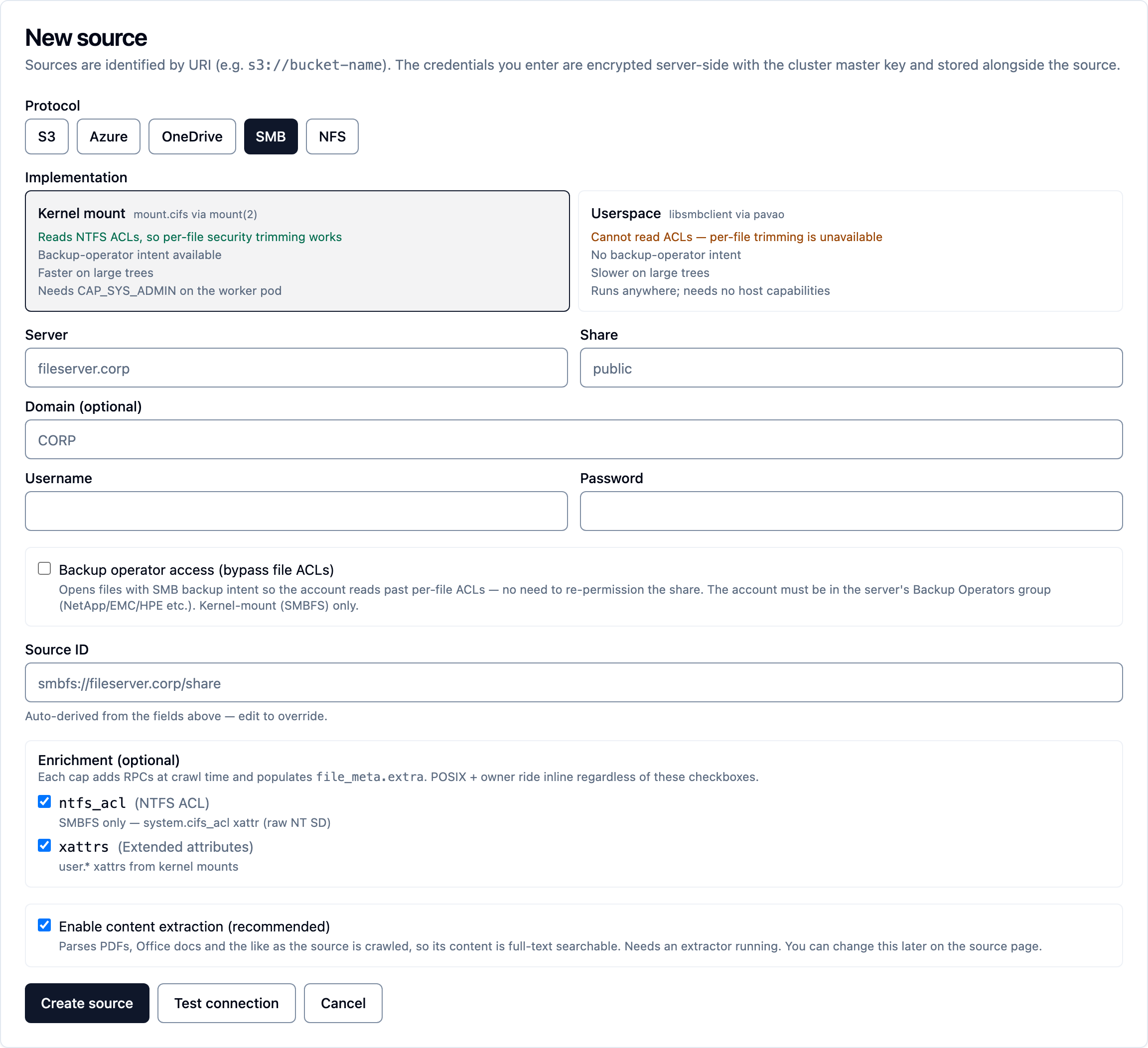
For NTFS/NFSv4 ACL trimming, prefer SMBFS over userspace SMB — userspace smb has no ACL surface (see step 5).
2. Enable content extraction on a source
Extraction pulls file contents (not just metadata) into the catalog so they can be searched and retrieved. Enable it per source; it takes effect within ~30 s. All source extract subcommands are API mode only.
- Enable extraction.
--extensionsand--max-bytesare preserved when omitted; pass an empty--extensions ""to mean "any extension".
kdbl-control --api-url "$KDBL_URL" --api-token "$KDBL_TOKEN" \
  source extract enable --source-id '<source-id>' \
  --extensions pdf,docx --max-bytes 26214400
Optional narrowing: --modified-after / --modified-before (RFC3339), --include-path / --exclude-path (repeatable globs; exclude wins).
- (Already-crawled sources) Re-enqueue extraction for existing files by re-crawling — the crawl re-enqueues every eligible file:
kdbl-control --api-url "$KDBL_URL" --api-token "$KDBL_TOKEN" \
  source extract backfill --source-id '<source-id>'
- Watch progress and coverage:
kdbl-control --api-url "$KDBL_URL" --api-token "$KDBL_TOKEN" \
  source extract show --source-id '<source-id>'
kdbl-control --api-url "$KDBL_URL" --api-token "$KDBL_TOKEN" \
  source extract progress --source-id '<source-id>' --watch
In the console it is the Content extraction step under Smart Actions on the source's Configure tab; the API is POST /api/sources/<urlencoded-source-id>/extract. Disable (preserving the allowlist/cap) with source extract disable.
3. Enable the MCP server
The MCP server lets AI clients (Claude and others) search and retrieve over the Model Context Protocol. It is off by default, and turning it on is a settings change rather than a deployment change: the endpoint resolves its configuration at runtime, so enabling it — or changing the address clients use — takes effect on save, with nothing to restart. A configuration that is on but names no address resolves to disabled and reports why, instead of taking the API down with it. Full detail in mcp; client setup in mcp-clients.
Turn it on
The console's AI access (MCP) › Setup tab is a guided checklist that does all of this and then verifies it. The equivalents are kdbl-control mcp set and PUT /api/mcp/config. These settings are cluster-wide — one public address and one tunnel per deployment, shared by every tenant's endpoint — so writing them needs a cluster-admin token.
| Setting | CLI flag | Default | Meaning |
|---|---|---|---|
| Enabled | --enabled |
false |
Master switch. |
| Endpoint address | --resource-uri |
— | The public URL clients reach, e.g. https://kdbl.example.com/mcp. Advertised as resource and is the aud every token must target (RFC 8707). It has to match exactly what clients connect to: naming an internal address while clients arrive through a tunnel breaks discovery, and the client reports only "authentication failed". |
| Scopes | --scopes |
kdbl.search,kdbl.read |
Comma-separated scopes advertised in Protected Resource Metadata. |
| Allowed origins | --allowed-origins |
empty | Comma-separated Origin allowlist for browser clients. Empty rejects any request carrying an Origin header (DNS-rebinding protection). Server-to-server clients send no Origin and pass. |
| Allow API audience | --allow-api-audience |
false |
Escape hatch: fall back to the tenant's API audience for IdPs that can't mint resource-scoped tokens. Weakens the no-passthrough guarantee — leave off unless needed. |
- Turn the endpoint on and set the address:
kdbl-control --api-url "$KDBL_URL" --api-token "$KDBL_TOKEN" \
  mcp set --enabled true --resource-uri 'https://kdbl.example.com/mcp'
- Confirm what is actually in effect, and where each value came from:
Each setting also has a matching KDBL_MCP_* environment variable on the kdbl-api Deployment, which supplies the boot-time default for that one field. A value written through the console, the CLI or the API overrides it; mcp set --clear <field> reverts a field to the deployment value.
Sign-in, and the per-tenant audience
K-Lake runs its own OAuth authorization server for MCP and federates login to your identity provider: a cloud client signs in against K-Lake, and K-Lake redirects to Entra (or Okta, or whichever IdP you use). Register K-Lake as an application there, then set the three values it gives you — issuer, application (client) ID, client secret — on the Setup tab's Let people sign in step, or with mcp set --idp-issuer / --idp-client-id / --idp-client-secret-stdin. The exact redirect URI to paste into the app registration is shown on that step.
A local client (Claude Code, Claude Desktop) skips all of that: it authenticates with a personal access token, so a deployment with no identity provider connected at all can still be reached over MCP. That is the documented path for evaluating locally first. See mcp-clients.
The audience a token must target is resolved per tenant from oidc_config.mcp_audience. A tenant with no mcp_audience set (and Allow API audience off) is unreachable over MCP — its tokens 401. Point a tenant at this deployment's endpoint with:
kdbl-control --api-url "$KDBL_URL" --api-token "$KDBL_TOKEN" \
  mcp tenant-apply --tenant '<tenant-slug>'
Nothing is typed: the issuer and audience are derived from the endpoint address the deployment already holds, which removes the mistyped-URL failure entirely, and they are merged into the tenant's config so directory correlation survives. mcp tenants lists which tenants are ready and what the rest are missing, and the console offers the same fix from the Setup tab's checks. (PATCH /api/tenants/:slug replaces oidc_config wholesale, so don't use it for this.)
The first tenant connected takes the bare /mcp endpoint; every other tenant gets its own, …/t/<tenant>/mcp, with its own issuer — see Multi-tenant deployments. Browser sign-in to the console is configured separately, on the tenant's Sign-in (SSO) card (Tenants, then the tenant; a self-managed tenant's own admin uses Settings › Sign-in), which also sets the default role for new sign-ins (reader unless changed) and the directory groups that make people operators or tenant admins — see Console sign-in and roles.
Smoke check
End-to-end check (fetches Protected Resource Metadata, then runs initialize + tools/list with your token):
Then connect a client per mcp-clients, and review activity with kdbl-control ... mcp audit.
4. Enable per-file security trimming
Per-file trimming makes a caller see only the files their source-native owner/group/ACL already grant them. It is strictly opt-in and fail-closed.
CRITICAL ORDERING. Trimming is fail-closed: the moment a source flips to
per_file, every file is hidden until both its grants are computed and the caller is correlated to the file's principals. If you enableper_filebefore directory enrichment and ACL capture + backfill are in place, the source trims down to nothing. Do those two first. See the end-to-end ordering.
The policy lives in a security_trim block on the source config (mode + fail_closed):
| Field | Values | Default | Meaning |
|---|---|---|---|
mode |
per_file | source_only | open |
source_only |
per_file turns trimming on; source_only is today's source-level visibility; open marks the source fully public. |
fail_closed |
true | false |
true |
With per_file: hide files whose grants aren't computed (true) or fall back to source-level visibility (false). |
source security-trim is API mode only; the change applies within ~30 s.
- UI: the Per-file security trimming card on the source's Security tab (mode drop-down + fail-closed toggle). From the source's page, the command palette's Open the Security tab gets you there.
- CLI (omit
--fail-closedto leave the stored value untouched):
kdbl-control --api-url "$KDBL_URL" --api-token "$KDBL_TOKEN" \
  source security-trim --source-id '<source-id>' \
  --mode per_file --fail-closed true
- API:
curl -X POST -H "Authorization: Bearer $KDBL_TOKEN" \
     -H "Content-Type: application/json" \
     "$KDBL_URL/api/sources/<urlencoded-source-id>/security-trim" \
     -d '{ "mode": "per_file", "fail_closed": true }'
POSIX grants (mode/uid/gid) are derived automatically. ACL grants require ACL capture first. See security-trimming for the grant model, grants_state, and limitations.
5. Enable ACL capture (NTFS / NFSv4)
Newer deployments do this for you
Sources added on a connector that can read file permissions — SMB via the kernel mount, and NFS — now capture ACLs by default, and start in per-file mode. This step is for sources created before that, or where the capture was turned off. Check the source's enrichment settings before doing it by hand.
This is the meta-caps prerequisite for ACL-based grants. POSIX grants need no cap, but an ACL-controlled file has no grants until K-Lake captures its raw ACL bytes — without the cap it falls back to POSIX bits (commonly grants_state = 0 → hidden under fail-closed). Do this before flipping the source to per_file.
| Protocol | Cap | Notes |
|---|---|---|
| SMBFS (kernel mount) | ntfs_acl |
Userspace smb has no ACL surface; ntfs_acl is masked out for it at registry time — use smbfs. |
| NFS | nfs4_acl |
source meta-caps is API mode only; applies within ~30 s.
- Enable the cap (UI: the Enrichment card on the source's Overview tab toggles NTFS / NFSv4 ACL capture):
# SMBFS:
kdbl-control --api-url "$KDBL_URL" --api-token "$KDBL_TOKEN" \
  source meta-caps --source-id '<smbfs-source-id>' --caps ntfs_acl
# NFS:
kdbl-control --api-url "$KDBL_URL" --api-token "$KDBL_TOKEN" \
  source meta-caps --source-id '<nfs-source-id>' --caps nfs4_acl
API: POST /api/sources/<urlencoded-source-id>/meta-caps with { "caps": "ntfs_acl" }.
- Backfill already-crawled files so existing files get their ACL bytes (and therefore their grants) computed — a crawl only enqueues enrichment for new listings:
kdbl-control --api-url "$KDBL_URL" --api-token "$KDBL_TOKEN" \
  source backfill-meta --source-id '<source-id>' --caps ntfs_acl
- Watch the backfill drain:
kdbl-control --api-url "$KDBL_URL" --api-token "$KDBL_TOKEN" \
  source meta-coverage --source-id '<source-id>'
6. Configure directory enrichment
Directory enrichment correlates IdP identities (the caller's token) to file-native principals (POSIX gids, NTFS/AD SIDs), so trimming authorizes the right people. Run this before enabling per_file. POSIX name resolution is automatic; the cross-directory cases below need setup. Full reference: directory.
The quickest route is the console (step c below): it takes the configuration and the client secret or bind password in one form. The directory CLI commands run in direct-DB mode (--postgres-url / KDBL_POSTGRES_URL), and the secret-bearing ones also need the master key.
a. Entra app registration (portal — the prerequisite people miss)
Before any Graph command works, the app registration in the Entra portal needs Microsoft Graph application permissions and admin consent:
- In the Entra admin center, open your app registration → API permissions.
- Add Microsoft Graph Application permissions (all read-only):
Group.Read.AllGroupMember.Read.AllUser.Read.All- Click Grant admin consent for the tenant. Without consent the app-only token Graph mints has no effect and discovery returns nothing.
- Create a client secret under Certificates & secrets; you'll pass it via
KDBL_GRAPH_CLIENT_SECRETbelow.
(Skip this for an unlinked on-prem AD that Entra has never synced — use set-ldap instead. See choosing a strategy.)
b. Store the directory config (CLI)
Secrets are read from env vars, never flags.
- Entra Graph — same / AD-synced Entra tenant. Stores non-secret config in
oidc_config.graphand encrypts the client secret (KDBL_GRAPH_CLIENT_SECRET) at rest withKDBL_MASTER_KEY. The workers then run Graph discovery automatically:
export KDBL_GRAPH_CLIENT_SECRET='<app-client-secret>'
export KDBL_MASTER_KEY='<base64-master-key>'
kdbl-control --postgres-url "$KDBL_POSTGRES_URL" \
  directory set-graph \
  --tenant '<tenant-slug>' \
  --entra-tenant '<azure-ad-tenant-id>' \
  --client-id '<app-registration-client-id>'
- AD / LDAP — separate, unlinked on-prem AD vs cloud-only Entra. Stores config in
oidc_config.ldapand encrypts the bind password (KDBL_LDAP_BIND_PASSWORD).--upn-rewrite(from=to, repeatable) bridges an on-prem UPN suffix to the cloud one;--name-scopesets the NetBIOS-domain scope forname::fallback refs. The worker must trust the DC's CA (LDAPS):
export KDBL_LDAP_BIND_PASSWORD='<ad-bind-password>'
export KDBL_MASTER_KEY='<base64-master-key>'
kdbl-control --postgres-url "$KDBL_POSTGRES_URL" \
  directory set-ldap \
  --tenant '<tenant-slug>' \
  --url 'ldaps://dc.demo.kdbl.com:636' \
  --bind-user 'DEMO\svc-kdbl' \
  --base-dn 'DC=demo,DC=kdbl,DC=com' \
  --name-scope DEMO \
  --upn-rewrite demo.kdbl.com=kdbl.co.uk
c. Or set it in the console
A tenant administrator opens Settings › Sign-in › Directory correlation (or presses ⌘K / Ctrl+K and types directory); a cluster administrator reaches the same card from Tenants, on the tenant's page. The card holds both blocks: Microsoft Entra ID (Entra tenant ID, app client ID, Client secret) and Active Directory (LDAP) (LDAPS address, bind user, base DN, optional name scope, Bind password, optional UPN rewrites). A secret is encrypted on the server when you save and never shown again; each block shows secret stored once it has one. Test the connection checks the details. The non-secret part is also PATCH /api/tenants/:slug/directory on the API.
d. Verify
Run a one-shot sync to materialize edges immediately (instead of waiting ~10 min for the workers' automatic refresh):
# Graph (uses KDBL_GRAPH_CLIENT_SECRET directly — does not need stored config):
export KDBL_GRAPH_CLIENT_SECRET='<app-client-secret>'
kdbl-control --postgres-url "$KDBL_POSTGRES_URL" \
  directory sync-graph \
  --tenant '<tenant-slug>' \
  --entra-tenant '<azure-ad-tenant-id>' \
  --client-id '<app-registration-client-id>'

# LDAP (decrypts the stored secret with the master key):
export KDBL_MASTER_KEY='<base64-master-key>'
kdbl-control --postgres-url "$KDBL_POSTGRES_URL" \
  directory sync-ldap --tenant '<tenant-slug>'
A healthy alias graph after a Graph sync should contain: group objectId ⇄ SID edges (sid::<SID>), synced-user SID ⇄ UPN/email edges, and directed membership edges (upn:<member> → group) that resolve the JWT group-overage case. For LDAP it should contain sid::<AD SID> ⇄ upn:<cloud-UPN> edges from the rewrite. See the alias graph for what high vs medium confidence means.
Once the alias graph is populated and ACL capture + backfill are done, proceed to step 4 — enable per_file.