Hosting many customers
One KDBL Context Lake (K-Lake) deployment can host many customers, each in its own tenant. This page is for the people who run such a deployment — cluster administrators, platform operators and managed service provider (MSP) partners. It covers who can act where, how you stop and remove a customer, how you share capacity fairly and bill for it, and how each customer gets its own look and address.
Everything here is built on the tenant isolation described in the Security overview and on the per-tenant AI endpoints in Multi-tenant deployments.
Serving one customer? Nothing changes.
A deployment that serves a single customer behaves exactly as it did before these features existed: the full licence view, full diagnostic packs and no per-tenant throttling. The MSP defaults on this page apply only once you switch the deployment into MSP mode.
MSP mode
A few defaults only make sense when tenants belong to different customers, who must not see or slow each other. They apply only in MSP mode:
| Behaviour | Single customer | MSP mode |
|---|---|---|
| Per-tenant concurrency | A tenant may use the whole API pod. | Each tenant gets a share of it (half by default). See Fair sharing. |
| Per-tenant request rate | Not limited. | Limited per tenant (100 requests/s per API pod by default). |
| What a tenant admin sees of the licence | The whole licence: holder, capacity, expiry. | Only their own tenant's quota and usage. |
| A tenant admin's diagnostic pack | Includes the database section and the deployment's work queue. | Only that tenant's own queue, and no database section. See Diagnostic packs. |
| New tenants' sources | NFS and the deployment's own cloud identity are allowed. | Both refused until a cluster admin allows them. See Source endpoint policy. |
| MCP address shown for a tenant not yet connected | The deployment's main address. | The tenant's own /t/<tenant>/mcp address. |
MSP mode switches on by itself the moment you designate a platform tenant
or create a partner (both described below), and the deployment re-checks
every 30 seconds. To pin it either way, set KDBL_MSP_MODE=on or
KDBL_MSP_MODE=off on the API. Per-tenant limits and quotas that a cluster
admin sets explicitly always apply, in either mode.
Some protections apply to every deployment regardless of mode: sources can never reach loopback or cloud-metadata addresses, tenant deletion is always asynchronous, and the admin audit log always records every change.
Who can act where
flowchart TB
    TOKEN["Cluster-admin token<br/>(bootstrap only)"]
    subgraph PLATFORM["Platform tenant"]
        OPS["Platform operators"]
    end
    subgraph PARTNER["Partner home tenant"]
        STAFF["Partner staff"]
    end
    subgraph CUST["Customer tenants"]
        C1["Customer A<br/>own admins"]
        C2["Customer B<br/>own admins"]
        C3["Customer C<br/>own admins"]
    end
    TOKEN -. "designates" .-> PLATFORM
    TOKEN -. "creates" .-> PARTNER
    OPS -->|"administer any tenant<br/>and the deployment"| CUST
    OPS --> PARTNER
    STAFF -->|"Partner access:<br/>admin (default)"| C1
    STAFF -->|"Partner access:<br/>admin_and_content"| C2
STAFF -. "Partner access: none<br/>(refused)" .-> C3| Who | How they sign in | What they can do |
|---|---|---|
| Platform operator | As a tenant admin of the deployment's platform tenant. | Everything a cluster admin can, as a named person, plus act as the administrator of any tenant. |
| Partner staff | As a tenant admin of an MSP partner's home tenant. | Create customer tenants for the partner, and act as the administrator of the partner's customers — within what each customer allows. |
| Customer (tenant) admin | As a tenant admin of their own tenant. | Their own tenant, including how far their partner may go. Its sign-in too, when the tenant is self-managed or the partner allows it. |
| Cluster-admin token | The static token created at install. | Bootstrap only: designate the platform tenant and create partners. Seal it away afterwards. A single-customer deployment does not need it for setup at all: see the deployment's administrator. |
Everyone signs in through their own tenant's identity provider, so the multi-factor and group rules that apply are the ones their own organisation enforces. Nobody shares a login, and nobody needs the cluster-admin token for day-to-day work.
Set it up
With the cluster-admin token, once:
# The tenant whose administrators operate the deployment
curl -X PUT "$KDBL_URL/api/cluster/platform-tenant" \
  -H "Authorization: Bearer $KDBL_CLUSTER_ADMIN_TOKEN" \
  -H "Content-Type: application/json" -d '{"tenant": "ops"}'

# A reseller, anchored on its own home tenant
curl -X POST "$KDBL_URL/api/partners" \
  -H "Authorization: Bearer $KDBL_CLUSTER_ADMIN_TOKEN" \
  -H "Content-Type: application/json" \
  -d '{"slug": "acme-msp", "name": "Acme MSP", "home_tenant": "acme-msp-home"}'

# Hand an existing customer to that partner ({"partner": null} detaches it)
curl -X PUT "$KDBL_URL/api/tenants/contoso/partner" \
  -H "Authorization: Bearer $KDBL_CLUSTER_ADMIN_TOKEN" \
  -H "Content-Type: application/json" -d '{"partner": "acme-msp"}'
GET /api/partners lists partners with their home tenant and how many
customers each has; DELETE /api/partners/:slug removes one. After this, a
platform operator in the platform scope can do the same without the token.
Partner staff then create their own customers, signed in as themselves:
curl -X POST "$KDBL_URL/api/partner/tenants" \
  -H "Authorization: Bearer $PARTNER_ADMIN_TOKEN" \
  -H "Content-Type: application/json" \
  -d '{"slug": "fabrikam", "name": "Fabrikam"}'
The new tenant belongs to the partner and starts with partner access set to
admin. The partner then acts in it to add the customer's first
administrator. GET /api/partner/tenants lists the partner's customers.
Act for a tenant
In the web console, platform operators and partner staff choose a tenant from
the account menu at the foot of the sidebar: Act as… (or press ⌘K /
Ctrl+K and type act as). It lists their home tenant, Platform — all
tenants (operators only) and the tenants they can reach, and the account
menu then reads Acting for
Over the API, send one header with each request:
| Header | Effect |
|---|---|
X-KDBL-Tenant: <slug> |
Act as the administrator of that tenant. |
X-KDBL-Scope: platform |
Act as cluster admin. Platform operators only. |
GET /api/me/scopes returns what the caller may choose. A request that names
a tenant outside the caller's reach is refused with the same 403 whether
the tenant exists or not, so the header cannot be used to discover customers.
Someone acting for a tenant never mints personal tokens in it, holds none of its directory group memberships, and cannot pass the access on.
What the customer controls
Each customer decides how far its partner may go. A tenant admin sets it on
Settings › General › Partner access (the card appears only when a partner
manages the tenant; ⌘K / Ctrl+K, partner access), under What your
partner's staff may do, or with PUT /api/tenants/<slug>/partner-access:
| Setting | Partner staff may |
|---|---|
none — No access |
Nothing. They cannot act in the tenant. |
admin — Administration (default) |
Manage users, sign-in (the tenant's Sign-in (SSO) card — see who can change sign-in), sources and settings. No search, file text, entities, warehouse questions, downloads or offboarding export. |
admin_and_content — Administration and content |
Administration plus content. Per-file permissions still apply, and a partner holds none of the tenant's directory group memberships, so files trimmed from them stay hidden. |
Only the customer's own administrators can change this — a partner acting in the tenant cannot. Platform operators can always administer a tenant, because they run the deployment, but see its content only when the tenant grants it.
Every action has a name on it
Every change made while acting is written to the customer's admin audit
log under the real person's principal and email, with their home tenant and
how they held the access (via = partner or platform). A customer can see
exactly what its MSP did, and when. See Admin audit log.
Tenant lifecycle
A deployment hosting several customers needs to stop, hand back and remove one of them without touching the others. Every tenant has a status:
stateDiagram-v2
    [*] --> active
    active --> suspended: suspend
    suspended --> active: resume
    active --> deleting: delete
    suspended --> deleting: delete
deleting --> [*]: purge finished| Status | Sign-in | Ingest | Data |
|---|---|---|---|
active |
Allowed | Running | Kept |
suspended |
Refused: 403 tenant suspended |
Held | Kept |
deleting |
Refused: 403 tenant is being deleted |
Stopped | Being removed |
A cluster admin (or platform operator) does all three from the Lifecycle card on the tenant's page in the console (Tenants, then the tenant): Suspend, Export and Delete tenant, each behind a confirmation — or from the CLI or API:
kdbl-control tenant suspend --slug contoso --reason "Invoice overdue"
kdbl-control tenant resume  --slug contoso
kdbl-control tenant export  --slug contoso --out contoso.ndjson
kdbl-control tenant delete  --slug contoso --confirm contoso
kdbl-control tenant show    --slug contoso      # status, reason, purge progress
The API equivalents are POST /api/tenants/:slug/suspend (optional
{"reason": "…"}), POST /api/tenants/:slug/resume,
GET /api/tenants/:slug/export and DELETE /api/tenants/:slug.
Suspend and resume
Suspending refuses the tenant's users on every path — the web console, SSO sign-in (no new users are created either), API tokens, MCP clients and signed download links — and a partner acting for the tenant is refused the same way. A platform operator can still get in. Ingest is held: the tenant's sources stop crawling, its schedules stop firing, and work already queued for it waits rather than running or being dropped. Nothing is deleted.
It takes effect on the next request, and within about five seconds on every API replica; a token the API had already verified does not outlive it. Other tenants are unaffected. Resume reverses all of it, and overdue schedules run on the next pass.
Offboarding export
The export streams everything the tenant owns as NDJSON — one JSON object
per line, each with a type: the tenant's configuration, users, sources,
schedules, classification schemes, entities, and for each source its files,
file metadata, extracted text (with page and offset locators), entity
mentions, relations and classifications. The last line is an end record with
a count per type.
- No secrets. Source credentials, directory secrets and API tokens are never exported; users are exported without their token hashes.
- Complete or visibly not. A file without the final
endline was cut short, and the CLI exits non-zero. - Safe to run live. It reads in small pages, so it can run against a large tenant while the deployment serves everyone else.
- A tenant admin can export their own tenant; a cluster admin can export any
tenant, including a suspended one. Because the export contains document
text, a partner can export only with
admin_and_contentaccess.
The console's Export button assembles the file in the browser before saving it; use the CLI for a large tenant.
Delete
Deletion is asynchronous and cannot be undone. The request returns 202
at once and the tenant is locked out immediately: its endpoint, every token
minted for it and every client bound to it stop working. The data is then
removed in the background, in bounded batches, so a large tenant never stalls
the deployment.
While that runs, the tenant's page, kdbl-control tenant show and
GET /api/tenants/:slug report status: deleting with a purge object —
phase, rows deleted, sources done of total, last error — until the tenant is
gone and the request returns 404. Deletion pauses during maintenance mode
and resumes afterwards, and carries on from where it stopped if a worker
restarts. If it fails repeatedly it is parked with the error; delete again to
retry.
Two records deliberately outlive the tenant: its admin audit log (which holds the record of who deleted it) and its usage metering (a tenant deleted mid-month is still billable for the days it existed).
Suspend → export → delete
Per-tenant restore is not offered — backups cover the whole deployment. The
safe order for offboarding is to suspend the tenant, take the
export, confirm it ends with its end record, and only then delete.
Per-tenant quotas
A licence covers the whole deployment as one pool of capacity. Quotas are how you allocate that pool, so one customer cannot fill it for everyone else. A cluster admin sets them; a tenant cannot change its own. Every quota is optional, and unset means unlimited.
| Quota | Reaching it means |
|---|---|
max_bytes |
That tenant's new ingestion stops: crawls (manual and scheduled), metadata backfills and new sources are refused. Search and reading carry on. |
max_files |
As max_bytes, counted in indexed files. |
max_sources |
The tenant cannot add another source. Existing sources keep crawling. |
max_users |
The tenant cannot add another user, and a person signing in through SSO for the first time is refused. |
max_warehouses |
The tenant cannot create or re-enable a warehouse beyond this many enabled ones. A cloned connection counts (it is created disabled when there is no room); several models on one connection do not. |
warn_pct |
The percentage of any quota at which the tenant is warned. Default 90. |
# Allocate 2 TB, 50 sources and 200 seats (replaces the tenant's quotas;
# anything you leave out becomes unlimited)
kdbl-control tenant quotas --slug contoso --max-bytes 2TB --max-sources 50 --max-users 200

# Read quotas, current usage and state
kdbl-control tenant quotas --slug contoso

# Remove every quota
kdbl-control tenant quotas --slug contoso --clear
The same is GET / PUT /api/tenants/:slug/quotas, and the Quota & usage
card on the tenant's page in the console.
Only the tenant that reaches its quota is affected. A refusal is a 403
whose message starts quota_exceeded: and names the quota and the figures,
for example:
File and storage quotas are enforced precisely near the limit: the check reads the tenant's live counts at every ingest decision, not a cached figure, so even a very fast ingest is stopped at the quota rather than thousands of files past it. The usage figures you see are refreshed about once a minute.
Quotas do not replace the licence — the deployment-wide capacity check still applies. Keep the sum of the byte quotas at or below the licensed capacity if every tenant must be able to reach its own allocation. See Licensing.
What a tenant admin sees
Tenant admins read their own quota and usage on Settings › General › Quota & usage, with a Daily usage (CSV) download:
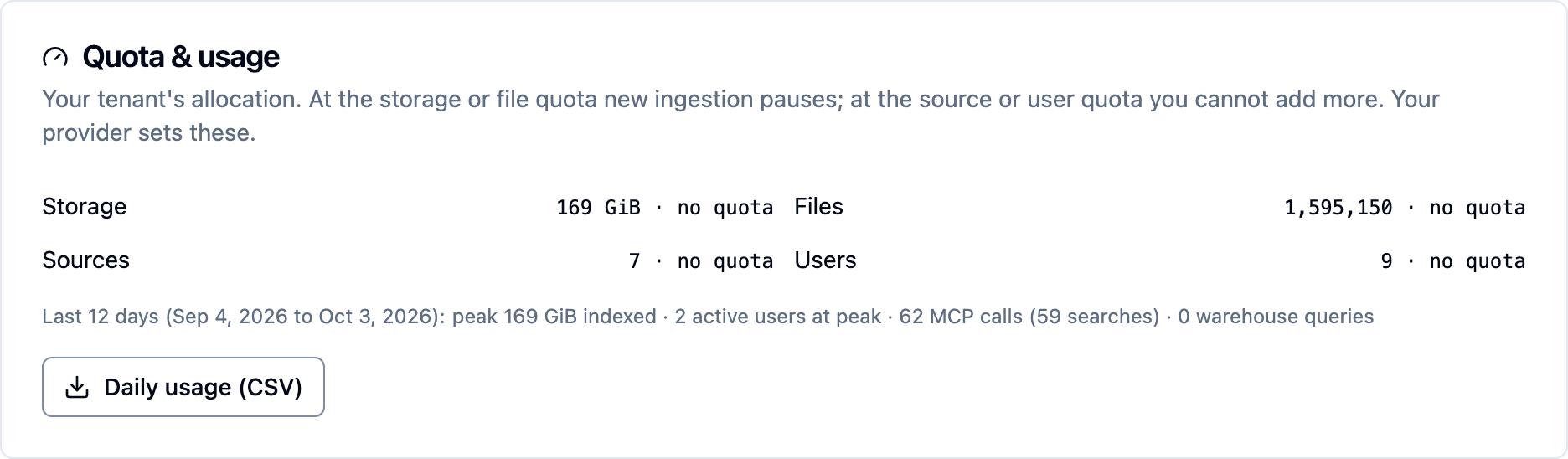
In MSP mode, a tenant admin's licence view (GET /api/licence and the console
banner) describes their tenant, not the deployment: their own usage and
quota. The licence holder, the deployment's capacity and fill, and the expiry
are shown only to cluster admins. When the deployment's licence is what is
blocking ingestion, the tenant is told so in words, without the deployment's
figures.
Usage metering for billing
The deployment keeps one usage record per tenant per UTC day:
| Field | Meaning |
|---|---|
bytes_indexed, bytes_peak |
Indexed bytes at the day's last refresh, and the day's high-water mark. |
files, sources, users |
Indexed files, sources and user accounts (seats). |
active_users |
Users who signed in through SSO or used an API token that day. |
mcp_calls, mcp_chars, mcp_searches |
MCP tool calls that returned content, characters returned, and how many were searches. |
warehouse_queries |
Questions asked of connected data warehouses. |
enriched_files, embedded_chunks |
Files enriched and text chunks embedded. |
final |
The day has ended and its figures are final. |
Today's record is refreshed about every 15 minutes; yesterday's is finalised shortly after midnight UTC.
# Every tenant, one month, as CSV (cluster admin)
kdbl-control tenant usage --from 2026-09-01 --to 2026-09-30 --csv > usage-2026-09.csv

# One tenant
kdbl-control tenant usage --slug contoso --from 2026-09-01 --to 2026-09-30
Over the API: GET /api/usage/tenants?from=YYYY-MM-DD&to=YYYY-MM-DD[&tenant=slug][&format=csv]
for a cluster admin, and GET /api/usage?from=…&to=…[&format=csv] for a tenant
admin's own tenant. JSON responses carry the daily rows and per-tenant totals
for the window. A window may span up to 400 days; the default is the last 30.
Fair sharing between tenants
In MSP mode, no single tenant can starve the others — on the query path or in the ingest pipeline.
Request rate and concurrency
Each tenant has its own request rate and its own share of every API pod's capacity for MCP tool calls, content searches and reranking. Every limit is per API pod, so with three API replicas a tenant gets roughly three times the figures below. Cluster-admin calls are never limited.
When a tenant goes over:
- REST answers
429 Too Many Requestswith aRetry-Afterheader. - MCP answers HTTP
429with a JSON-RPC error (code-32001, anddata.retryAfter). - Reranking does not fail: the search is served in its un-reranked order instead, so the user still gets results.
| Variable (on the API) | Default | Meaning |
|---|---|---|
KDBL_TENANT_RATE_PER_SEC |
100 |
Sustained requests per second per tenant, per pod. 0 turns the rate limit off. |
KDBL_TENANT_RATE_BURST |
200 |
Requests a tenant may send at once. |
KDBL_TENANT_CONCURRENCY_SHARE |
0.5 |
A tenant's fraction of each pod's capacity. |
KDBL_TENANT_CONCURRENCY_MIN |
4 |
The smallest share a tenant ever gets. |
KDBL_MCP_MAX_CONCURRENCY |
32 |
Pod-wide MCP tool-call slots — 16 per tenant by default. |
KDBL_SEARCH_MAX_CONCURRENCY |
32 |
Pod search capacity the tenant share is taken from — 16 per tenant by default. |
KDBL_RERANK_MAX_CONCURRENCY |
16 |
Pod-wide concurrent rerank calls — 8 per tenant by default. |
A tenant's share is the larger of KDBL_TENANT_CONCURRENCY_MIN and
KDBL_TENANT_CONCURRENCY_SHARE × the pod's capacity. With the defaults, one
busy tenant can use half of every lane and a second tenant always has room.
Per-tenant overrides. Give a larger customer, or a paid plan, more headroom without touching anyone else:
curl -X PATCH "$KDBL_URL/api/tenants/contoso" \
  -H "Authorization: Bearer $KDBL_CLUSTER_ADMIN_TOKEN" \
  -H "Content-Type: application/json" \
  -d '{"limits": {"rate_per_sec": 500, "rate_burst": 1000,
                  "mcp_concurrency": 24, "search_concurrency": 24,
                  "rerank_concurrency": 12}}'
Every field is optional; an omitted one uses the default. Concurrency values
are absolute slot counts, and rate_per_sec: 0 exempts the tenant from the
rate limit. The PATCH replaces the stored overrides ({"limits": {}} removes
them all). It applies at once on the pod that served it and within 30 seconds
on the others, and is returned as limits on GET /api/tenants/:slug.
Ingest
Queued work — listing, extraction, enrichment and embedding — is served to tenants in turn, so one customer's ten-million-file crawl no longer delays another customer's first hundred files. Under heavy load the tenants producing the most work are slowed first. Two further controls are available:
KDBL_QUEUE_TENANT_INFLIGHT_MAX(on the workers) caps how much work any one tenant may have running at once. Off by default.- Per-file Run now re-runs of Smart Actions are limited per tenant
(
KDBL_ACTION_RUN_NOW_PER_MINUTE, default 120;0disables); past it the request gets a429.
Seeing who is busy
| Metric | Answers |
|---|---|
kdbl_tenant_queue_depth{tenant,state} |
Whose work is filling the queue. Pending and running work for the busiest tenants (the top 20 by default, KDBL_TENANT_QUEUE_GAUGE_TOP), refreshed every 30 seconds; a tenant that has drained drops out. |
kdbl_tenant_limit_rejected_total{tenant,limit} |
Which tenant hit which limit. |
If one tenant sees 429s while the pods have headroom, raise that tenant's
limits. If many tenants see them at once, add API replicas. See
Telemetry for wiring metrics into Prometheus.
Branding and custom hostnames
Each tenant can have its own look and its own address, so a customer sees its own brand at its own hostname.
Per-tenant branding
| Field | Value |
|---|---|
display_name |
A co-brand label shown alongside the licensed product name ("Sign in to Contoso"). The product name itself cannot be changed per tenant. |
logo_svg / logo_url |
The wide logo on the sign-in screen and at the top of the expanded sidebar. |
icon_svg / icon_url |
The square icon in the header and in the collapsed sidebar. A brand with an icon and no wide logo shows the icon beside its name in the expanded sidebar. |
favicon_svg / favicon_url |
The browser-tab icon. Falls back to the icon. |
theme |
The default colour mode: light or dark. |
color_primary, color_accent |
HSL triples, for example "210 90% 40%". |
support_url, docs_url |
Where the tenant's users go for help — typically the MSP's own helpdesk. |
- SVGs are limited to 64 KB each and treated as untrusted: anything that could run script, load an external resource or restyle the page is refused, editor metadata is stripped, and a clean copy is stored rather than the pasted bytes. If a logo exported from a design tool is refused, running it through an SVG optimiser that converts styles to attributes usually fixes it.
- URLs must be
https://. - Setting either half of a pair (
logo_svgorlogo_url) replaces both, so a tenant's hosted logo is never hidden behind an inherited inline one.
A cluster admin sets branding on the tenant's page in the console
(Branding card) or through the API. A tenant's own admin can change it,
under Settings › General › Branding, only if a cluster admin has allowed it
(tenant_admin_can_edit):
curl -X PUT "$KDBL_URL/api/tenants/contoso/branding" \
  -H "Authorization: Bearer $KDBL_CLUSTER_ADMIN_TOKEN" \
  -H "Content-Type: application/json" \
  -d '{"branding": {
        "display_name": "Contoso",
        "theme": "light",
        "color_primary": "210 90% 40%",
        "support_url": "https://help.msp.example/contoso"
      }}'
The PUT replaces the tenant's branding as a whole; "branding": null clears
it, and the tenant inherits the deployment's look again.
Custom hostnames
A cluster admin can map up to 20 hostnames to a tenant (for example
files.contoso.example). A hostname belongs to exactly one tenant; mapping
one another tenant already holds is refused with 409, naming the holder.
Hostnames must be DNS names — no ports, wildcards or IP addresses.
curl -X PUT "$KDBL_URL/api/tenants/contoso/hostnames" \
  -H "Authorization: Bearer $KDBL_CLUSTER_ADMIN_TOKEN" \
  -H "Content-Type: application/json" \
  -d '{"hostnames": ["files.contoso.example"]}'     # [] clears
At a mapped hostname the console shows the tenant's branding and goes straight to that tenant's SSO — no tenant-name prompt. Any other hostname shows the deployment's own branding. There is deliberately no way to look up a tenant's branding by name, so a tenant's brand is only visible at a hostname you mapped to it.
For each hostname:
- Register it with the tenant's identity provider. The console's sign-in
redirect URI is
https://<the host the user is on>/authn/callback, so every tenant hostname must be an allowed redirect URI on that tenant's app registration. See Console sign-in and roles. - Route it at your ingress, with a certificate. Add it under
ingress.extraHostsin the Helm values. A host with its owntlsSecretNamegets its own certificate (the usual cert-manager pattern); a host without one joins the main certificate. - Point DNS at the ingress — the customer adds a CNAME from their hostname to your deployment's hostname.
console:
  access: ingress
ingress:
  host: kdbl.msp.example
  annotations:
    cert-manager.io/cluster-issuer: letsencrypt-prod
  tls:
    enabled: true
    secretName: kdbl-msp-tls
  extraHosts:
    - host: files.contoso.example
      tlsSecretName: kdbl-contoso-tls
    - host: knowledge.fabrikam.example
      tlsSecretName: kdbl-fabrikam-tls
Adding a host takes both the Helm upgrade (routing) and the hostname mapping; either alone is not enough. Because the sign-in discovery endpoint must answer unauthenticated, rate-limit it at your ingress, which sees the real client address.
MCP stays at the deployment address
A tenant's AI endpoint is not moved to its custom hostname. Give each
customer's AI clients the deployment-origin URL,
https://<deployment-host>/t/<tenant>/mcp, as described in
Multi-tenant deployments. Its sign-in metadata names
that address, and an AI client refuses metadata that does not match the
URL it connected to.
Source endpoint policy
On a shared deployment a tenant must not be able to use a source definition to reach things that belong to the deployment rather than to the customer.
Always refused, for every tenant: source endpoints that point at loopback,
link-local addresses (169.254.0.0/16, fe80::/10), cloud metadata services,
or unspecified and multicast addresses — plus any range you list in
KDBL_SOURCE_ENDPOINT_DENY_CIDRS on the API and worker (your cluster's service
range is a good candidate). Private network ranges stay allowed. Names are
resolved and every address they resolve to is checked.
Per tenant, a cluster admin decides:
| Setting | Allows |
|---|---|
allow_ambient_credentials |
S3 and Azure Blob sources with no secret, which authenticate as the deployment's own cloud identity. A warehouse connection using Kerberos counts as the same. |
allow_nfs |
NFS sources, which read files as the worker's own user. |
endpoint_allowlist |
If set, the only hosts this tenant's sources may reach: hostnames, *.domain suffixes, IP addresses or CIDR ranges. A name must resolve entirely inside the list. |
The policy covers S3, Azure Blob, SMB and NFS servers and data-warehouse
hosts, and is checked when a source is created, edited or tested. Tightening a
policy also applies to sources already running. Refusals are a 403 for
ambient credentials and NFS, and a 400 for an endpoint.
- Existing tenants are unchanged. Every tenant that existed before the upgrade keeps both allowances, so no crawl stops.
- New tenants in MSP mode start restricted — no ambient credentials, no NFS — until a cluster admin allows them. Outside MSP mode new tenants are allowed, as before.
kdbl-control tenant source-policy --slug contoso                       # read
kdbl-control tenant source-policy --slug contoso \
  --allow-nfs false --allow-endpoint '*.contoso.example' --allow-endpoint 10.20.0.0/16
kdbl-control tenant source-policy --slug contoso --clear-allowlist
Over the API: GET / PUT /api/tenants/:slug/source-policy with any of
allow_ambient_credentials, allow_nfs and endpoint_allowlist (an absent
field is left as it is; [] clears the list). A tenant admin can read their
own tenant's policy; only a cluster admin can change it. The console shows it
on the tenant's page (Source policy card).
Identity
Several tenants on one identity provider
An MSP often runs one identity provider — one realm, one directory — for many customers. Several tenants can share one issuer. Each token is matched to its tenant:
- By audience. Give each tenant its own client in the identity provider,
and set that tenant's
audience; the token'saudpicks the tenant. - By an organisation claim, when audiences alone are still ambiguous. Set
tenant_claimon the tenant, for example{"claim": "organization", "value": "contoso"}. The claim may be a string, an array, or Keycloak's organisation-object shape. A tenant withtenant_claimset requires that claim on every token.
A token that matches none of the tenants sharing its issuer is refused with
401, and a token that still matches two of them (a user in two
organisations) is refused rather than routed to either.
In the console, open the tenant's Sign-in (SSO) card (the tenant's page
under Tenants, or Settings › Sign-in while acting in it) and type the
issuer. If another tenant already uses it, the card lists those tenants with
their audience and tenant claim, says whether this tenant would be told apart
from them, and shows the Tenant claim fields. Either give the tenant its
own API audience (simplest), or, when customers must share one client and
audience, open Advanced and under Tenant claim enter the Claim
name that names the customer (for example organization) and This
tenant's value. Until the tenants can be told apart, the card says Saving
would be refused and why.
A save is refused (409, saying which tenants and what to set) when:
- another tenant on the issuer has no API audience, so it is matched by the issuer alone — give it an audience first;
- this tenant has no API audience;
- this tenant shares an audience with another tenant and either of them has no tenant claim;
- tenants sharing an audience use different claim names (one token could satisfy both) or the same value.
The same rules apply to every way of setting a tenant's sign-in: the card
(PATCH /api/tenants/:slug/sso) and an oidc_config sent to
POST /api/tenants or PATCH /api/tenants/:slug. A refused request changes
nothing. The checks run only when the issuer, audience or tenant claim change,
so editing groups on an existing tenant is never blocked. The deployment's
built-in sign-in server cannot be shared this way; give each tenant its own
endpoint from AI access (MCP) › Setup instead.
Over the API, supply the configuration when you create the tenant
(POST /api/tenants), or later with PATCH /api/tenants/:slug/sso, which
takes the same keys at the top level and changes only the ones you send:
{
  "oidc_config": {
    "issuer": "https://login.msp.example/realms/customers",
    "client_id": "kdbl-contoso",
    "audience": "kdbl-contoso",
    "tenant_claim": {"claim": "organization", "value": "contoso"}
  }
}
Warning
PATCH /api/tenants/:slug with oidc_config replaces the whole
sign-in configuration, so include every key the tenant needs. Prefer
PATCH /api/tenants/:slug/sso, which merges.
Who can see and change a tenant's sign-in
| Who | Sign-in (SSO) card | Other tenants on a shared issuer |
|---|---|---|
| Cluster administrator; platform operator (in the platform scope or acting in the tenant) | View and change, any tenant | Named |
Partner staff acting in a customer tenant whose partner access is admin or admin_and_content |
View and change that tenant's | Named when the tenant is the partner's own (its home tenant or one of its customers); otherwise shown anonymously, as another tenant on this deployment |
| The tenant's own administrators, in a self-managed tenant | View and change, under Settings › Sign-in | Shown anonymously |
| The tenant's own administrators, in a tenant a partner or the platform operator manages | View only, under Settings › Sign-in; view and change once the provider allows it under Who can change this tenant's sign-in | Shown anonymously |
Readers, operators and warehouse admins; partner staff when partner access is none |
No access | — |
The same rule decides who may register the tenant's MCP clients (Settings › AI assistants › Sign-in › MCP clients) and connect the tenant to its MCP endpoint, because both change how the tenant's users sign in.
Partner staff reach only the sign-in of the tenant they are acting in. Every
change is written to the tenant's own admin audit log
under the name of whoever made it. For a tenant the caller may not
administer, the card and the 409 message show neither its name nor its
audience or claim value, but still say what to set. No response carries a
client secret.
Self-managed tenants
A tenant is self-managed when no partner or platform operator runs it. Its own tenant administrators then do every tenant-level setup step from Settings, with no cluster-admin token: the Sign-in (SSO) card and directory correlation (secrets included) under Sign-in, the MCP endpoint and client registrations under AI assistants, and users and roles under People & access.
| Tenant | Managed by |
|---|---|
| Assigned to a partner | The partner |
| The platform tenant, or a partner's home tenant | Itself |
| Any other tenant on an MSP deployment | The platform operator |
| Any tenant on a deployment outside MSP mode | Itself |
A single customer running its own estate, such as a proof of concept, is therefore self-managed from the start. Setting up sign-in for your admins walks through it.
The provider's switch. A partner's customer keeps the partner's control of
its sign-in by default. The provider (a cluster administrator, a platform
operator, or partner staff acting in the tenant) can hand it to the customer
under Who can change this tenant's sign-in on the tenant's Sign-in card —
Only you, the provider or The customer's administrators too — or
with PUT /api/tenants/<slug>/sso/self-service
{"customer_manages_sign_in": true}. The customer's own administrators can
never set it themselves.
Protection against lock-out. A sign-in change that would lock
administrators out is refused until it is confirmed. The console warns first
(This change could lock administrators out, confirmed with Save
anyway), and the API answers 409 with the reasons:
- the change ends your own session, because you signed in through the issuer or API audience being changed;
- you are an administrator only through a directory group, and none of your groups is in the new admin groups;
- no administrator could sign in afterwards.
Personal access tokens keep working whatever the sign-in settings say, so keep one for an administrator as the way back in. The shared-issuer rules above apply to a tenant administrator's save exactly as to anyone else's, so a tenant can never claim an issuer and audience another tenant uses.
The deployment's administrator
Some settings belong to the deployment rather than to a tenant: the licence, the MCP endpoint settings (AI access (MCP) › Setup: on/off, the public address, the deployment's identity provider), the remote-access tunnel, MCP clients registered at the deployment's main endpoint, and the console's HTTPS certificate. They are for the deployment's administrator:
- a cluster administrator (the token, or a platform operator in the platform scope); or
- the tenant administrator of a deployment whose only tenant is
self-managed and which is not in MSP mode. That tenant is the whole
deployment, so these settings are its own. The
defaulttenant every install starts with does not count while it is empty (no users, no sources), so a proof of concept with its own tenant qualifies.
As soon as a second tenant, a partner or a platform tenant exists, these settings return to the cluster administrator. Everything else that spans the deployment (creating tenants and partners, quotas, source policy, hostnames, maintenance mode) always needs a cluster administrator.
Scoped personal access tokens
Personal access tokens can be narrowed when they are minted
(POST /api/tokens {"name": "...", "scopes": [...]}). A scope never widens
what the token's owner may do.
| Scope | What the token can do under /api |
|---|---|
read |
Any read the owner could make — nothing that changes anything. |
search |
Search, file viewing and the entity explorer only, whatever the owner's role. |
mcp |
Nothing under /api: the token is for an AI client. |
admin |
The owner's full authority, stated explicitly. |
| (none) | The owner's full authority — every token minted before scopes existed keeps working. |
Unknown scopes are refused at mint, and a scoped token can only mint tokens within its own scopes. For how scopes behave on the AI endpoint, see MCP server.
Admin audit log
Every state-changing API request — every create, change and delete, by a tenant admin, a partner, a platform operator or the cluster-admin token — is recorded, including requests that were refused. Reads are not recorded. Request bodies are never stored, so the log never holds a secret.
| Field | Meaning |
|---|---|
at |
When (Unix time). |
tenant |
The tenant acted upon — kept even after that tenant is deleted. |
actor, actor_email |
Who: the real person's principal and email. |
actor_tenant_id |
The actor's home tenant. |
via |
How the authority was held: tenant, partner, platform or cluster_token. |
method, route, path, params |
What was called. |
status |
The response status — so refused attempts are visible. |
client_ip, user_agent, request_id |
Where from, and a correlation id. |
Recording never slows or fails the change itself. The log cannot be edited or deleted through the product, and it outlives a deleted tenant.
# Newest first (default 100, up to 1000 per page)
curl "$KDBL_URL/api/audit/admin?limit=200" -H "Authorization: Bearer $TOKEN"

# Older pages: pass the oldest "at" you have seen as before=
curl "$KDBL_URL/api/audit/admin?before=1759000000" -H "Authorization: Bearer $TOKEN"

# One person, or (cluster admin) one tenant; CSV for an auditor or SIEM
curl "$KDBL_URL/api/audit/admin?principal=alice@example.com&format=csv" \
  -H "Authorization: Bearer $TOKEN" -o admin-audit.csv
Tenant admins see their own tenant's entries; cluster admins see every
tenant's, and can narrow with ?tenant=<slug>. In the CSV export, any cell
that a spreadsheet would treat as a formula is neutralised, so the file is
safe to open in Excel. The admin audit log is available through the API; the
console does not have a view of it yet.
Per-tenant secret sealing
Stored credentials — source secrets, identity-provider client secrets, signing keys — are sealed per tenant and bound to the record they belong to. A secret only opens in its own tenant and its own row: copied into another tenant's record, or another row of the same tenant, it does not decrypt.
Existing secrets are migrated automatically the first time an upgraded worker starts. You can also run the migration on demand, or preview it:
kdbl-control --postgres-url "$KDBL_POSTGRES_URL" secret reseal --dry-run
kdbl-control --postgres-url "$KDBL_POSTGRES_URL" secret reseal
This runs directly against the database as its owner, with KDBL_MASTER_KEY
set; it is safe to run more than once.
Upgrade the worker before the API
When you upgrade to a release with per-tenant sealing, roll the worker first so existing secrets are migrated before the API relies on them.
Sealing is derived from the deployment's master key, so backups remain readable with that key. Deleting one tenant does not make that tenant's data in older backups unreadable.
Shared GPU services across customer estates
Some providers prefer a stronger boundary than tenants: one estate per customer, where each customer gets its own Kubernetes namespace and its own K-Lake release — its own database, keys, backups, queue and upgrade schedule. What makes that affordable is sharing the one expensive part, the GPUs.
The GPU-backed services — embedding and reranking, entity enrichment, and vision-model OCR — hold no customer state: they receive a document or a query, return a result, and keep nothing. So one shared-services namespace can serve every estate:
- In the shared namespace, install the chart with
sharedServices.mode: provider. It deploys only the GPU services, with network policies that admit estate namespaces — those labelledkdbl.io/estate: "true"(sharedServices.estates.namespaceSelector) or named explicitly (sharedServices.estates.namespaces) — and only the pods in them that call each service. - In each estate, point at the shared endpoints with
sharedServices.embed.url,sharedServices.rerank.url(optional),sharedServices.enrich.discovery(or.url) andsharedServices.ocr.url. A component with a shared URL is not deployed in the estate, so moving an existing estate over is one upgrade that also frees its GPU. - If your estate namespaces deny egress by default, enable
sharedServices.egressPolicyto open the path to the shared namespace. Leave it off otherwise.
The network is the boundary
The shared services do not authenticate callers, so the network policies are the whole boundary. Confirm your cluster's network plugin enforces network policies before onboarding a second customer, and restrict who can label namespaces — anyone who can add the estate label can reach the shared services.
The shared services serve requests in arrival order, so fairness between
estates comes from each estate capping its own load: lower an estate's
enrichment concurrency and sharedServices.embed.backfillConcurrency while it
onboards a large corpus. Upgrade the shared-services namespace first, then the
estates one at a time. The two models combine: an estate can itself hold
several tenants.
See also
- Multi-tenant deployments — each tenant's AI endpoint, identity provider and signing keys
- Console sign-in and roles — browser sign-in and tenant roles
- Licensing — the deployment-wide licence that quotas allocate
- Diagnostic packs — what a tenant admin's pack contains
- REST API and CLI reference
- Production deployment — ingress, TLS and backups