Sources
A source is one location KDBL Context Lake (K-Lake) indexes: an S3 bucket, an Azure Blob container, an SMB share, an NFS export, a SharePoint document library, or a user's OneDrive. This page covers the full lifecycle — adding, listing, configuring, and removing sources — across the UI, CLI, and API.
The source model
Every source has:
| Field | Description |
|---|---|
source_id |
Stable, unique identifier within your tenant. Use a URI-style name such as s3://my-bucket, az://myaccount/documents, smb://nas.corp/finance, or odsp://contoso.onmicrosoft.com/site/<site-id>. |
protocol |
One of s3, azblob, smb, smbfs, nfs, onedrive. |
config |
Protocol-specific connection settings. See the protocol sections below. On S3, Azure Blob, SMB and NFS sources, config.path_prefix limits the source to one folder (see Crawling one folder). |
| Credentials | Provided once at creation. Stored encrypted at rest. |
enabled |
When false, the source is paused: it isn't crawled and its files aren't read (see Enabling and disabling). Defaults to true. |
bulk_ingest |
When true, uses the optimized first-crawl write path. Defaults to true. |
meta_caps |
Set of optional enrichments to gather (S3 tags, Azure tags / content-type, NTFS / NFSv4 ACLs, xattrs). |
Sources are tenant-scoped. Users in other tenants cannot see or address them.
Finding your way around a source
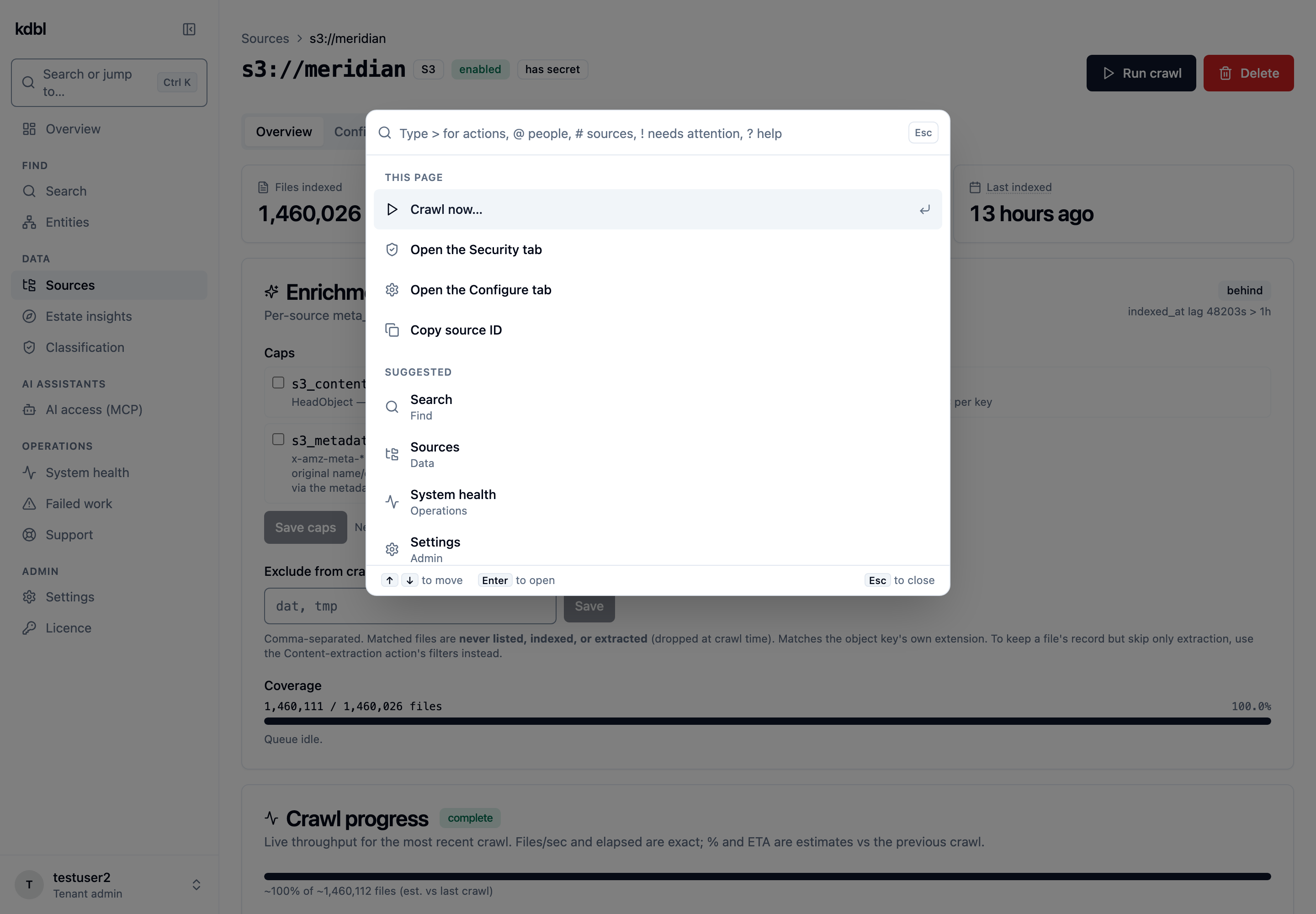
In the console, sources live under Data › Sources in the sidebar. To jump
straight to one, press ⌘K (Mac) or Ctrl+K (or / outside a text field) and
type # followed by part of its ID, for example #finance; the # prefix
limits the results to sources and databases.
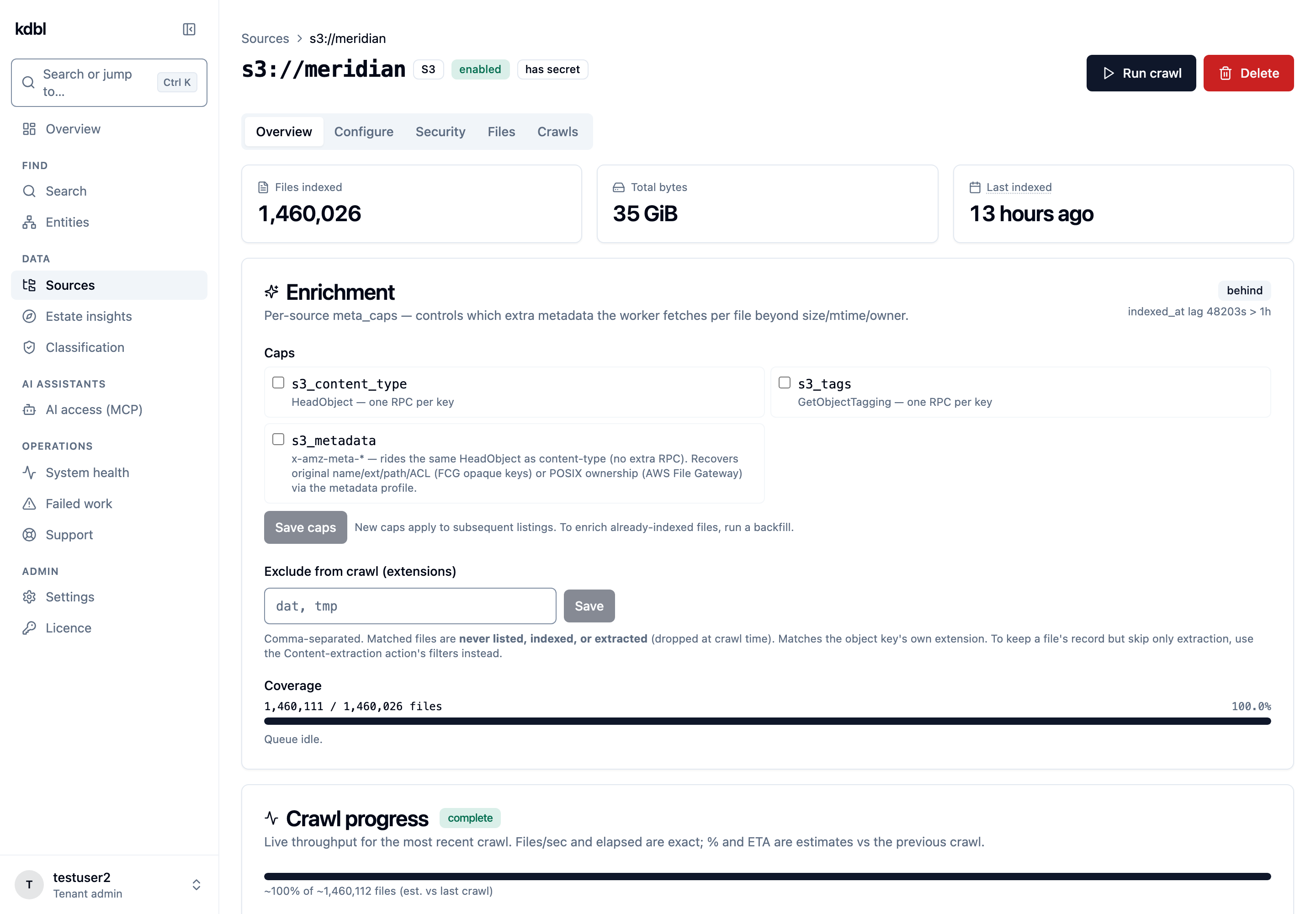
A source's page has the Run crawl, Disable (or Enable) and Delete buttons at the top, and five tabs:
| Tab | What it holds |
|---|---|
| Overview | Files indexed, total size and last indexed time; the Enrichment card (metadata caps and crawl exclusions); live Crawl progress, Extraction progress, Entity enrichment, Redaction and Classification progress. Advanced folds away the Subtree-claim history and the raw stored configuration. |
| Configure | Everything that changes how the source behaves: Connection settings, Folder to crawl, Smart Actions, Extractor, Hybrid search, Metadata fields, Schedules, Subtree work units, version history, and SMB multichannel for kernel-mounted SMB shares. |
| Security | Access grants, Per-file security trimming, TLS trust, and the Cloud egress log when cloud extraction is in use. |
| Files | The files indexed from this source, with a name search and a tag filter. |
| Crawls | Every crawl: when it started, how long it took, who started it and the outcome. |
While you are on a source's page, the command palette offers actions for that source under This page: Crawl now… (moves focus to Run crawl, so you press it to confirm), Enable or disable… (moves focus to the Enable or Disable button), Open the Security tab, Open the Configure tab and Copy source ID.
Adding sources
Console: go to Data › Sources and click New source (or press ⌘K / Ctrl+K and choose Add a source). Choose the Protocol (S3, Azure, OneDrive, SMB or NFS; for SMB you then choose a Kernel mount or Userspace implementation), fill in the fields for it, and click Test connection to check the endpoint and credentials before anything is saved. The Source ID is filled in from the fields you entered; edit it if you want a different ID. For S3, Azure Blob, SMB and NFS, Folder to crawl (optional) limits the new source to one folder; leave it empty to crawl everything (see Crawling one folder). Leave Enable content extraction (recommended) ticked so the files are made searchable, then click Create source. The sections below list each protocol's settings and the CLI and API equivalents.
S3
S3-compatible object stores including AWS S3, MinIO, Wasabi, and on-prem gateways.
Required: bucket name. Optional: endpoint_url, region, force_path_style (for MinIO-style gateways).
Credentials: access key ID + secret access key, or leave blank to use ambient credentials (IRSA, environment variables on the worker pod).
CLI:
echo "<secret-access-key>" | kdbl-control \
  --api-url "$KDBL_URL" --api-token "$KDBL_TOKEN" \
  source add-s3 \
  --source-id 's3://my-bucket' \
  --bucket my-bucket \
  --region us-east-1 \
  --access-key-id AKIA... \
  --secret-access-key-stdin
API:
curl -X POST -H "Authorization: Bearer $KDBL_TOKEN" \
     -H "Content-Type: application/json" \
     "$KDBL_URL/api/sources" \
     -d '{
       "source_id": "s3://my-bucket",
       "protocol": "s3",
       "config": { "bucket": "my-bucket", "region": "us-east-1" },
       "secret": { "access_key_id": "AKIA...", "secret_access_key": "..." }
     }'
Azure Blob
Azure Blob Storage containers, including ADLS Gen2 (hierarchical-namespace) accounts and the Azurite emulator. Source IDs use the az://account/container scheme.
Required: account (storage account name), container. Optional: endpoint_url — set this for sovereign clouds (*.core.usgovcloudapi.net, *.core.chinacloudapi.cn) or Azurite; it defaults to https://{account}.blob.core.windows.net.
Credentials — choose whichever your account uses:
- Microsoft Entra ID (recommended): leave credentials blank to use the worker's ambient identity (AKS Workload Identity or Managed Identity). Grant that identity the Storage Blob Data Reader role on the account or container — note that subscription Owner alone does not include data-plane read access.
- SAS token: a shared access signature scoped to the container with read + list permissions (
sp=rl). - Account key: a storage account access key.
- Connection string (CLI only): an
AccountKey=…orSharedAccessSignature=…connection string — KDBL parses out the account, endpoint, and credential for you.
CLI (account key):
echo "<account-key>" | kdbl-control \
  --api-url "$KDBL_URL" --api-token "$KDBL_TOKEN" \
  source add-azblob \
  --source-id 'az://myaccount/documents' \
  --account myaccount --container documents \
  --account-key-stdin
For other auth, swap --account-key-stdin for --sas-token-stdin or --connection-string-stdin, or omit all three to use ambient Entra ID.
API (SAS token):
curl -X POST -H "Authorization: Bearer $KDBL_TOKEN" \
     -H "Content-Type: application/json" \
     "$KDBL_URL/api/sources" \
     -d '{
       "source_id": "az://myaccount/documents",
       "protocol": "azblob",
       "config": { "account": "myaccount", "container": "documents" },
       "secret": { "auth": "sas", "sas_token": "sv=2026-04-06&ss=b&srt=co&sp=rl&sig=..." }
     }'
For an account key use "secret": { "auth": "account_key", "account_key": "..." }; for ambient Entra ID omit secret entirely.
Archive tier is skipped. Blobs in the Archive access tier are listed but not extracted — reading them would require an explicit rehydration, with its cost and delay. Hot, Cool, and Cold (online) tiers are indexed normally. If a blob is archived after it was queued, the extractor skips it rather than triggering a rehydration.
Blob metadata and tags are mapped through to the index as searchable file metadata (captured during listing, at no extra request cost).
Preserving on-prem permissions on backed-up data. When files are tiered or backed up into Azure Blob by a file-gateway or backup product that stamps the file's original Windows security descriptor into blob metadata, K-Lake reads that descriptor back and applies the source's per-file security trimming as if the data were still on the file server. NTFS ACL-based access stays intact for cloud-tiered copies — a caller sees only the blobs their on-prem identity was entitled to. If the descriptor can't be parsed, the file fails closed (hidden) rather than being exposed.
Recovered original filenames (backup-gateway blobs). File-gateway/backup products often store each file under an opaque GUID blob name while keeping the real filename, extension, and path in blob custom metadata. K-Lake recovers those: the file-detail page shows the real filename as the title (with the GUID key kept below), plus an Original file card with the name, extension, source path, and the NTFS security descriptor — and the real name flows into search results and download filenames. Control this with the metadata profile on the source: Auto (default — detects backup-gateway blobs, a no-op for plain ones), FCG (force the mapping), or None (ignore custom metadata). Requires the Azure custom metadata cap.
SMB (userspace)
For SMB / CIFS shares accessed without a kernel mount.
Required: server, share. Optional: domain.
Credentials: username + password. The password is never a flag — pipe it in on stdin (as below), or leave it out and be prompted for it at the terminal, so it never lands in your shell history or the process table.
CLI:
printf '%s' "$PASSWORD" | kdbl-control \
  --api-url "$KDBL_URL" --api-token "$KDBL_TOKEN" \
  source add-smb \
  --source-id 'smb://nas.corp/finance' \
  --server nas.corp --share finance \
  --domain CORP \
  --username svc-indexer
SMBFS (kernel mount)
For SMB / CIFS shares mounted via the kernel CIFS client. Higher throughput than userspace SMB for large shares.
Required: server, share. Optional: domain, vers (defaults to 3.1.1), max_channels, extra_opts, backup_intent (defaults to false).
CLI:
printf '%s' "$PASSWORD" | kdbl-control \
  --api-url "$KDBL_URL" --api-token "$KDBL_TOKEN" \
  source add-smbfs \
  --source-id 'smbfs://nas.corp/finance' \
  --server nas.corp --share finance \
  --username svc-indexer
Backup-operator access (bypass file ACLs)
By default the extractor only sees files the configured account is granted by the share's per-file ACLs — indexing everything otherwise means re-permissioning the data. Instead, enable backup-operator intent and grant the service account the backup privilege on the NAS:
- What it does: adds
backupuid=/backupgid=to the CIFS mount, so every file open carriesFILE_OPEN_FOR_BACKUP_INTENT. The server honours it (bypassing per-file ACLs) iff the account holdsSeBackupPrivilege— i.e. is a member of the server's Backup Operators group (or the vendor equivalent on NetApp / EMC Isilon / HPE). No file ACL changes are required. - How to enable: pass
--backup-intenttosource add-smbfs, tick Backup operator access (bypass file ACLs) in the New source form (SMB, Kernel mount), or set"backup_intent": truein the config JSON. To flip it on an existing source without re-adding it, use the toggle (API mode), which re-mounts within ~30 s:
kdbl-control --api-url "$KDBL_URL" --api-token "$KDBL_TOKEN" \
  source set-backup-intent --source-id 'smbfs://nas.corp/finance' --enabled true
smb backend cannot send
backup intent; the API rejects backup_intent there with a pointer to smbfs.
If a NAS hard-rejects backup intent for non-privileged accounts, leave the
flag off.
printf '%s' "$PASSWORD" | kdbl-control \
  --api-url "$KDBL_URL" --api-token "$KDBL_TOKEN" \
  source add-smbfs \
  --source-id 'smbfs://nas.corp/finance' \
  --server nas.corp --share finance \
  --username svc-backup \
  --backup-intent
NFS
NFSv3 and NFSv4 exports mounted into the worker.
Required: server, export (must start with /). Optional: vers (defaults to 4.2), sec (defaults to sys), nconnect (defaults to 16), extra_opts.
CLI:
kdbl-control \
  --api-url "$KDBL_URL" --api-token "$KDBL_TOKEN" \
  source add-nfs \
  --source-id 'nfs://nas.corp/export/data' \
  --server nas.corp \
  --export /export/data
OneDrive / SharePoint
Microsoft 365 content via the Microsoft Graph
API — a SharePoint site's document library, or a user's OneDrive for
Business. Source IDs use the odsp:// scheme.
Listing is incremental: the first crawl enumerates everything, and every crawl after that uses a Graph delta token to fetch only what changed — unchanged files are never re-listed or re-extracted.
Authentication is app-only (client credentials): one Microsoft Entra app registration serves the whole tenant, with no per-user sign-in and no stored refresh tokens. Each source targets one drive (one SharePoint library, or one OneDrive).
1. Register an Entra app (one-time)
In the Azure portal → Microsoft Entra ID → App registrations:
- New registration — give it a name (e.g. "K-Lake indexer"); single-tenant is fine. Note the Directory (tenant) ID and Application (client) ID.
- API permissions → Add a permission → Microsoft Graph → Application
permissions → add
Sites.Read.AllandFiles.Read.All→ then Grant admin consent (a tenant admin must click this — an un-consented permission is the most common cause of a403at crawl time). - Certificates & secrets → New client secret → copy the secret's Value (not its ID — the value is shown only once).
The app needs only read permissions. It never needs
User.Read.Allunless you want the console wizard to enumerate users by directory — you can always target a OneDrive by its owner's email directly.
2. Add the source
Console (recommended): go to Data › Sources › New source and choose OneDrive as the protocol. Enter the Entra tenant, Client (application) ID and Client secret, then under Target either keep SharePoint site, type part of its name in Find a site by name and pick the site (and its library) from Matching sites, or choose OneDrive (user), enter the User email and click Find OneDrive. You never type a raw Graph id — the wizard discovers them from the credentials you entered.
CLI: the client secret is read from stdin, so it never lands in your shell
history. Supply exactly one of --site-id or --drive-id.
# SharePoint site (its default document library):
printf '%s' "$ENTRA_CLIENT_SECRET" | kdbl-control \
  --api-url "$KDBL_URL" --api-token "$KDBL_TOKEN" \
  source add-onedrive \
  --source-id 'odsp://contoso.onmicrosoft.com/site/<site-id>' \
  --entra-tenant contoso.onmicrosoft.com \
  --client-id <application-client-id> \
  --site-id '<hostname>,<siteGuid>,<webGuid>'

# A user's OneDrive (address the drive directly):
printf '%s' "$ENTRA_CLIENT_SECRET" | kdbl-control \
  --api-url "$KDBL_URL" --api-token "$KDBL_TOKEN" \
  source add-onedrive \
  --source-id 'odsp://contoso.onmicrosoft.com/drive/<drive-id>' \
  --entra-tenant contoso.onmicrosoft.com \
  --client-id <application-client-id> \
  --drive-id '<drive-id>'
--site-id and --drive-id are mutually exclusive. Add --site-drive-id to
pin a specific library of a site (otherwise the site's primary document
library is used). The connection is probed automatically before the source is
saved; add --no-test to skip that check, or --force to save even if it
fails.
API:
curl -X POST -H "Authorization: Bearer $KDBL_TOKEN" \
     -H "Content-Type: application/json" \
     "$KDBL_URL/api/sources" \
     -d '{
       "source_id": "odsp://contoso.onmicrosoft.com/site/<site-id>",
       "protocol": "onedrive",
       "config": {
         "tenant_id": "contoso.onmicrosoft.com",
         "target": { "kind": "site", "site_id": "<hostname>,<siteGuid>,<webGuid>" }
       },
       "secret": {
         "auth": "client_secret",
         "client_id": "<application-client-id>",
         "client_secret": "<client-secret-value>"
       }
     }'
For a user's OneDrive, use "target": { "kind": "drive", "drive_id": "<drive-id>" }.
Discovering targets by name
You rarely know a SharePoint site or drive's raw Graph id. The console wizard's
pickers are backed by POST /api/sources/onedrive/discover, which enumerates
targets by friendly name straight from the app-only credentials — before the
source is saved:
# Search sites by name:
curl -X POST -H "Authorization: Bearer $KDBL_TOKEN" -H "Content-Type: application/json" \
     "$KDBL_URL/api/sources/onedrive/discover" \
     -d '{ "tenant_id": "contoso.onmicrosoft.com",
           "client_id": "<application-client-id>",
           "client_secret": "<client-secret-value>",
           "kind": "sites", "query": "finance" }'
# → { "items": [ { "id": "<site-id>", "name": "Finance Team", "detail": "https://…" } ] }
kind may be sites (search by query), drives (a site's libraries, by
site_id), or user_drive (a user's OneDrive, by upn).
Notes
- Sovereign clouds: set
--graph-base-url/--authority-host(CLI) orgraph_base_url/authority_host(config) to the US Gov or China Graph and login endpoints. The defaults are the public cloud (https://graph.microsoft.com/v1.0,https://login.microsoftonline.com). - Network egress: the deployment needs outbound HTTPS to
graph.microsoft.comandlogin.microsoftonline.com(or the sovereign equivalents) — from the API (for discovery) and from the workers (for crawling). - Throttling: Graph rate-limits app-only workloads; the source honours
Retry-Afterand backs off automatically, so large libraries crawl steadily without manual tuning. - Exclusions: set an
exclude_extensionslist (under Advanced (sovereign cloud, exclusions) in the New source form, or in the APIconfig) to skip matching files entirely. - Subtree work units don't apply. Like Azure Blob, OneDrive/SharePoint uses
Graph's own delta listing rather than a directory walk, so the subtree
fan-out knobs are not used for
odsp://sources.
Listing sources
UI: Data › Sources lists every source in your tenant with its protocol, state (enabled or disabled), when it was last indexed, its subtree depth and its last error. Click a source to open its page; the file count and total size are at the top of its Overview tab.
CLI:
API:
Crawling one folder
By default a source crawls everything in its bucket, container, share or
export. To index only part of it, for example finance/2026/ of a large
bucket or Legal\Contracts on a share, give the source a folder to crawl.
Only that folder and the folders inside it are read; the rest is never listed,
so a narrow folder in a very large bucket crawls quickly.
A folder can be set on S3, Azure Blob, SMB (kernel mount or userspace) and NFS sources. OneDrive / SharePoint sources are always crawled from the top of the drive, because Microsoft's change tracking works only from there, so setting a folder on one is refused.
Where to set it.
- Console, new source: fill in Folder to crawl (optional) in the New source form. Test connection then lists that folder, as the crawl will.
- Console, existing source: on the source's Configure tab, the Folder to crawl card (below Connection settings) shows what is crawled now. Enter the folder and click Save folder; Reset puts the field back to the saved value. Clear the field and save to crawl the whole source again.
-
CLI:
-
API: set
path_prefixin the source'sconfigwhen you create it, or in a later configuration update.null, an empty string or/all mean "the whole source".
What you can enter. A folder path inside the source, such as finance/2026
or Legal\Contracts. You can also paste the full location you copied from
elsewhere, and it is shortened to the folder inside: s3://my-bucket/finance/2026
on an S3 source, \\nas.corp\finance\2026 (or smb://nas.corp/finance/2026)
on an SMB source, or the export's full path on an NFS source. The folder is
stored in one form, with / separators and a trailing / (finance/2026/),
whatever you typed. K-Lake refuses a path that names a different bucket,
server or share, a web address, a path containing . or .. as a folder
name, and a path that is too long (over 1,024 bytes), and says which.
Narrowing an existing source. When you save a folder on the Folder to crawl card, the console asks you to confirm (Crawl only …?, naming the folder), because files already indexed from outside the folder are removed:
- From the next crawl, only the folder is read.
- After the next complete crawl of the folder, files indexed from outside it are hidden from search, in the same way as files deleted from the source.
- After the recovery period, 7 days unless your administrator changed it, they are deleted from the index for good.
Changed your mind? Set the wider folder (or clear the folder) again within those 7 days, and the next crawl restores the hidden files without extracting them again. Clearing the folder asks for confirmation too (Crawl the whole bucket?, or container, share or export), because on a large source that crawl can take much longer than usual.
Nothing is removed by a crawl that didn't finish, or by a folder that lists empty (a mistyped folder, for example). A crawl that started just before you widened the folder, and so still read the narrow one, hides nothing either.
With a folder set, a crawl of one path (kdbl-control crawl --prefix …, see
Triggering crawls) must lie inside the folder; a path
outside it is refused. A crawl of the whole source crawls the folder.
Enabling and disabling
Disabling a source pauses it without deleting anything. Within about a minute:
- Crawling stops, scheduled crawls included. Run crawl is greyed out while the source is disabled.
- Nothing is read from the source, so extraction pauses and links to original files (previews and downloads) stop opening.
- Everything already indexed stays searchable, with its permissions enforced as before.
- Files that were waiting to be extracted may end up in Failed work. Retry them there once the source is enabled again.
Enabling it again resumes scheduled crawls within about a minute, and files can be read and extracted again. Run a crawl to pick up anything that changed while the source was disabled.
Console: on the source's page, click Disable (or Enable) at the top
and confirm. On that page you can also press ⌘K / Ctrl+K and choose Enable or
disable…. A disabled source shows a notice on its page and a disabled
badge next to its ID, and Data › Sources shows its state. You need to be
able to change the source (a tenant administrator, or an owner or editor
grant on it; a viewer can't);
a source that is being deleted can't be enabled or disabled.
CLI:
kdbl-control source disable --source-id 's3://my-bucket'
kdbl-control source enable  --source-id 's3://my-bucket'
API:
curl -X POST -H "Authorization: Bearer $KDBL_TOKEN" \
     -H "Content-Type: application/json" \
     "$KDBL_URL/api/sources/<urlencoded-source-id>/enabled" \
     -d '{"enabled": false}'
The API answers 403 with the code source.editor_required when the caller can
see the source but not change it, and 409 with source.deleting while the
source is being deleted.
TLS trust anchors
Many on-premises endpoints — object stores, SMB gateways, webhook receivers — present certificates signed by an internal certificate authority that no public trust store knows about. Rather than turning verification off, install your CA as a trust anchor and keep certificates verified.
Anchors are managed per tenant:
kdbl-control tenant ca-cert add --name "Acme Internal Root" --file acme-root.pem
kdbl-control tenant ca-cert list
kdbl-control tenant ca-cert remove <cert-id>
list reports what each anchor actually is — subject, issuer and validity —
parsed from the certificate rather than echoing back the name you gave it, so
an anchor that is about to expire is visible before it starts failing crawls.
In the console they are on Settings › Security › TLS trust anchors (or
press ⌘K / Ctrl+K and type trust anchors), and each source's choice is on
its Security tab, TLS trust card.
Each source then chooses how it uses them:
| Mode | Behaviour |
|---|---|
inherit (default) |
Trust every anchor the tenant has installed. |
custom |
Trust only a named subset of the tenant's anchors. |
none |
Platform roots only — ignore the tenant's anchors for this source. |
custom selects anchors by reference, not by holding its own copy. That
means one place to rotate a certificate, and no way for a source to keep
trusting one the tenant believes it removed.
Trust applies across the board, not just to crawling: identity lookups, object-store and Microsoft 365 connectors, and outbound webhook deliveries all honour the tenant's bundle. Operators can additionally install deployment-wide anchors that apply to every tenant.
Removing an anchor takes effect on the next configuration refresh — a few moments, not a restart.
Source endpoint policy
Each tenant has a source policy that decides what its sources may borrow from the deployment and which hosts they may reach. It matters most where one deployment serves several customers. Only a cluster admin can change it:
| Setting | What it allows |
|---|---|
| Ambient cloud credentials | S3 and Azure Blob sources with no secret, which authenticate as the deployment's own cloud identity and can read anything it can. |
| NFS sources | NFS sources, which authenticate as the worker's user and group IDs. |
| Endpoint allow-list | Hosts, *.domain suffixes, IP addresses and CIDR ranges the tenant's sources may reach. Empty means no restriction beyond the addresses below. |
Whatever the policy, a source endpoint that points at a cloud metadata, loopback or link-local address is always refused. The check applies when a source is added, changed or tested, and again when it connects.
Tenants that existed before this setting was introduced keep working as they did; new tenants start with ambient credentials and NFS refused.
# Read a tenant's policy:
kdbl-control tenant source-policy --slug acme

# Allow NFS, and limit sources to one domain and one subnet (cluster admin):
kdbl-control tenant source-policy --slug acme --allow-nfs true \
  --allow-endpoint '*.acme.example' --allow-endpoint 10.20.0.0/16

# Remove the allow-list:
kdbl-control tenant source-policy --slug acme --clear-allowlist
The same settings are on the Source policy card of the tenant's page in the
console (Admin › Tenants, then the tenant), and at GET / PUT /api/tenants/<slug>/source-policy.
Access grants
Whether a caller can see a source at all is controlled by its access grants.
A caller sees a source if they're a tenant admin or hold a grant on it —
viewer (read/search), editor (read + manage content), or owner (full
control) — whose principal matches one of theirs (user:<id> or a group:<id>
from directory enrichment). Grant to groups where you can:
membership then drives access and survives identity churn.
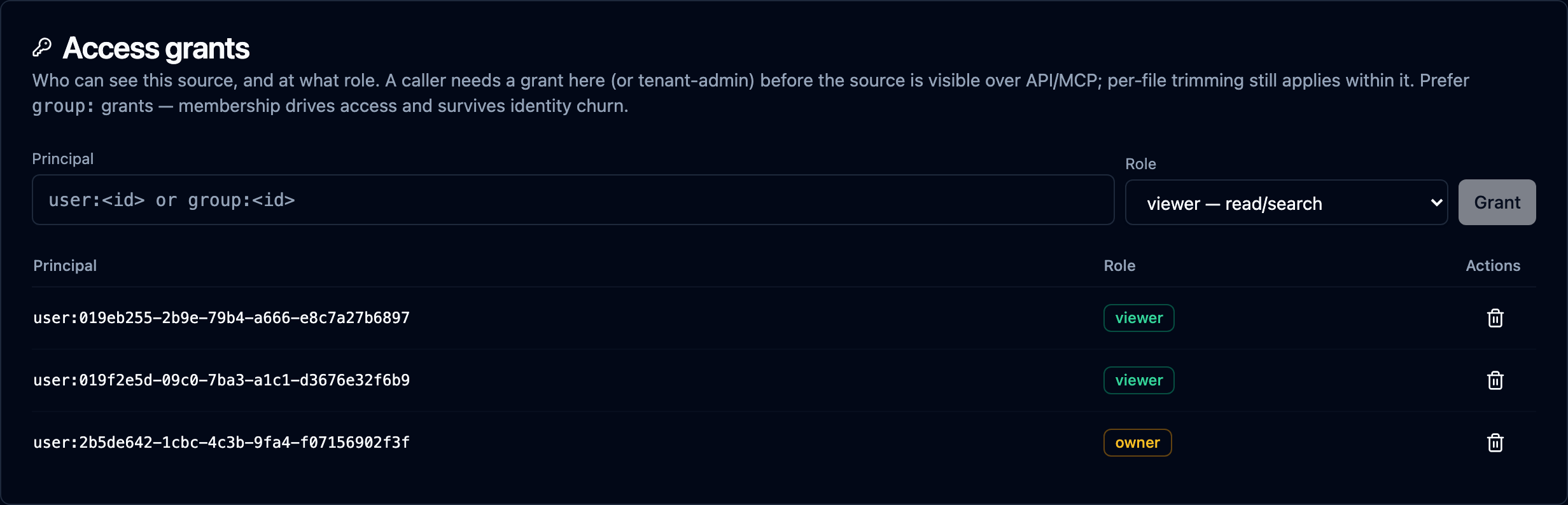
Manage grants three ways, at full parity:
- Web console — the source's Security tab, Access grants card (or, on the source's page, press ⌘K / Ctrl+K and choose Open the Security tab). Search for a person or group under Who, pick a Role and click Grant; the bin icon on a row revokes it.
- CLI:
kdbl-control acl list   's3://my-bucket'
kdbl-control acl grant  's3://my-bucket' 'group:sales' viewer
kdbl-control acl revoke 's3://my-bucket' 'group:sales'
- REST API —
GET/POST/DELETEon/api/sources/<id>/acl.
Per-file security trimming then applies within a visible source — the two gates are complementary.
Hybrid search (lexical vs hybrid)
Search has two stacks: lexical (full-text — always on) and hybrid, which adds a dense embedding arm + reranking on top. Hybrid is more accurate but costs more: embedding compute at ingest and vector index storage. You can run a tenant or an individual source lexical-only to keep that cost off, and turn hybrid on later.
Hybrid enrichment is powered by a dedicated embedding service that scales independently of the ingest workers — so turning hybrid on for a large corpus adds embedding capacity without slowing extraction or the write path. (Earlier releases could only produce vectors inside the document extractor itself, so a deployment running the default engine had no embedder at all.)
The effective setting is source override ?? tenant default ?? off, then ANDed
with whether an embedding service is deployed. New tenants default to
lexical-only.
In the console, the tenant default is Settings › Search & content › How sources are searched (By meaning and keywords is hybrid, By keywords only is lexical); press ⌘K / Ctrl+K and type hybrid to jump there. A source's override is on its Configure tab, Hybrid search card, which also shows the tenant default and the effective setting.
# Tenant default (tenant-admin / cluster-admin):
curl -X PATCH -H "Authorization: Bearer $KDBL_TOKEN" -H "Content-Type: application/json" \
     "$KDBL_URL/api/tenants/<slug>/hybrid" -d '{"enable_hybrid": true}'

# Per-source override (true/false to set, null to inherit the tenant default):
kdbl-control source search enable  --source-id 's3://my-bucket'
kdbl-control source search disable --source-id 's3://my-bucket'
kdbl-control source search inherit --source-id 's3://my-bucket'
kdbl-control source search show    --source-id 's3://my-bucket'
Timing — the toggle is not instantaneous for ingest. Queries honour the setting immediately. New ingest, however, only picks up the change within ~30 s — workers read the resolved setting per task when work is dispatched. So if you flip a source and immediately force a re-extract, the in-flight task can still use the previous setting. Wait ~30 s after toggling before (re-)extracting if you need the new setting to apply to that ingest.
Disabling hybrid is non-destructive: existing embeddings are retained (and
harmless to lexical results) until you explicitly reclaim them
(kdbl-control source search reclaim --source-id …), which NULLs them in the
background. Re-enabling later needs a re-crawl/backfill to rebuild vectors — see
the capacity view below for the retained-vector bytes and the per-stack storage
split.
Boilerplate demotion
Many archives repeat the same text at the end of nearly every document: the regulatory disclosure on a broker note, a legal disclaimer, a confidentiality notice, an email signature. Because that text is a dense run of exactly the words a query might use, a keyword search could match it in every document and rank it above the documents that genuinely discuss the topic.
K-Lake learns each source's boilerplate as it indexes and ranks it down. It is on by default for every source and needs no re-extraction.
- What counts. A sentence at the end of the source's documents that recurs in at least 20 files and at least 15 % of the source's files. Running page headers and footers are not treated as boilerplate: a sector heading on every page is something people search for.
- What search does. A result whose match comes only from boilerplate is ranked after every other result, in keyword and hybrid search alike. It is not removed, so if nothing else matches you still see it. A query about something else is unaffected.
- Searching for the boilerplate itself still works: put four or more of its words in quotes, or paste a whole sentence of it.
- Existing sources are learned in the background after an upgrade, with no re-crawl and no re-extraction. New files are learned as they are indexed.
Settings (tenant administrator). Per source, under
config.search.boilerplate:
| Setting | Default | Meaning |
|---|---|---|
enabled |
true |
false switches detection and demotion off for this source. |
min_files |
20 |
A sentence must appear in at least this many files. |
min_share |
0.15 |
… and in at least this share of the source's files (0–1]. |
# What has been found for a source, and the settings in force:
curl -H "Authorization: Bearer $KDBL_TOKEN" \
     "$KDBL_URL/api/sources/<source-id>/boilerplate"

# Switch it off for one source (null restores a default):
curl -X POST -H "Authorization: Bearer $KDBL_TOKEN" -H "Content-Type: application/json" \
     "$KDBL_URL/api/sources/<source-id>/boilerplate" -d '{"enabled": false}'

# Count any files not yet counted, or forget what was learned and start again:
curl -X POST -H "Authorization: Bearer $KDBL_TOKEN" "$KDBL_URL/api/sources/<source-id>/boilerplate/backfill"
curl -X POST -H "Authorization: Bearer $KDBL_TOKEN" "$KDBL_URL/api/sources/<source-id>/boilerplate/reset"
Capacity & cost
Hybrid search is more accurate but not free — it adds embedding compute at ingest and a dense-vector index on disk. The Capacity & cost panel (on the console's Overview, and cluster-wide on the Licence page) makes that cost visible so you can decide, per tenant or per source, whether hybrid is worth it.
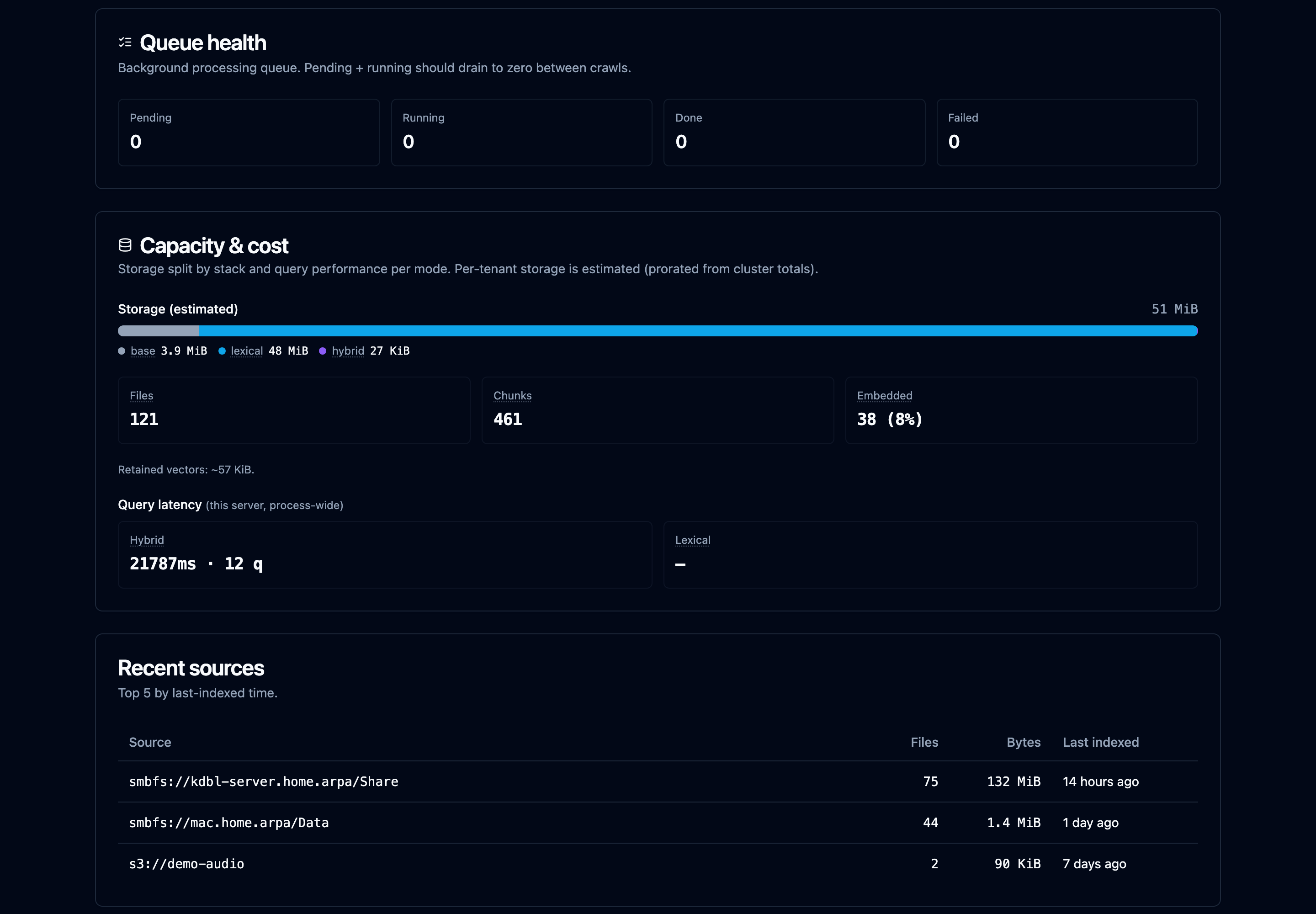
It breaks down:
- Storage split — how many bytes each search stack uses: base (the raw content + metadata), lexical (the always-on full-text index), and hybrid (the dense-vector index). Per-tenant figures are prorated estimates; cluster-scope figures are exact.
- Counts — files, total chunks, and how many chunks are embedded (the share that's hybrid-ready).
- Retained vectors — vector bytes still held after hybrid was disabled but not yet reclaimed (and whether they're reclaimable).
- Query latency — average time and query count per mode (hybrid vs lexical), so you can weigh the accuracy/latency trade-off on real traffic.
The same numbers are available headless:
kdbl-control --api-url "$KDBL_URL" --api-token "$KDBL_TOKEN" capacity
curl -H "Authorization: Bearer $KDBL_TOKEN" "$KDBL_URL/api/capacity"
Add --include-cluster (CLI) or ?include_cluster=true (API) for a cluster-wide
view — that requires a cluster-admin token.
Content extraction
Every source runs its files through a content-extraction pipeline that pulls text (and structure — tables, headings) out of PDFs, Office documents, images, and more — and transcribes audio and video — ready for search. Supported file types lists every format, what is extracted from it, and which engine reads it.
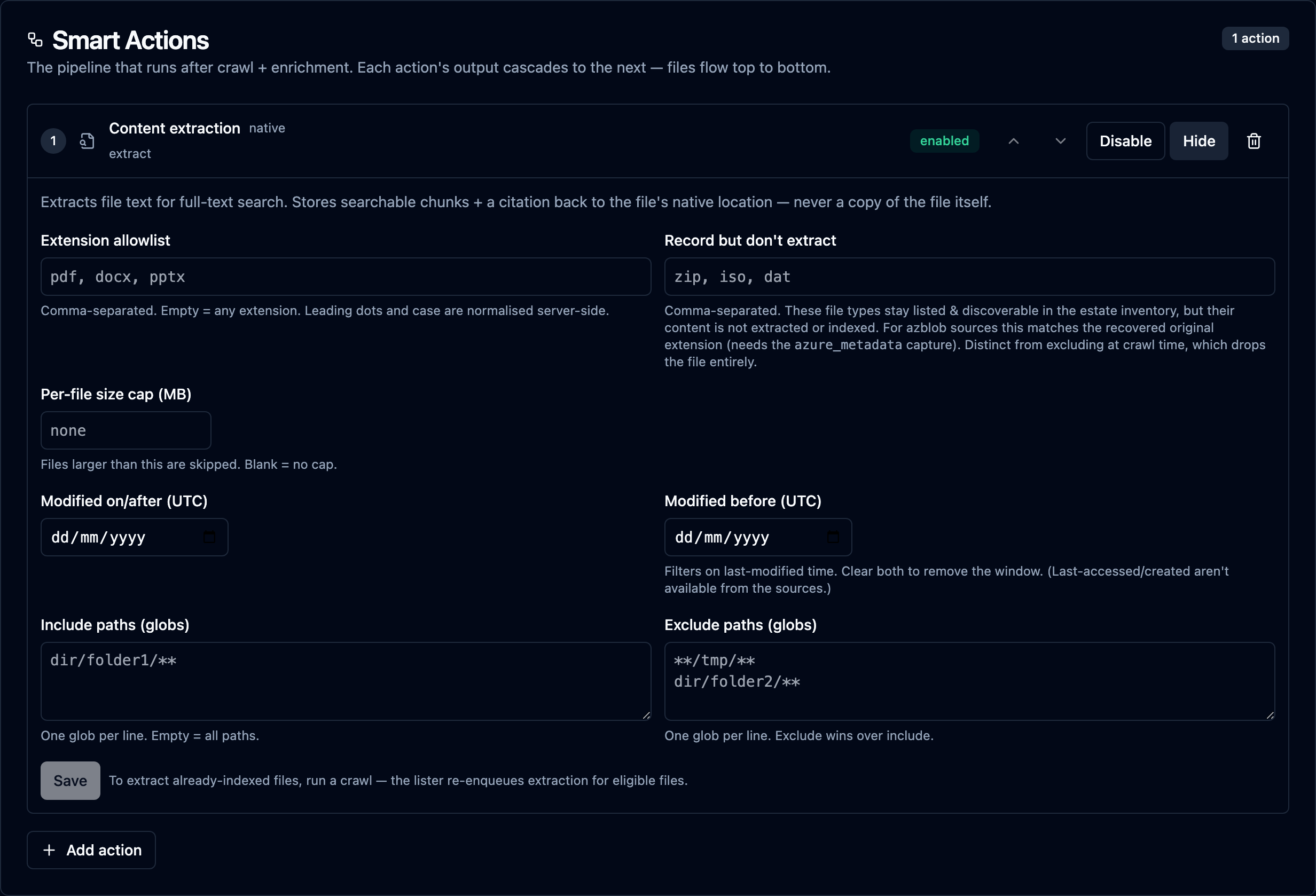
Per-source extraction settings. On the source's Configure tab, click
Configure on the Content extraction step of Smart Actions (or use
kdbl-control source extract …) to tune extraction for that source:
- On/off and a file-size ceiling — cap the largest file the extractor will open, to bound memory.
- Include / exclude paths and extensions (
source exclude-extensions) — skip folders or file types you don't want indexed (build artefacts, media, and so on). - Extractor choice — pick the extraction engine per source where more than one is available (see below), in the Extractor card on the Configure tab. The picker offers only the extractors your licence includes (see Licensing).
K-Lake ships five extraction engines. You choose per source, and most estates never need to change the default:
| Engine | Use it for |
|---|---|
| klex (default) | Standard text extraction. Fast and light, so many pods pack onto a node and extraction scales out cheaply. |
| kdoc2 (recommended companion) | The document engine: scanned PDFs, images, OCR and structured tables. A little more than a klex pod reserves — and a fraction of the previous document engine — and it splits large scans into page ranges across the fleet so one big document never blocks the rest. Runs on x86-64 and ARM, on CPU or GPU; on a GPU it reads scanned pages several times faster, which is what decides the timeline on a scan-heavy estate. |
| kvision | Vision-model extraction for the hardest documents, using self-hosted vision models. Needs the VLM extraction licence feature. |
| kmedia | Audio and video transcription. |
| Cloud document service | Your own Azure AI Document Intelligence, Amazon Textract or Google Document AI account reads scanned pages, images and tables, with no GPUs to run. Usually used for just the pages the standard extractor can't read; see Cloud extraction. Needs the VLM extraction and Cloud extraction licence features. |
klex, kdoc2 and kmedia need no licence feature. In particular, kdoc2 can be chosen as a source's extractor without the VLM extraction feature.
The original document engine, kdoc, was retired in 0.1.47, on CPU and GPU. klex and kdoc2 read every format it did, and sources that used it moved to standard extraction automatically on upgrade (see Upgrading).
Scanned pages and tables are re-read automatically. Whenever kdoc2 is
running, the pages klex couldn't read are handed to it for just those pages:
scanned pages with no text layer, pages klex read poorly (skewed, photocopied
or photographed), and tables klex couldn't structure. Nothing needs switching
on, and documents indexed before kdoc2 was deployed are picked up in the
background. To stop it for one source, set "on_unread_tables": false on the
source's Fallback extraction step; that
turns off all of these re-reads for the source, scanned pages included.
Hybrid (semantic) search is provided by the dedicated embedding service (see Sizing), not by any extraction engine — enable it alongside whichever engines you deploy. Without it, search is keyword-only.
Highest performance by default. The extractor defaults to its highest-throughput engine and scales out as a fleet — add replicas to extract many files in parallel. Per pod it extracts several times as many files per minute as the previous default, in a fraction of the memory, so many more extractor pods pack onto a node and the fleet as a whole drains roughly an order of magnitude faster. Both the default engine and the document engine run on x86-64 and ARM nodes.
High-accuracy visual extraction (optional). For scanned documents, complex layouts, and image-heavy PDFs, an optional vision-model (VLM) extractor delivers higher-accuracy OCR and layout understanding. By default it uses self-hosted, GPU-accelerated models, and no document content leaves your environment. Enable it per source where the extra accuracy is worth the compute. Your operator can instead point the custom vision-model extractor at a cloud vision provider (OpenAI, Azure OpenAI, Anthropic, Google Gemini or Amazon Bedrock); Gemini needs no manual endpoint URL.
When content does leave your environment
Document content stays inside your environment unless an administrator switches on Cloud extraction for a source, or routes a source to a cloud vision provider. With Cloud extraction, only the pages the standard extractor can't read are sent (unless you route the whole source to the Cloud document service), and they go to your own cloud account. In every case an administrator must confirm per source, every file sent is recorded in the source's egress audit, and the Cloud extraction licence feature is required.
Audio & video transcription (optional). K-Lake can make audio and video files searchable by their content, not just their filename and metadata. A dedicated media extractor transcribes the spoken words and, for video, also reads the text shown on screen (frame OCR — slides, captions, titles). Every segment is timecoded, so a search hit deep-links to the exact moment the term is spoken or shown, and the media player opens there. Common audio and video formats are supported; transcription runs on self-hosted models (CPU, or GPU-accelerated for throughput) so no media ever leaves your environment. Like the other extractors it runs as a scale-out fleet — add replicas to transcribe more files in parallel — and is enabled where you want it. Without it, audio and video files are still recorded — name, path, size, dates and permissions — but their content isn't indexed. See Supported file types for the formats each engine reads.
Watching progress. The Extraction progress card on the source's Overview tab shows how many eligible files have been extracted and how many remain, the throughput, an ETA, and the ok / failed / skipped counts. When files have failed, a Failed work link next to Run crawl opens them.
- Files/sec is the rate over the last minute. Under it, pages/s counts the pages of documents that have them, such as PDFs and Office files, so a 400-page report weighs more than a one-page memo; formats without pages, such as plain text and images, count as files only. Pages per second appears once something extracted in the last minute reported pages.
- Run average is the files-per-second rate averaged over the whole current run. On a mix of quick and slow documents the one-minute rate swings from minute to minute, so the run average is the steadier figure to plan with.
- ETA (and the time left for a re-extraction) is worked out from the run average while work is moving.
- Throughput is the data read per second.
kdbl-control prints pages per second in its extraction progress line too.
Global content search
By default a search spans every source the caller is allowed to see: results are drawn from all readable volumes at once and ranked together, so you don't have to know which share or bucket a document lives in. Access is still enforced per source and per file (see security trimming) — the global scope only ever includes sources the caller holds a grant on. You can still scope a search to a single source when you want to.
Adjusting metadata enrichment
Use source meta-caps (CLI) or the Enrichment card on the source's Overview tab (tick the caps, then Save caps) to choose which optional enrichments are gathered: S3 tags, Azure blob tags / content-type, NTFS ACLs, NFSv4 ACLs, extended attributes. Start narrow — every additional cap adds work per file. (Azure tags and content-type are captured during listing at no extra request cost.)
You can also enqueue a backfill to retroactively enrich files that were indexed before a cap was added:
Triggering crawls
UI: click Run crawl at the top of the source's page (or, on that page, press ⌘K / Ctrl+K and choose Crawl now…, then press Run crawl). The console always crawls the whole source, or its folder to crawl when one is set; to crawl one path prefix, use the CLI or API. A disabled source can't be crawled until it is enabled again. Each crawl is listed on the Crawls tab, and recurring crawls are set up on the Configure tab, Schedules card.
CLI:
kdbl-control crawl --source-id 's3://my-bucket'
kdbl-control crawl --source-id 's3://my-bucket' --prefix 'reports/2026/'
API:
curl -X POST -H "Authorization: Bearer $KDBL_TOKEN" \
     "$KDBL_URL/api/sources/<urlencoded-source-id>/crawl"
Subtree work units
A single walk that descends a tree one directory at a time is fine for a small share, but on a very large or very wide file system it is slow to finish — one crawler works through millions of paths while the rest of your extraction fleet sits idle.
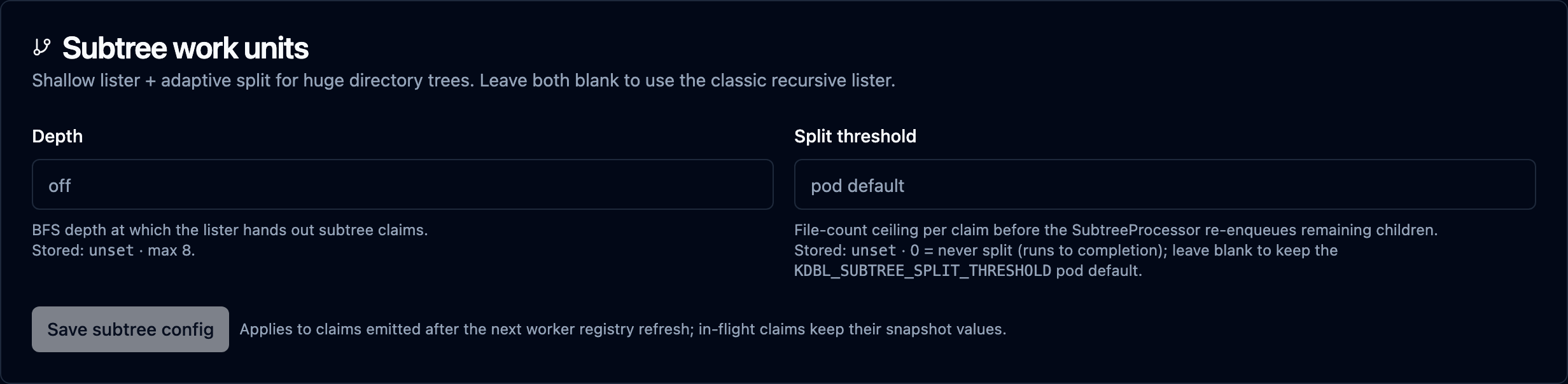
Subtree work units break a big tree into many independent crawl units that K-Lake hands out across all of your workers at once, so a huge share is crawled in parallel instead of end-to-end. File-share sources — SMB, SMBFS and NFS — use them by default. You can force the classic single walk, or bound how big one unit gets, from the Subtree work units card on the source's Configure tab, using two values.
The two knobs
| Knob | What it does | Range |
|---|---|---|
| Depth | Whether K-Lake fans the source's tree out into independent crawl units at all. 0 forces the classic single walk; anything from 1 to 8 turns the fan-out on. File-share sources default to 1. |
0–8 |
| Split threshold | A safety valve for a unit that turns out to be huge. Once a single unit has listed this many files, K-Lake re-hands-out its remaining, un-walked contents as fresh units so one runaway folder can't stall the crawl. | file count |
Think of Depth as the on/off switch and Split threshold as the backstop for a unit that turns out bigger than expected.
How Depth works
Depth is an on/off switch, not a level to tune: any value from 1 to 8
turns the fan-out on, and 0 turns it off. The size and number of the units are
worked out at runtime from the shape of the tree, so a bigger number does not
mean smaller units.
With the fan-out on, K-Lake discovers that shape as it walks. A wide
directory is packed into a bounded number of units covering several sibling
folders each, so a thousand small folders don't become a thousand tiny units; a
narrow directory becomes one unit per child, and the big ones are broken up
further as workers descend into them. There is nothing to size by hand — a share
laid out as customers/<id>/<year>/<file> and one that is a single flat dump both
end up with units sized to keep the fleet busy.
How Split threshold works
The fan-out follows the tree's shape; the split threshold is the backstop for the one folder that turns out to hold 20 million files while its siblings hold a few thousand. While a unit is being crawled, once it crosses the threshold K-Lake stops, re-queues everything it hasn't reached yet as new units, and lets other workers pick them up.
- Leave it blank to use the system default (50,000 files), which bounds how much one unit holds in memory and how long it runs before handing work back. This suits almost everyone.
- Lowering it is rarely the answer. K-Lake already redistributes a wide subtree as soon as its breadth becomes visible, without waiting for a file count; in measurement, a smaller threshold made one enormous folder slower, because it produced many more, much smaller units.
- Set
0to disable splitting entirely: each unit runs to completion no matter how big it gets. Only do this if you specifically want whole subtrees handled by a single worker.
0means "never split", not "use the default". To go back to the system default after setting a custom threshold, clear the field rather than entering0.
Worked examples
A large NAS archive on a source where the fan-out was previously forced off.
Any depth above 0 turns it back on; the shape of the tree does the rest.
Revert a source to the classic single walk — for instance while a NAS is under load and you want exactly one crawler on it.
Setting the values
All three surfaces are at parity. At least one of the two values must be provided; the one you omit keeps its stored value.
- Web console — the Subtree work units card on the source's
Configure tab. Type a Depth and/or Split threshold and click
Save subtree config. Leaving a box blank leaves that value untouched; to
reset a value use the documented
0semantics above. - CLI —
kdbl-control source subtree --source-id <id> [--depth N] [--split-threshold N](see the examples above; requires API mode via--api-url/--api-token). - REST API —
POST /api/sources/<urlencoded-source-id>/subtreewith a body of{"depth": N},{"split_threshold": N}, or both. The response echoes the stored values.
curl -X POST -H "Authorization: Bearer $KDBL_TOKEN" \
     -H "Content-Type: application/json" \
     "$KDBL_URL/api/sources/smbfs%3A%2F%2Fnas.corp%2Farchive/subtree" \
     -d '{"depth": 1, "split_threshold": 100000}'
Changes take effect for newly started crawl units within about 30
seconds; units already in flight finish with the settings they started with.
Managing this requires tenant-admin, or an owner/editor grant on the source.
Watching it work
When a source is running in subtree mode, a Subtree-claim history card appears on its Overview tab, under Advanced, with a live rollup of every unit K-Lake has processed, categorised by outcome:
| Outcome | Meaning |
|---|---|
| drained | The unit was crawled all the way to completion. |
| split | The unit turned out too big to run alone, so it handed its remaining contents off as new units. |
| failed | The unit hit an error while listing or writing; it is retried automatically. |
| skipped | The unit couldn't be processed on the worker that picked it up and was re-queued. |
The card also shows the largest crawl trees by file count and the most recent adaptive splits, and lets you search failed units by error message — a quick way to confirm your depth and threshold are producing the parallelism you expect.
File shares only. Subtree work units require the crawler to walk a hierarchical (folder-style) listing itself, so they apply to SMB, SMBFS and NFS sources. Object stores and document libraries are paged rather than walked — an S3 or Azure Blob container is listed as a flat namespace, and OneDrive/SharePoint is crawled through Graph's own delta feed. The setting is rejected outright for
az://andodsp://sources, and has no effect ons3://ones.Parallel crawling is on by default. Each worker sizes its own pool of subtree drainers from the cores available to it, so the fan-out spreads across the fleet with no configuration. An operator can pin or disable that in the worker configuration; if you have set a depth and see no activity in the Subtree-claim history card, check with them.
Removing sources
Removing a source deletes its registry entry and its indexed files from the catalog. This is not recoverable — re-add and re-crawl to get back to a populated state.
UI: Delete at the top of the source's page (you are asked to confirm).
CLI:
API: