Smart Actions
KDBL Context Lake (K-Lake) doesn't stop at cataloguing your files — it reads what is inside them and acts on what it finds. After each crawl, every file flows through a pipeline of actions you choose per source. Content extraction is the first action (on by default); from there you compose a pipeline that can redact sensitive content, notify your own systems, and more. Every step reads your files read-only: what it produces — extracted text, masked text, entities — is stored alongside the file, never written back into it.
Think of it as "what should happen to each file once K-Lake has found it?" — answered per source, with a library of building blocks.
The action library
| Action | What it does | Status |
|---|---|---|
| Content extraction | Pulls searchable text out of each file (documents, spreadsheets, PDFs, images, and more) so it can be searched and served to AI. The default first step. | Available |
| Redaction | Masks sensitive patterns — identifiers, email addresses, card numbers, and your own custom patterns — in the extracted text, so search results and AI answers return the masked version. | Available |
| Webhook | Sends a signed notification to an endpoint you control whenever a file is processed, so your own systems can react in real time. | Available |
| Fallback extraction | When the default extractor fails on a file, retry it automatically on a heavier backend, so the structured or complex documents the fast default can't parse still get extracted. Also where a source opts out of the automatic re-read of scanned pages and tables. | Available |
| Entity enrichment | Reads the extracted text and records the people, organisations, locations and agreements it names, plus the relations between them — building the knowledge graph. | Available |
| Data classification | Assigns every file a sensitivity level and labels from what its text contains — personal data, explicit markings, document category — with the evidence, and enforces rules about what search and AI assistants may return. See data classification. | Available |
| Data placement | Copy or tier each object to another location. | Coming soon |
| Custom script | Run your own sandboxed logic over each file. | Coming soon |
| Custom container | Run your own container as a one-shot job per file. | Coming soon |
Coming-soon actions appear in the catalogue so you can see what's on the way; they're inert until released.
Pipelines cascade
Actions run in order, each building on the one before it. A common pipeline is:
Extraction produces the searchable text; redaction masks the sensitive parts of that text; the webhook then tells your systems the file is ready. You decide the order and which steps are enabled, per source.
How it runs
- Automatic. The pipeline runs after each crawl, with no manual step. New and changed files flow through it as they're discovered.
- Only re-does what changed. A file that has already been through a step — at the same version, with the same settings — is skipped. Change a redaction rule and only redaction re-runs; there's no need to re-crawl or re-extract the whole source. Changes take effect within a few moments.
- Resilient. Each step is tracked per file, so a transient failure is retried rather than silently dropped.
- Retroactive. Adding a step to a source that has already been crawled does not only apply to new arrivals — a background sweep finds the files that were processed before you added it and puts them through. Enabling redaction or enrichment on an existing source backfills it without a re-crawl.
- Elastic. The runners that execute your pipelines scale automatically with the backlog — capacity is added when work piles up and released when it drains. See the sizing guide.
Configuring a pipeline
Open the source (Data › Sources, then the source; or press ⌘K / Ctrl+K and
type # and part of its ID), then its Configure tab — on the source's page,
the palette's Open the Configure tab does the same. The Smart Actions
card shows the pipeline as a numbered, top-to-bottom list of steps:
- Add action at the bottom adds a step from the action library.
- Enable / Disable switches a step on or off without losing its settings.
- Move up / Move down reorder the steps.
- Configure opens the step's settings, which you save with Save settings.
- Remove takes the step out of the pipeline (you are asked to confirm).
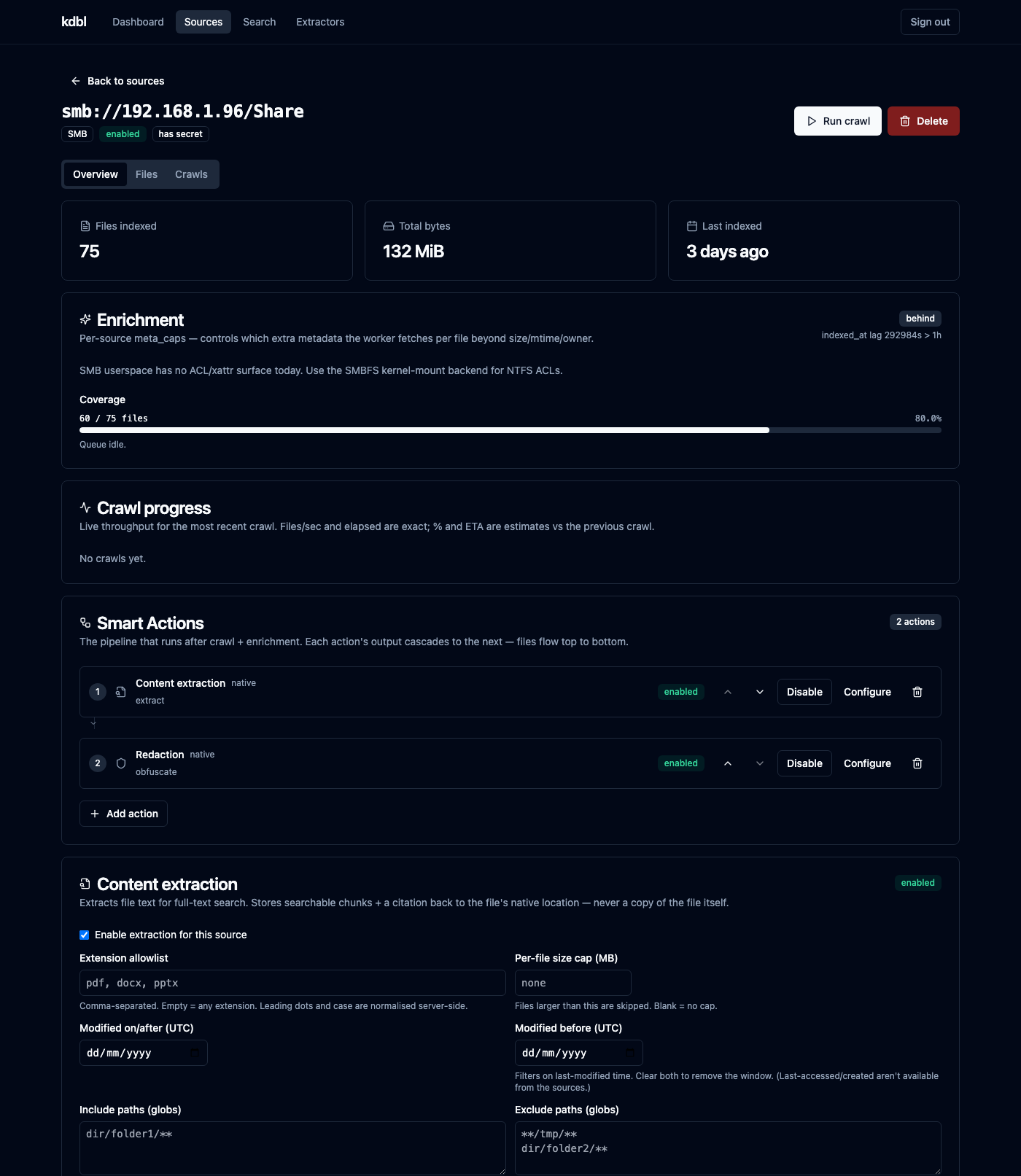
Everything is also available from the CLI and the REST API, so you can manage pipelines programmatically:
- Web console — the Smart Actions card on each source's Configure tab.
- CLI — the
kdbl-control source actioncommands (catalog,list,add,set,reorder,remove). - REST API — the action catalogue and per-source pipeline endpoints.
The actions in detail
Content extraction
The default first step. It reads each eligible file and produces the searchable text and structure that power content search and AI answers over MCP. You control which files are eligible with extension, size, and path filters, and you can watch extraction progress live on the Extraction progress card of the source's Overview tab. Leaving extraction off means a source is catalogued (its files are inventoried) but its contents aren't searchable.
Redaction
Redaction runs over the extracted text and masks matches of the patterns you select. Built-in rules cover identifiers, email addresses, card numbers, phone numbers and IP addresses; leave the selection unset and the first three apply as the default set. You can add your own patterns alongside them. The masked text is what search and AI answers return. Because it operates on a source's own pipeline, you can apply redaction to sensitive sources and leave it off elsewhere, and tune the rule set without re-extracting.
The console gives redaction a proper configuration form (Configure on the Redaction step) with a rule tester: paste representative text into Try it on sample text, click Test rules to see exactly what the current rule set would mask, and adjust before you Save settings. A redaction rule that is slightly too broad is expensive to discover after the fact, because the masked text is what everything downstream then returns.
Each run also records what it actually removed — how many matches, of which rule, shown on the Redaction card of the source's Overview tab — so you can confirm a rule is doing something, and see when one stops matching after a document format changes.
Webhook
The webhook action sends a signed JSON notification to an HTTPS endpoint you configure, each time a file completes its pipeline. Use it to kick off downstream workflows in your own systems — ticketing, data-loss-prevention review, record-keeping. Set a shared secret and every request is signed, so your endpoint can verify it came from K-Lake rather than from anyone who has learned the URL; outbound destinations are validated to keep notifications going only where you intend.
The console's webhook form includes a target pre-flight: Check endpoint checks the address is acceptable before you save, without sending anything, rather than letting every delivery fail silently against a typo'd URL.
Entity enrichment
Enrichment reads the extracted text and records the entities it names, building the knowledge graph. Like the other actions it is enabled per source, so you can build a graph over your contracts without doing the same work on a bulk archive.
Per-document work is bounded by a character budget, so one pathological file cannot monopolise the fleet, and the default entity schema can be overridden per source when a source has its own vocabulary. Coverage — how much of a source has actually been enriched — is reported in the console (the Entity enrichment card on the source's Overview tab), the CLI and the API, so a draining backlog is visible as a partial number rather than looking like a source with nothing in it.
Data classification
Classification reads the same extracted text and derives a sensitivity
level (public, internal, confidential, restricted by default) from
evidence: the kinds of personal data it finds and validates, the explicit
markings it matches, and the document categories it assigns. The level and
its evidence show on the file, filter search, and drive the rules that decide
which files search and MCP may return. Run it after extraction — and after
redaction if you use one, so it judges what remains. The full account is on
the data classification page; fleet sizing is in the
sizing guide.
Fallback extraction
A resilience action for extraction quality. K-Lake defaults to a fast, high-throughput extractor that handles the bulk of a corpus cheaply — but some files (complex layouts, unusual or structured formats) don't parse cleanly on it. Fallback extraction catches exactly those: when the default extractor fails on a file, it retries that one file on a heavier backend (for example a higher-fidelity document extractor), so the hard cases still become searchable without slowing down the common case.
- Triggers on failure — it is not part of the normal success cascade, so it adds no cost to files that extract fine the first time.
- Scanned pages and unread tables are re-read automatically. Whenever a layout-capable engine (kdoc2) is running, the pages the default extractor couldn't read are re-read by it even when extraction succeeded: scanned pages, pages it read poorly, and tables it couldn't structure (a PDF that stores a table as positioned text looks extracted and quietly isn't). This happens for every source, with or without this step; with the step, those pages are handed over as each file is extracted rather than by a background pass. Only those pages are re-read, not the whole document.
-
Opting a source out. Set
"on_unread_tables": falsein this step's settings, with the step enabled, to stop all of those re-reads for the source, scanned pages included. Failed files still fall back. There is no console switch for it; set it from the CLI or the API, for example:kdbl-control source action set --source-id 's3://my-bucket' \ --action-id <fallback-step-id> \ --config '{"backend": "kdoc2", "on_unread_tables": false}'--configreplaces the step's settings, so include the ones it already has (kdbl-control source action listshows them). A source with no Fallback extraction step adds one withsource action add --type fallback_extract --config '{"backend": "kdoc2", "on_unread_tables": false}'. - Scope it by file extension (and, optionally, size and path) so only the types you care about fall back — e.g. retry failedpdf/docxon the high-fidelity engine and let everything else be. - Configure the targetbackend(the extractor to retry on) in the action's settings. It's best-effort: a failed fallback never blocks the pipeline.
See also
- Sources — where pipelines are configured
- Web console — the Smart Actions card
- Sizing guide — how the runners scale