Licensing
KDBL Context Lake (K-Lake) deployments are licensed offline by source-file capacity (bytes) with an expiry. There is no phone-home — a deployment validates its licence entirely locally, so it works in air-gapped environments.
How it works
A licence is a small cryptographically signed document carrying the customer, capacity, expiry, and grace/lockdown windows — plus any optional capabilities your contract includes, and, for a white-label deployment, the product name to present:
- KDBL issues licences. A licence is signed when it is created and is tamper-evident — any edit to the capacity, expiry, or customer breaks the signature and the licence stops verifying.
- Every K-Lake service can verify a licence but cannot create or alter one. The signature can only be produced by KDBL, so customers cannot self-mint a licence.
kdbl-control(which customers run) can only apply and inspect a licence.
Once applied, the licence is stored in the deployment. Each service re-checks it in the background (changes take effect within ~30s): it re-verifies the signature, sums deployment-wide usage, guards against clock roll-back, and computes the current enforcement stage.
How you get a licence
Licences are issued by KDBL. Evaluations and proof-of-concept deployments get a
standard 30-day licence; paid deployments get a licence sized to the purchased
capacity and term. KDBL sends you a licence file (or a KDBL_LICENCE blob to set
before bringing the deployment up). To renew or change capacity, contact KDBL for
a new licence and apply it (see below) — no reinstall is required.
Azure Marketplace deployments are licensed automatically. If you deploy K-Lake through the Azure Marketplace offer, entitlement is derived from your Marketplace plan — there's no licence blob to obtain or apply by hand, and it tracks your subscription for the life of the deployment.
Applying a licence (customer)
# Optionally check it first (verifies locally with the built-in public key):
kdbl-control licence inspect acme.kdbl

# Apply it (the API verifies the signature before storing). The token is a
# cluster admin's or, on a deployment whose only tenant manages itself, that
# tenant's administrator's personal access token:
kdbl-control --api-url http://kdbl-api --api-token <TOKEN> licence apply acme.kdbl

# Check status any time (tenant-admin or cluster-admin):
kdbl-control --api-url http://kdbl-api --api-token <TOKEN> licence status
In the console, open Licence (under ADMIN in the sidebar, or press
⌘K / Ctrl+K and type licence). Its Apply a new licence card takes the
.kdbl file: drag it onto the card, or browse for it. The licence is verified
before it is stored. The card is there for whoever may apply a licence: a
cluster administrator, or the tenant administrator of a
single-customer deployment that no partner or platform operator manages (a
proof of concept or your own install). There the licence is your own, so no
cluster-admin token is needed. See
the deployment's administrator.
The same page shows the licence's status, expiry and capacity used. Status is
also at GET /api/licence, and a banner on every console page warns when
the licence needs attention. Tenant administrators see a summary on Settings
› General › Licence.
Enforcement
Enforcement is fail-closed. The effective stage is the most restrictive of the capacity and expiry tracks:
| Trigger | Stage | Effect |
|---|---|---|
| Within limits | valid |
Normal. |
| > 90% capacity, or < 14 days to expiry | warn |
Allowed; warning surfaced. |
| Capacity reached | block_new_ingestion |
New crawls/sources blocked; reads/search keep working. Never escalates further. |
Expired, within grace_days |
grace |
Allowed; loud warning. |
Expired, within lockdown_days after grace |
block_new_ingestion |
New ingestion blocked; reads still work. |
| Expired past lockdown | block_all |
All operations blocked except reading and applying a licence, and generating a diagnostic pack. |
| No / invalid licence at boot | — | Container refuses to start (see below). |
"Block new ingestion" is enforced both at the API (the crawl / add-source endpoints
return 403) and in the worker (already-queued work stops too). MCP retrieval is
blocked at block_all too.
block_all deliberately keeps three things reachable, so a lapsed deployment is
recoverable rather than bricked: reading the licence status (so you can see why
everything is blocked), applying a renewed licence, and generating a
diagnostic pack. Everything else returns 403.
Fail-closed at boot (no opt-out). Every K-Lake service checks the licence at
startup, reading it from the kdbl-licence Secret (KDBL_LICENCE /
KDBL_LICENCE_FILE):
- Absent or invalid → the service refuses to start. There is no opt-out flag; a deployment cannot run unlicensed. (Azure Marketplace deployments are the one exception: they carry no licence file because entitlement comes from your Marketplace plan instead — see above.)
- Expired → the API still boots (so it can serve
/licencefor live renewal); the data-plane services refuse to start once past lockdown (block_all), but boot fine in grace / block-new.
So a fresh deployment must be provisioned with the kdbl-licence Secret. The
standard install scripts enforce this. Evaluations get a 30-day licence from KDBL —
see How you get a licence above.
Paid features
Search, content extraction, entities and MCP come with every licence. Paid features are granted individually: your licence lists each one you have bought, and can cap it with a limit. Both are covered by the licence signature, so they can't be edited.
| Feature | What it gives you | Limits |
|---|---|---|
Structured sources (structured_sources) |
Your AI assistants answer questions from your data warehouses, queried in place through a semantic model, with the warehouse's own permissions. Covers the console's Databases page, the warehouse API and the warehouse MCP tools. See Data warehouses. | max_warehouses: enabled warehouses across the whole deployment. |
VLM extraction (vlm_extraction) |
Choosing a vision-model extractor (for example kvision, or a custom vision model) for a source, as a tenant default, or in a pipeline step. Reads scanned forms, photographed pages, charts and diagrams that text extraction and OCR get wrong. | — |
Cloud extraction (cloud_extraction) |
Reading hard pages with a hosted document service in your own cloud account, for sources an administrator has consented for. See Cloud extraction. Requires VLM extraction: without it, cloud extraction is reported as not enabled and does nothing. | — |
Model authoring assistance (structured_sources_assist) |
Optional AI help for database model authors, with your own AI provider key: suggested descriptions, synonyms and worked questions in the model editor, and Ask in the Playground. Off for each tenant until a tenant administrator switches it on. See AI help and Ask. Requires Structured sources. | — |
The first-party engines — klex, kdoc2 and kmedia — never need a feature. The source Extractor picker offers only the extractors your licence includes, and a pipeline step can't select one it doesn't include.
Seeing what you have
- In the console, the Licence page has a Features card listing every paid feature, whether you have it or not, with what it does and the value it brings. A feature your licence lacks says how to add it, and one that needs another feature first says so.
- From the CLI,
kdbl-control licence statusprints each feature, whether it is licensed and enabled, and its limits. - Over the API, any signed-in user can call
GET /api/features, which returns each feature'slicensedandenabledstate and itslimitsfor the caller's tenant.GET /api/licencecarries the same list.
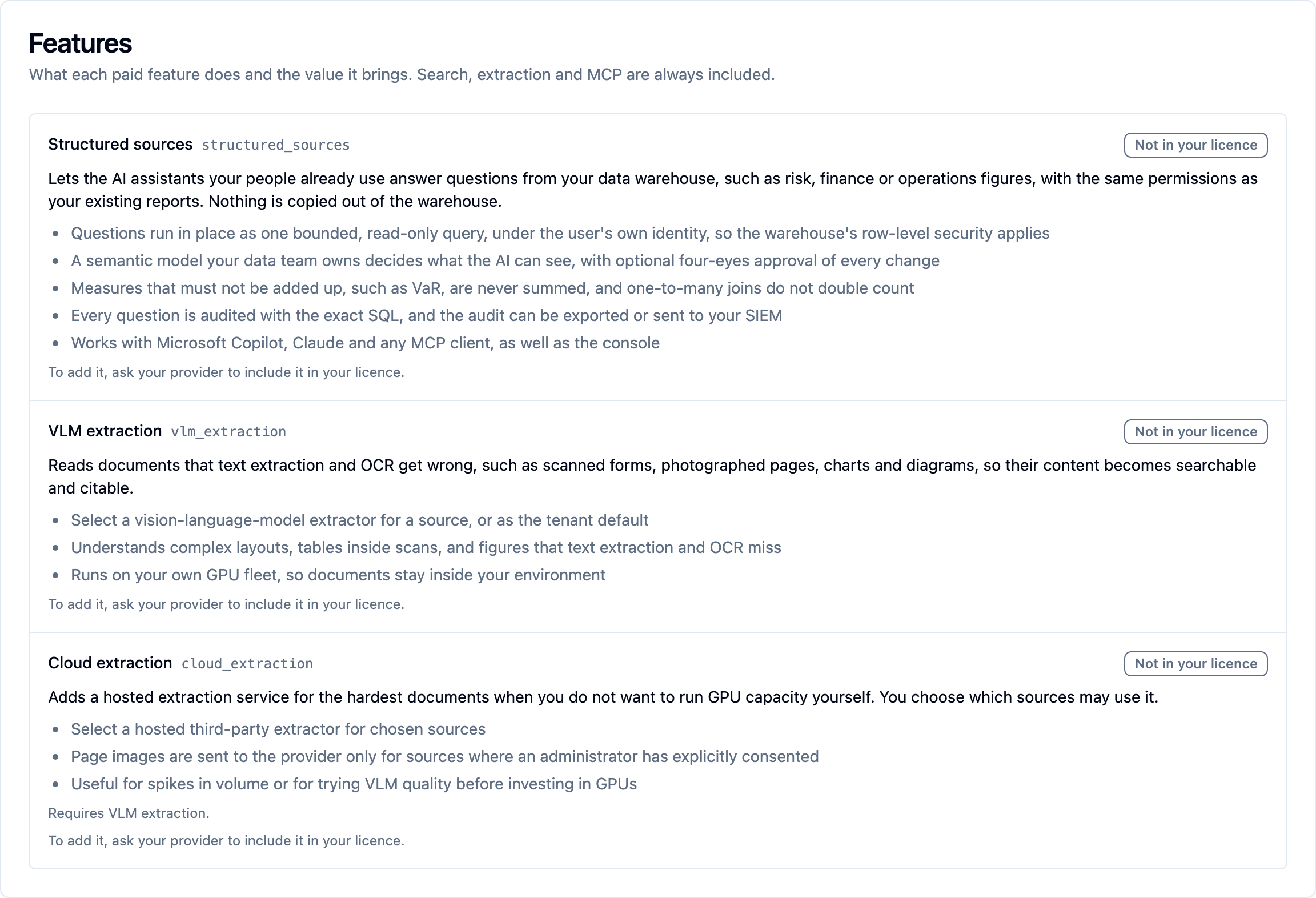
To add a feature, ask KDBL for a licence that includes it and apply it as usual; no reinstall is needed. Azure Marketplace plans don't include paid features today; if you deployed through the Marketplace, contact KDBL.
Enabling a feature for some tenants only
A licence covers the whole deployment. By default, every tenant has every feature the licence grants, and a single-customer deployment never needs to change that. A provider hosting several customers can narrow it per tenant, so a tenant has a feature only when the licence grants it and the tenant's feature list names it. Only a cluster admin can change the list:
# Enable structured sources for one tenant only:
kdbl-control --api-url http://kdbl-api --api-token <CLUSTER_ADMIN> \
  tenant features --slug acme --enable structured_sources

kdbl-control ... tenant features --slug globex --disable structured_sources
kdbl-control ... tenant features --slug globex          # show the list
kdbl-control ... tenant features --slug globex --all    # back to every licensed feature
kdbl-control ... tenant features --slug globex --none   # no paid features
The same is the Licensed features card on the tenant's page in the console
(Tenants, then the tenant: On or Off per feature, and Reset to
every licensed feature),
or PATCH /api/tenants/<slug> with {"features": [...]}. Per-tenant quotas
and daily usage metering are covered in
Hosting many customers.
When a feature lapses
When you apply a licence without a feature, a licence expires past lockdown, or a provider switches a feature off for a tenant:
- Your data is kept. Nothing is deleted.
- Administrators can still see and clean up. For structured sources, listing, viewing and deleting warehouses keep working.
- Everything else is refused with a
403whose message startsfeature_not_licensed:(the licence doesn't grant it) orfeature_not_enabled:(it isn't enabled for this tenant). - The feature's MCP tools are hidden from connected AI assistants, which are told to refresh their tool list.
- Cloud extraction stops sending pages. Pages that needed it keep the standard extractor's text.
Which licence is in force
A deployment can hold two licences: the one in the kdbl-licence Secret, read
by every service at start-up, and the one applied in the console or with
kdbl-control licence apply. The one applied in the console is in force, and
it survives restarts. The Secret's licence replaces it only when the
Secret's licence was issued later, as a renewal rolled out through Helm
would be.
Keep the Secret current anyway: a service refuses to start if the Secret's licence has expired past its lockdown window.
Tamper model
The licence is cryptographically signed — capacity and expiry can't be edited without invalidating the signature, and only KDBL can issue a valid licence. Runtime enforcement is tamper-resistant, not tamper-proof: it runs on hardware the customer controls, so a determined party with root could patch the software — which is true of all self-hosted licensing, and is a breach of the Commercial Licence Agreement. The defences raise the bar substantially: enforcement fails closed, usage is read from authoritative state, clock roll-back gains nothing, services verify independently, and stage changes are logged.
Renewals and licence handling
To renew or resize, KDBL issues you a new licence; apply it with
kdbl-control licence apply (or POST /api/licence) with no restart required.
See Licence key management for guidance on storing and renewing your licence.