Why can't this user see this file?
The support ticket behind this page reads: "They find the documents in search, but when they ask the AI assistant, it says there is nothing." Or: "The share is set to per-file trimming and our domain users see none of it." Both have a short diagnostic path in KDBL Context Lake (K-Lake), and both usually end in one of a handful of fixes. Work down the page in order.
Before you start: who is actually asking?
Two callers can look at the same source and get different answers, and neither is wrong:
- Tenant administrators, and a source's owner or editor, bypass per-file trimming on that source. Whoever created a source is its owner. So the operator who checks in the console sees every file; the person who reported the problem sees only what the file server would show them.
- Search and the AI assistant apply the same rules. "Search shows it, the assistant doesn't" is almost always two different people — the operator in the console and the user behind the assistant — not two different surfaces.
Test as the user who reported it, or use the access check below, which replays the decision for any user without needing their token.
Step 1 — Can they see the source at all?
Per-file trimming decides which files someone sees inside a source they can already see. Whether they can see the source is a separate gate, and the symptom is identical: nothing found.
Open the source (Sources, or press ⌘K / Ctrl+K and type # and the
source's name) and its Security tab, and look at the Access grants
list. The
user, or one of their groups, needs viewer or better — or the tenant's
access mode must be
Everyone in this tenant, which shows as a * grant in the same list. No grant means stop
here: grant their group a role, and the access check in step 2 will confirm it.
Step 2 — Run the access check
Open the file (the source's Files tab, then the row; Find by name narrows the list), scroll to the Access card, enter the user in Check access for a user (email, id or principal) — their email, their user id, or their principal as shown on Settings › People & access › Users and roles — and click Check. Tenant administrators only.
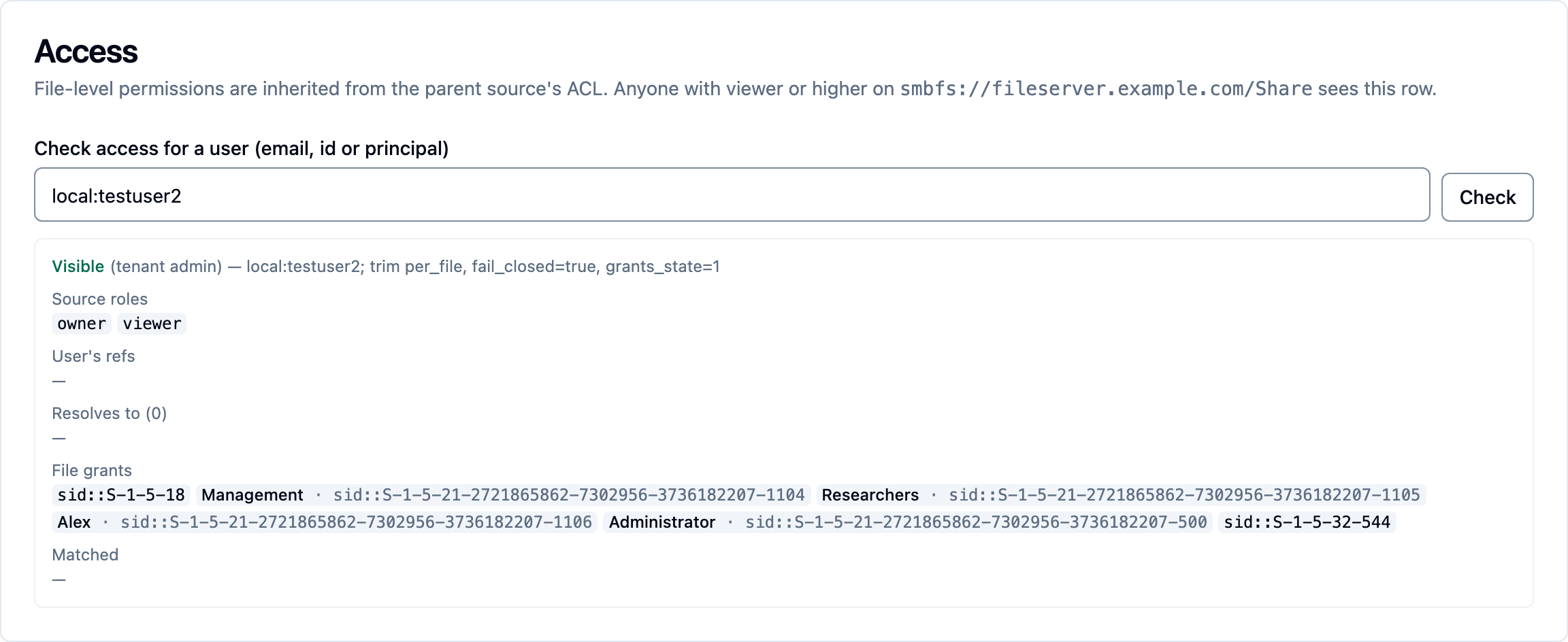
The result is the trimming decision replayed in the open:
| Line | What it tells you |
|---|---|
| Visible / Hidden and the reason | The step that decided it — see the table below. |
| Source roles | The roles the user holds on the source through grants. Empty means step 1 failed. |
| User's refs | The identities the user's sign-in yields: object id, email, UPN, groups. |
| Resolves to | Everything those identities are known to be equivalent to through directory enrichment: on-prem SIDs, nested groups, Domain Users, Authenticated Users. This is the list that must reach the file. |
| File grants | Every identity the file's own permissions grant read to. |
| Matched | The intersection. Empty on a per-file source means hidden. |
Hidden results carry a hint where one applies — no source role, no
correlation reaching the file's SIDs, a group probably reached only through
nesting, a well-known group on the ACL, a deny on the file, or grants not yet
computed. The API result also lists the file's read denies
(file_deny_refs) and which of them the user holds (denied_refs).
The same check from the command line or the API:
kdbl-control --api-url "$KDBL_URL" --api-token "$KDBL_TOKEN" \
  source access-check --source-id 'smbfs://nas.corp/finance' \
  --key 'Reports/Q3.xlsx' --user alice@corp.com
The reasons
| Reason | Verdict | Meaning |
|---|---|---|
tenant admin |
Visible | The user is a tenant administrator; trimming does not apply to them. |
source owner |
Visible | The user owns or edits the source; trimming does not apply on it. |
not per file |
Visible | The source is in source_only or open mode; source access is enough. |
world readable |
Visible | The file is readable by Everyone on the file server. |
grant |
Visible | One of the user's resolved identities holds a read grant on the file. |
well known |
Visible | The file grants Authenticated Users or BUILTIN\Users and the source treats those as everyone. |
fail open |
Visible | Grants are not computed yet and the source's fail-closed setting is off. |
no source role |
Hidden | Step 1: no grant on the source. |
acl deny |
Hidden | The file's permissions deny read to an identity the user holds — by name or through a group. A deny overrides every allow, including one for Everyone, as on the file server. |
acl deny truncated |
Hidden | The file carries a read deny, and the user belongs to so many groups that their list could not be resolved in full, so membership of the denied group cannot be ruled out. The file is hidden to be safe. |
grants not computed |
Hidden | The file's permissions have not been read yet (fail-closed). |
no matching grant |
Hidden | The file has grants, the user has identities, and none of them meet. |
Step 3 — Fix by reason
no source role
Grant the user's group a role on the source (its Security tab, Access
grants card: type the group in Who, pick a Role, click Grant; or
kdbl-control acl grant). Prefer groups so membership drives access. If every
new source should be visible to everyone in the tenant, set Settings › People &
access › Access to new sources to Everyone in this tenant (or press ⌘K /
Ctrl+K and type access to new sources) and apply it to the existing
sources.
acl deny and acl deny truncated
K-Lake is doing what the file server does: a read deny on a group hides the
file from every member of that group, even one allowed by name, through another
group, or through Everyone, and a deny wins whatever the order of the entries
on the ACL. If the user should see the file, the fix is on the file server —
remove the user from the denied group, or remove the deny — and then re-crawl
so K-Lake picks up the changed permissions. For acl deny truncated, the user
is in an unusually large number of groups; see
security trimming for how denies are applied.
grants not computed
The source is in per-file mode but its files' permissions have not been
captured. For SMB and NFS sources make sure the ACL capture (ntfs_acl /
nfs4_acl) is ticked on the Enrichment card of the source's
Overview tab, and click Backfill now there; POSIX
permissions need no capture. Files appear as their grants land. See
enabling it on a source.
no matching grant — the common case
Look at the two lists. File grants are typically on-prem SIDs
(sid::S-1-5-21-…), and Resolves to is what the user's cloud identity is
known to be. They meet only when directory enrichment has told K-Lake they are
the same people. Three things cause a gap:
The groups in the token are names, not ids. Entra emits group object
ids, and the file-side mapping is keyed on them. Check that the tenant's
groups claim carries ids, and that any declared mapping uses sid::<SID> on
the file side (an empty scope — SIDs are globally unique).
The share grants a group the user reaches only through another group. A
share granted to Finance-Share-Readers, which contains Finance, which
contains the user, needs the nesting expanded. AD/LDAP correlation expands
it from each object's memberOf, however deep the nesting, and also derives the
two memberships AD never lists: every account's primary group (Domain
Users for nearly every account) and Authenticated Users. Configure it and
run a sync:
export KDBL_LDAP_BIND_PASSWORD='…'
kdbl-control --postgres-url "$KDBL_POSTGRES_URL" directory set-ldap \
  --tenant acme --url ldaps://dc.corp.example:636 \
  --bind-user 'CORP\svc-klake' --base-dn 'DC=corp,DC=example' \
  --upn-rewrite corp.local=corp.com

kdbl-control --postgres-url "$KDBL_POSTGRES_URL" directory sync-ldap --tenant acme
After the sync, the user's Resolves to list grows to include the nested groups and Domain Users, and the check turns Visible (grant). Entra Graph discovery on an AD-synced tenant does the same for the groups Entra knows, and adds the Domain Users and Authenticated Users edges for every synced user. See directory enrichment.
The share grants "everyone in the company" by a well-known group. An ACL
that grants Authenticated Users (S-1-5-11) or BUILTIN\Users
(S-1-5-32-545) grants every domain account on the file server, but no cloud
identity carries either. With directory enrichment configured, every synced
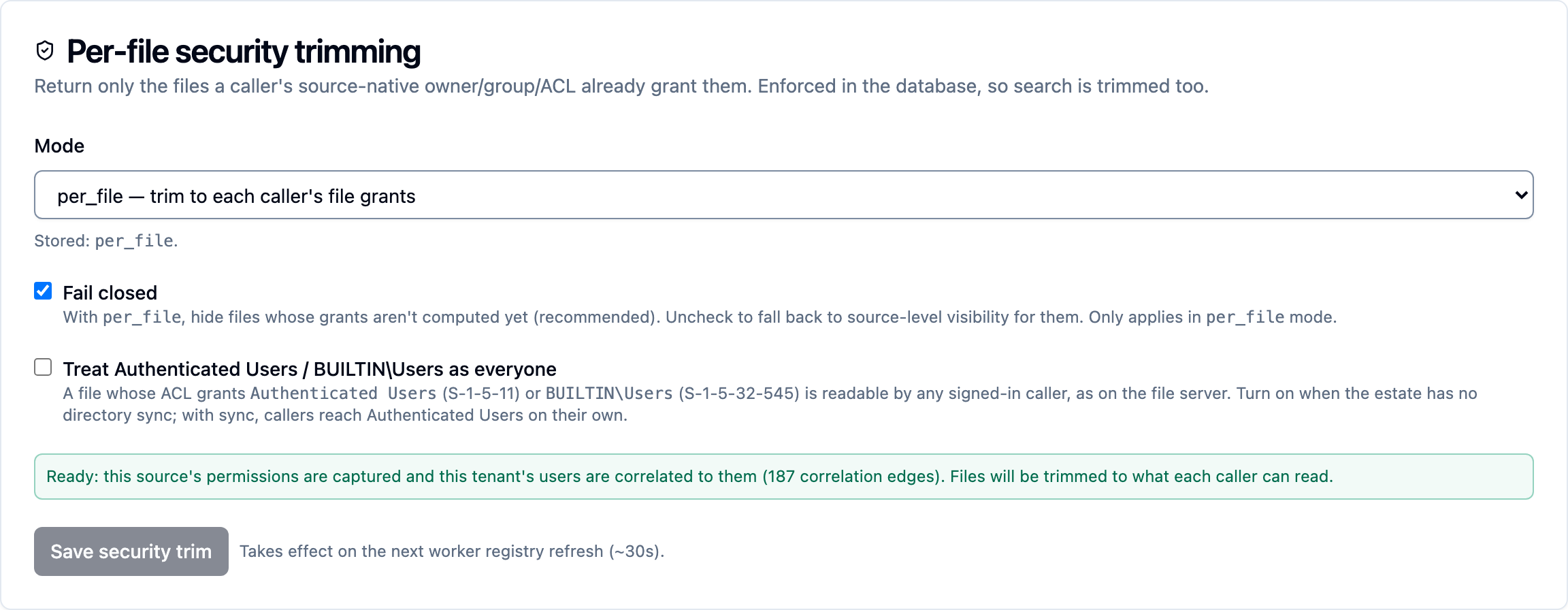
account reaches Authenticated Users on its own. Without it, tick Treat
Authenticated Users / BUILTIN\Users as everyone on the source's Security
tab and click Save security trim: a file that grants either is then readable by any signed-in caller, as it
is on the file server. Everyone (S-1-1-0) needs no opt-in.
kdbl-control --api-url "$KDBL_URL" --api-token "$KDBL_TOKEN" \
  source security-trim --source-id 'smbfs://nas.corp/finance' --well-known-open true
A worked example
The finance share is set to per-file trimming. The share's ACL grants
CORP\Finance-Share-Readers, which contains Domain Users. Entra users find
the files in search but the assistant returns nothing.
- Who is asking? The person searching in the console is the tenant administrator who created the source. The assistant runs as an ordinary federated user.
- Access check for that user: Hidden (no matching grant). File grants
show
sid::S-1-5-21-…-1178(Finance-Share-Readers); the user resolves to their own object id, email and the groups in their token — none of them that SID. Hint: a group probably reached only through nesting. - Fix: configure AD/LDAP correlation and run a sync. Domain Users is
derived as every account's primary group, and its membership of
Finance-Share-Readers comes from
memberOf. - Re-check: Visible (grant), matched on
sid::…-1178. The assistant now returns the same files search does.
See also
- Security trimming — the model, modes and fail-closed behaviour
- Directory enrichment — Entra Graph and AD/LDAP correlation
- Console sign-in and roles — who signs in, and as what
- Sources → Access grants — the source-visibility gate