Security trimming¶
Per-file security trimming makes a caller see only the files their source-native permissions already grant them — the file's own owner, group, or ACL. A user who can't read a file on the NAS can't see it, its metadata, or its extracted content through KDBL Context Lake (K-Lake) either.
Enforcement lives in the datastore's row-level security (RLS), so it applies everywhere automatically: list, file detail, and content search are all trimmed by the same predicate. There is no separate "filter the search results" code path to keep in sync.
Trimming is fail-closed. A source configured for per-file trimming hides any file whose permissions haven't been read yet — K-Lake would rather hide a file you could read than leak one you can't.
New sources on connectors that can read file permissions (SMB via the kernel mount, and NFS) use per-file trimming by default, and capture the permission data needed for it. The other connectors — S3, Azure Blob, OneDrive, and the userspace SMB backend — stay on source-level visibility, because trimming a source whose permissions are never read would hide every file in it permanently. (Azure Blob is the one you can opt into anyway: see the file-gateway note below.)
Sources that already exist are never changed by an upgrade.
How it works¶
Both sides of the question — "who is this caller?" and "who may read this file?" — are collapsed into one namespace, the principal ref, of the form <kind>:<scope>:<value>. Each distinct ref is interned to an integer principal_id.
- File side. When a file is indexed, K-Lake derives the set of principal refs that may read it from the file's own permissions — its ACL where one is captured, and its POSIX mode bits on sources whose mode bits are real (see POSIX vs ACL grants) — and records a read-grant for each granted principal.
- Caller side. When a caller hits the API, their IdP claims (object id, email, UPN, group memberships) are turned into principal refs, resolved to the
principal_idset, and handed to the datastore. A caller using a personal access token resolves the same way, from the email and groups on the user the token belongs to.
A file is authorized for a caller when the caller's resolved principal id set intersects the file's grant set — a positive set-intersection. The same authorization predicate is applied to file listings, metadata, and content, ANDed on top of the existing tenant + source-visibility checks. It short-circuits in this order:
- Tenant admin, or source
owner/editor→ unrestricted (admin path). - Source not in
per_filemode → source-level visibility (today's behavior). - File is world/everyone-readable (
grants_state = 2) → visible. - Caller holds a read grant on the exact file → visible.
fail_closedis off and the file's grants aren't computed yet → visible (fail-open fallback).- Otherwise → hidden.
Two gates. Steps 1–2 are the source-visibility gate — a caller must be a tenant admin or hold a source access grant (
owner/editor/viewer) before the source is visible at all. Steps 3–6 are per-file trimming within a visible source. This page is about the second gate; manage the first via the Access grants card,kdbl-control acl, or/api/sources/:id/acl.
The principal-ref kinds are:
| Kind | Scope | Example | Origin |
|---|---|---|---|
sid |
AD/domain (often empty) | sid::S-1-5-21-… |
NTFS owner / ACE SID |
upn |
(none) | upn:alice@corp.com |
User principal name — the cross-directory bridge key |
email |
(none) | email:alice@corp.com |
Email / Google Workspace group address (lowercased) |
oid |
issuer | oid:<issuer>:<objectId> |
Entra/Azure object GUID (user or group) |
posixuid |
source_id | posixuid:<source_id>:<uid> |
Numeric POSIX owner — source-scoped (uid spaces are server-local) |
posixgid |
source_id | posixgid:<source_id>:<gid> |
Numeric POSIX group — source-scoped |
name |
directory | name:<dir>:<group> |
Resolved friendly user/group name |
nfs4who |
source_id | nfs4who:<source_id>:<who> |
NFSv4 who-string, pre-resolution |
The same ref can appear on both sides — e.g. a POSIX group on the file and the caller's resolved group — and that's the common case. When the file-side and caller-side refs are in different namespaces (an on-prem AD SID on the file vs. an Entra group object id in the token), they're bridged by directory enrichment, which builds the alias graph.
Enabling it on a source¶
The trim policy lives in a security_trim block inside the source's config JSON, read by both the workers and the authorization predicate. The block has two fields:
| Field | Values | Default | Meaning |
|---|---|---|---|
mode |
per_file | source_only | open |
source_only |
per_file turns on per-file trimming. source_only is today's source-level visibility. open explicitly marks the source fully public (no trimming, even if other sources in the tenant trim). An absent block or any unrecognised value falls back to source_only. |
fail_closed |
true | false |
true |
With per_file, decides what happens to files whose grants aren't computed yet: hide them (true) or fall back to source-level visibility (false). |
Set it through the dedicated endpoint, which merges the block into the source config without disturbing the rest (the same merge pattern as meta-caps / subtree). The change takes effect within ~30 s.
CLI:
kdbl-control --api-url "$KDBL_URL" --api-token "$KDBL_TOKEN" \
  source security-trim --source-id 'smbfs://nas.corp/finance' \
  --mode per_file --fail-closed true
--fail-closed is optional — omit it to flip the mode while leaving the stored fail_closed untouched.
API:
curl -X POST -H "Authorization: Bearer $KDBL_TOKEN" \
     -H "Content-Type: application/json" \
     "$KDBL_URL/api/sources/<urlencoded-source-id>/security-trim" \
     -d '{ "mode": "per_file", "fail_closed": true }'
The response echoes the stored policy ({ "mode": ..., "fail_closed": ... }). Auth is tenant-admin or the source's owner/editor; an unauthorised caller gets 404 (the row isn't visible under RLS), not 403.
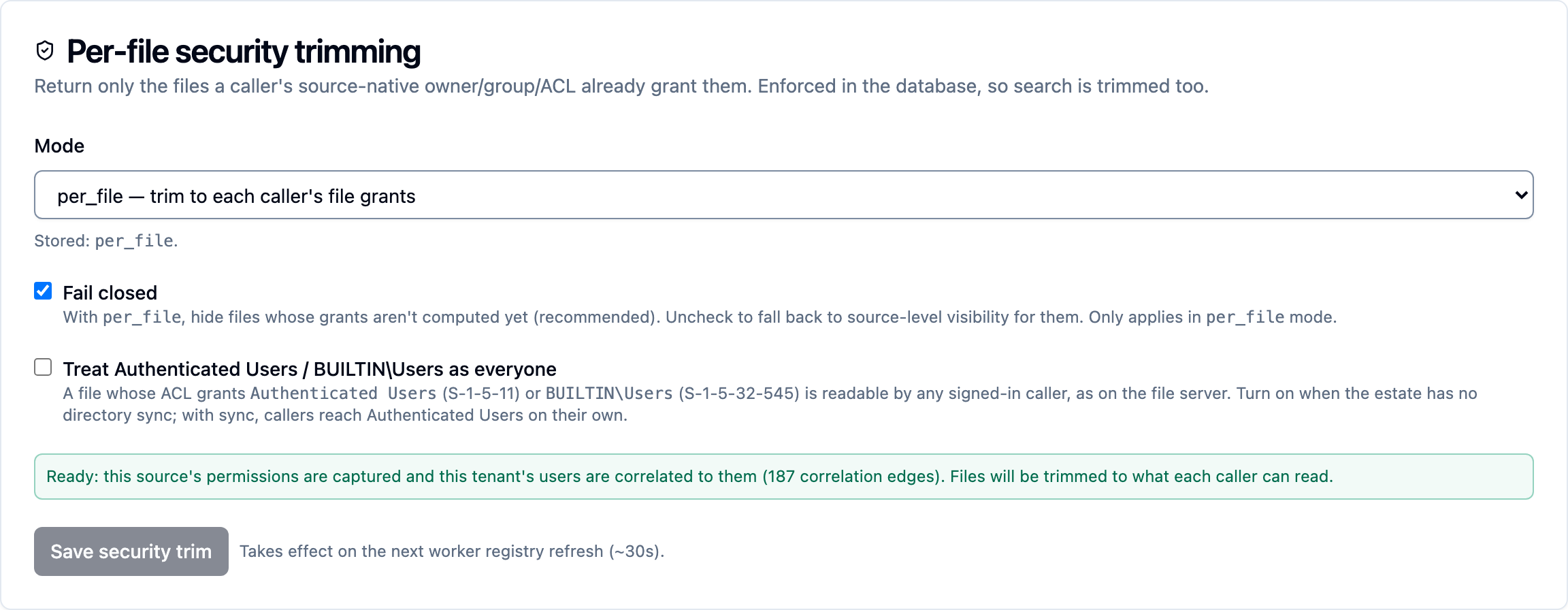
In the console, open the source (Sources, or press ⌘K / Ctrl+K and type # and its name) and its Security tab: the Per-file security trimming card (a Mode dropdown, Fail closed and the well-known-groups option, saved with Save security trim) posts to this endpoint. Below the options it says whether the source is ready for per-file trimming: whether its permissions are captured and the tenant's users correlated to them.
Prerequisite for ACL-based trimming: capture the ACL bytes¶
POSIX grants are derived automatically from the mode/uid/gid the crawl already captures — no extra configuration, and on SMB kernel-mount sources they are not derived at all (see below). ACL grants are not: the source must first capture the raw ACL bytes via a metadata-capture cap (ntfs_acl for SMB/SMBFS, nfs4_acl for NFS). Without the cap there are no ACL bytes to derive grants from, so on an SMB share the file has no grants at all — grants_state = 0, hidden under fail-closed. This is the intended outcome: the alternative would be to grant on the mount's synthetic mode bits, which describe nothing about the file.
Enable the cap the same way as any other enrichment — see sources.
UI: the source detail page's enrichment controls let you toggle NTFS / NFSv4 ACL capture.
Azure Blob backed up by a file gateway. If a backup or file-gateway product stamped the file's original Windows security descriptor into blob metadata, K-Lake reads it from there — no
ntfs_aclcapture cap is needed for those blobs, and NTFS ACL trimming works on the cloud copies. If the descriptor can't be parsed, the file fails closed. See Azure Blob.
CLI:
kdbl-control --api-url "$KDBL_URL" --api-token "$KDBL_TOKEN" \
  source meta-caps --source-id 'smbfs://nas.corp/finance' --caps ntfs_acl
# NFS export:
kdbl-control --api-url "$KDBL_URL" --api-token "$KDBL_TOKEN" \
  source meta-caps --source-id 'nfs://nas.corp/export/data' --caps nfs4_acl
API:
curl -X POST -H "Authorization: Bearer $KDBL_TOKEN" \
     -H "Content-Type: application/json" \
     "$KDBL_URL/api/sources/<urlencoded-source-id>/meta-caps" \
     -d '{ "caps": "ntfs_acl" }'
Console: on the source's Overview tab, tick the cap on the Enrichment card and click Save caps; Backfill now on the same card fills in files already indexed.
SMB userspace (the
smbprotocol) has no ACL surface;ntfs_aclis masked out for it at registry time. Use thesmbfs(kernel-mount) backend for NTFS ACL capture.
After enabling a cap on a source that's already indexed, run a backfill so existing files get their ACL bytes (and therefore their grants) computed:
POSIX vs ACL grants¶
K-Lake derives read-grants from whichever permission model the source exposes. Each cap that produced a grant is tracked against that grant, so re-crawling one model's grants never clobbers another's.
POSIX (automatic). Derived from the file's mode bits and owner/group, on sources where those bits describe the file — NFS and other POSIX filesystems:
| Mode bit | Octal | Effect |
|---|---|---|
| other-read | 0o004 |
File is world-readable → grants_state = 2, no per-principal rows needed |
| owner-read | 0o400 |
Grant to posixuid:<source_id>:<uid> |
| group-read | 0o040 |
Grant to posixgid:<source_id>:<gid> |
SMB kernel-mount sources derive no POSIX grants
A CIFS mount does not expose the file's real owner, group or mode. Unless
the server negotiates POSIX extensions, the kernel synthesises them
from the mount options — typically the same uid, gid and file_mode
for every file on the share, regardless of what the Windows security
descriptor actually says. Deriving grants from those bits would grant on a
fiction, and a mount specifying a world-readable file_mode would mark
every file on the share world-readable.
So on smbfs sources the POSIX derivation above is switched off entirely.
Access comes from the NTFS ACL alone, which means ntfs_acl capture is not
an optimisation for these shares — it is the only thing that grants
access. A file whose ACL has not been captured has no grants and stays
hidden under fail-closed.
Upgrading to 0.1.37 or later repairs shares affected by the earlier behaviour automatically. Re-crawl afterwards to restore any file whose NTFS ACL genuinely does grant Everyone.
ACL (requires the cap). Derivation is deliberately conservative — it only emits a grant it is certain of, and any parse error or malformed field yields no grants (fail-closed):
- NFSv4 (
nfs4_acl, RFC 7530 §5.11 wire format). Allow-read ACEs become grants;OWNER@/GROUP@resolve to the file's POSIX owner/group principals, named whos becomenfs4who:<source>:<who>refs for directory enrichment to alias later.EVERYONE@allow-read marks the file world-readable; aDENY-read onEVERYONE@yields no grants. Other deny-read ACEs are recorded as denies (below); a deny onOWNER@orGROUP@whose uid or gid is unknown hides the file from everyone. - NTFS (
ntfs_acl, parsed from the self-relativeSECURITY_DESCRIPTOR, MS-DTYP §2.4.6). DACL allow-read ACEs becomesid::<SID>grants; the well-known Everyone SID (S-1-1-0) marks the file world-readable, and a deny-read on Everyone hides the file from everyone. - Deny ACEs (both kinds). A read deny is checked against every identity the caller holds, groups included. A match hides the file whatever the allows say — so a user allowed by name, through another group, or through Everyone, but denied through a group they belong to, does not see the file, just as on the file server. "Everyone: allow, Contractors: deny" hides the file from contractors. Deny wins regardless of ACE order, which can hide a file in the rare case where Windows would let an earlier allow take precedence over an inherited deny — K-Lake errs closed. A user whose group list is too large to resolve in full cannot be ruled out of a denied group, so files carrying a deny are hidden from them.
Well-known groups on the ACL¶
An NTFS ACL that grants Authenticated Users (S-1-5-11) or BUILTIN\Users (S-1-5-32-545) grants every domain account on the file server — it is the commonest way of saying "everyone in the company" — but neither SID is anything a cloud identity carries. With directory enrichment configured, every synced account is given a caller-side edge to Authenticated Users (see directory enrichment), so such files resolve normally. Without it, tick Treat Authenticated Users / BUILTIN\Users as everyone on the source's Security tab and click Save security trim (or source security-trim --well-known-open true, or well_known_open on the endpoint above): a file whose grants include either SID is then readable by any signed-in caller, the way it is on the file server. Off by default; Everyone (S-1-1-0) needs no opt-in.
grants_state and fail-closed behavior¶
Each file's grants_state records whether grants have been computed and what they say. It's how the read-time predicate distinguishes "no grants yet" (fail-closed input) from "grants present" without scanning the full grant set on every hit.
grants_state |
Meaning | Visible under per_file? |
|---|---|---|
0 |
No per-file grants computed (uncomputed, or no metadata captured yet) | Hidden when fail_closed = true; falls back to source-level visibility when fail_closed = false |
1 |
Grants computed and present | Visible only to callers holding a matching grant |
2 |
Grants computed; file is world / everyone-readable | Visible to everyone with source access |
The default for every new file is 0. So the moment you flip a source to mode = per_file, files trim down to nothing until their grants are computed — which is exactly the fail-closed guarantee, but it means you should backfill (and, for ACL sources, enable the capture cap first) before relying on the source being usefully visible.
Correlating callers to files¶
POSIX trimming works out of the box when the caller's IdP groups resolve to the same names/ids as the file owners. Cross-directory cases — an on-prem AD SID on a Windows ACL vs. an Entra object id in an OIDC token, or a numeric POSIX gid vs. a name-based IdP group — need the two namespaces bridged.
That bridging is directory enrichment: it materializes the alias graph from declared operator mappings, POSIX name resolution, Entra Graph discovery (group + user SIDs, with group-membership/overage resolution), and AD/LDAP correlation for unlinked on-prem directories — including nested group membership, each account's primary group (Domain Users) and Authenticated Users, the groups an NTFS ACL most often grants and that no cloud directory carries. Only high-confidence alias edges are used to expand grants, so a fuzzy match can never produce a false grant. See directory enrichment for how to configure and run it.
Diagnosing "this user cannot see this file"¶
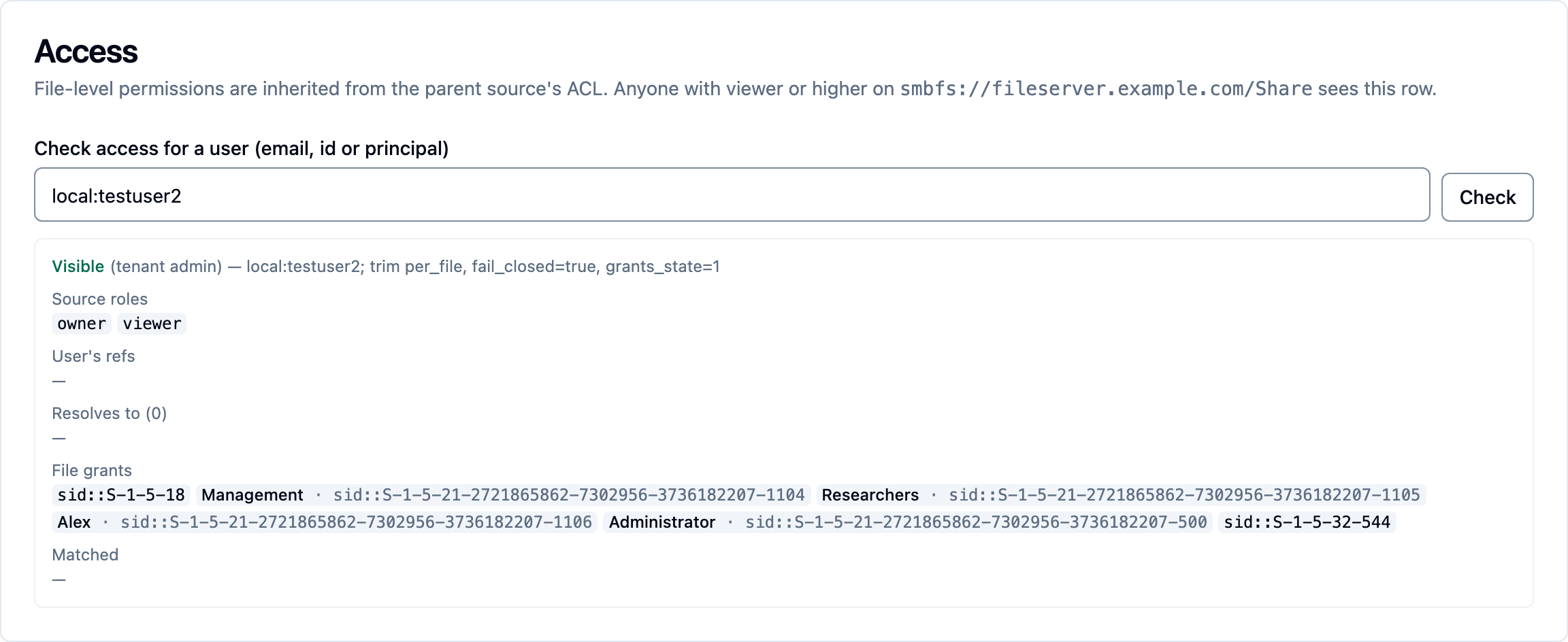
Ask K-Lake rather than guessing: the Access card on the file's page (Check access for a user (email, id or principal), then Check), kdbl-control source access-check --source-id … --key … --user …, or GET /api/sources/:id/files/:key/access?user=<email | id | principal> (tenant admin). It replays the trimming decision for that user and file in the open — verdict and the step that decided it, the user's source roles, the identities their sign-in yields and what those resolve to, every read grant on the file, and the intersection — with a hint where one applies. The step-by-step, including the classic Domain Users case, is on Why can't this user see this file?.
Who can see a source at all¶
Trimming decides which files someone sees inside a source they can already see. Whether they can see the source is a separate control, and the two are easy to confuse when someone reports seeing nothing.
Each tenant has an access mode that decides what happens when a source is added:
| Mode | When a source is added | Result |
|---|---|---|
| Everyone in this tenant (automatic) | Everyone in the tenant is given read access to the source | People see the source immediately; per-file permissions still decide which files |
| Only people an administrator chooses (manual) | Nobody is given access | Nobody sees the source until an administrator grants it |
Automatic (Everyone in this tenant) is the default for new tenants. It exists because manual mode made a new user's first connection — especially from an AI assistant — return nothing at all, which reads as a broken product rather than a security posture. The promise that people only see what they already have access to is kept by per-file permissions, not by hiding the source.
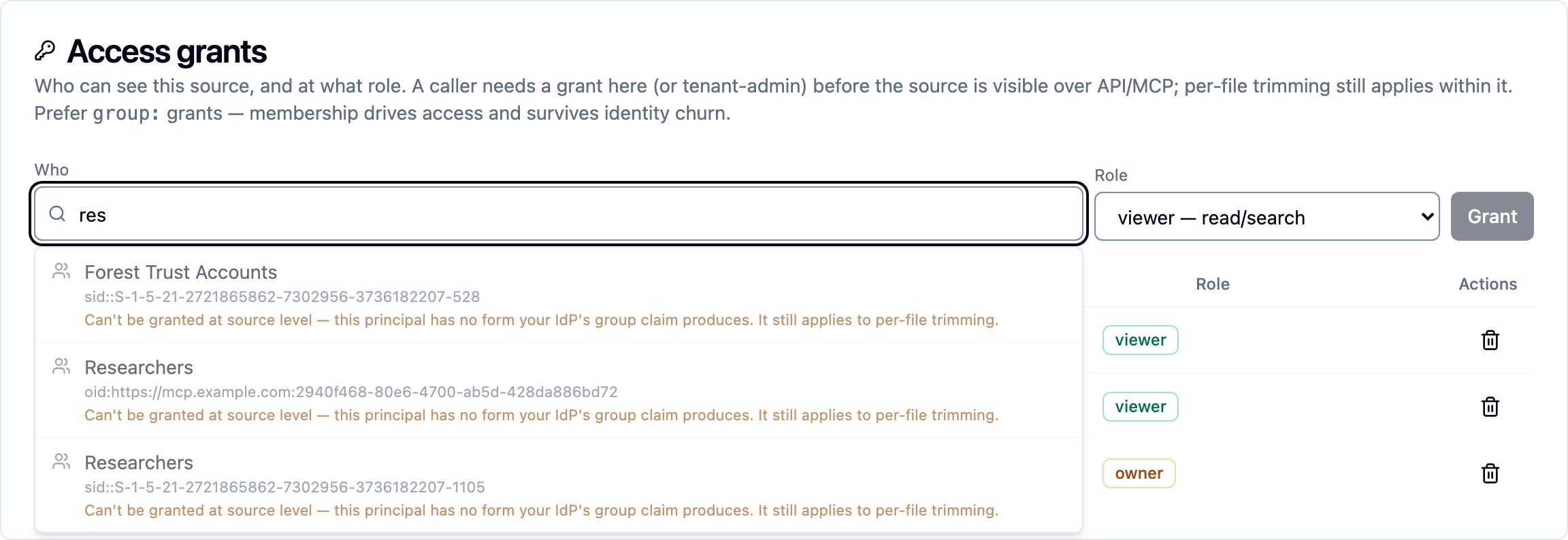
The blanket grant is a normal, visible entry in the source's access list, so "why can this person see this?" has a readable answer and revoking it is an ordinary delete. It only ever grants read access.
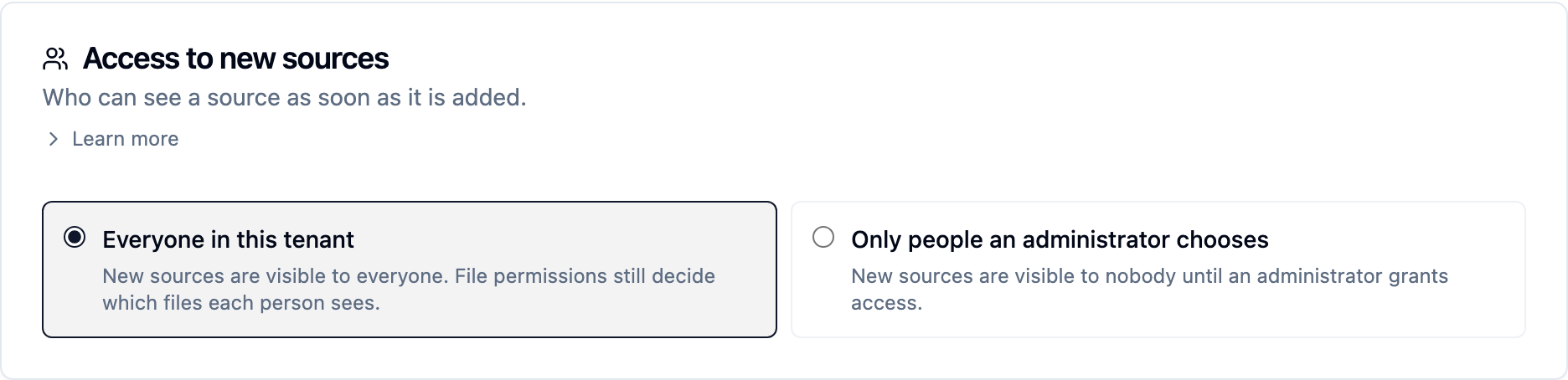
Change it under Settings › People & access › Access to new sources (or press ⌘K / Ctrl+K and type access to new sources).
Upgrading never widens access. Tenants that existed before this setting keep manual mode, so nothing changes for them until an administrator opts in. When they do, existing sources are only affected if they explicitly ask — and the console tells them how many sources that would open, and how many of those do not use per-file permissions, before they commit. A tenant already in automatic mode with sources that predate it sees an Apply to N existing sources now button on the same card, so the blanket grant can be extended to them without switching mode and back.
Limitations and current management surface¶
- Set via UI, CLI, or API. The Per-file security trimming card on the source's Security tab, the
source security-trimCLI command, or thePOST /sources/:id/security-trimendpoint (above) all set the sameconfig.security_trimblock. - ACL trimming needs the capture cap first. Enable
ntfs_acl/nfs4_acl(and backfill) before trusting ACL-controlled files to be visible. POSIX-only trimming needs no cap. - Cross-directory trimming needs directory enrichment. Without the alias graph, only same-namespace (typically POSIX) grants match. Entra Graph and AD/LDAP discovery run automatically on the worker's directory sweep once configured — see directory enrichment.
- "Search shows it, the assistant does not" is almost always the caller, not the surface. Both apply the same rules. Tenant admins and a source's owner or editor bypass per-file trimming on it — and whoever created the source is its owner — so an operator checking in the console sees files an ordinary federated user cannot. Test as the user who reported it, or run the access check for them.
- Fail-closed means "hidden until computed." Flipping a source to
per_filehides its files until grants land. Plan a backfill as part of the cutover. - The trim layer is consumed by the API and MCP — both resolve the caller's principal set into the same authorization context, so a caller sees the same trimmed view through either surface.